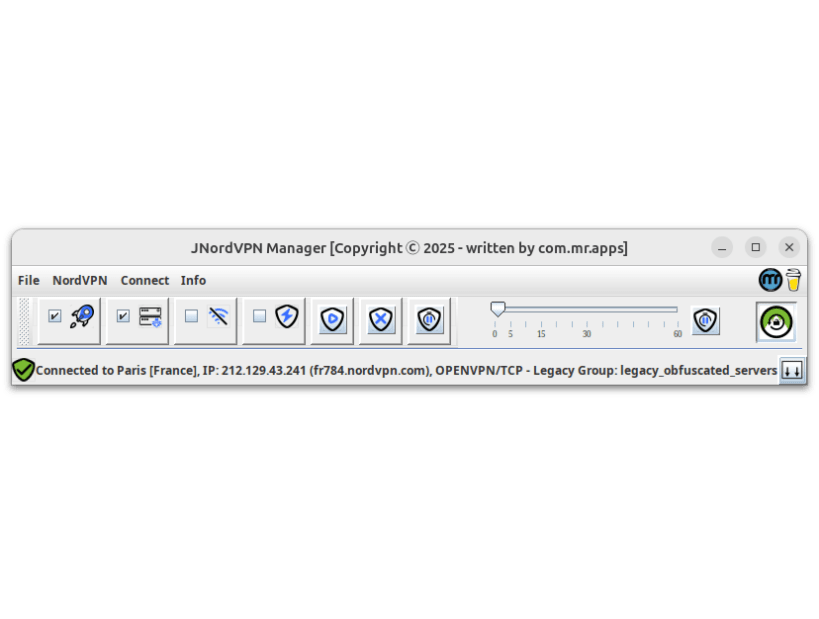

Introducing JNordVPN Manager - a user-friendly, open-source graphical interface for managing NordVPN connections on Linux. This application simplifies VPN administration with features like a server/city tree-list with filter functionality, connection management (login, logout, connect, disconnect, pause), and a world map showing all servers and the active one. Recent connections are also stored for easy re-connection by a single click.
JNordVPN Manager is an open-source graphical user interface (GUI) application designed to make managing NordVPN connections on Linux easier and more intuitive than using the native nordvpn commands. Built with Java, this GUI provides a comprehensive set of features that cater to the needs of NordVPN users on the Linux platform.
Key Features:
Important:
Because snaps restricts the execution of commands outside of their own sandbox, the installed JNordVPN Manager icon will run the application in "Installation" mode: The created Desktop Icon has the extension '(install)'. Run in 'Install mode', the application creates a new desktop file in the local desktop folder (https://github.com/com-mr-apps/JNordVPNManager/blob/main/snap/local/JNordVpnManager_Java.desktop) with that the JNordVPN Manager will be called outside of the sandbox. Alternatively the command:
`/snap/j-nordvpn-manager/current/bin/java /snap/j-nordvpn-manager/current/JNordVpnManager-current.jar`
can be executed.
References
NordVPN backend
GeoTools
The world map is based on GeoTools, an open source (LGPL) Java code library that provides tools for geospatial data:
World map data
Thanks to Natural Earth. Free vector and raster map data from:
Speed Test
Based on JSpeedTest: Speed test client library for Java/Android
The application is released under the Common Development and Distribution License 1.1 (CDDL-1.1) with a Commons Clause License, ensuring that it remains free for private use only. This means that while you can download and enjoy JNordVPN Manager without any costs, commercial exploitation of the software requires my explicit permission.
Thank you for considering JNordVPN Manager as your go-to GUI for managing NordVPN connections on Linux.
Donations are welcome for funding the ongoing development and maintenance of this application:
You are about to open
Do you wish to proceed?
Thank you for your report. Information you provided will help us investigate further.
There was an error while sending your report. Please try again later.
Snaps are applications packaged with all their dependencies to run on all popular Linux distributions from a single build. They update automatically and roll back gracefully.
Snaps are discoverable and installable from the Snap Store, an app store with an audience of millions.
Snap can be installed from the command line on openSUSE Leap 15.x and Tumbleweed.
You need first add the snappy repository from the terminal. Choose the appropriate command depending on your installed openSUSE flavor.
Tumbleweed:
sudo zypper addrepo --refresh https://download.opensuse.org/repositories/system:/snappy/openSUSE_Tumbleweed snappy
Leap 15.x:
sudo zypper addrepo --refresh https://download.opensuse.org/repositories/system:/snappy/openSUSE_Leap_15.6 snappy
If needed, Swap out openSUSE_Leap_15. for, openSUSE_Leap_16.0 if you’re using a different version of openSUSE.
With the repository added, import its GPG key:
sudo zypper --gpg-auto-import-keys refresh
Finally, upgrade the package cache to include the new snappy repository:
sudo zypper dup --from snappy
Snap can now be installed with the following:
sudo zypper install snapd
You then need to either reboot, logout/login or source /etc/profile to have /snap/bin added to PATH.
Additionally, enable and start both the snapd and the snapd.apparmor services with the following commands:
sudo systemctl enable --now snapd
sudo systemctl enable --now snapd.apparmor
To install JNordVPN Manager, simply use the following command:
sudo snap install j-nordvpn-manager
Browse and find snaps from the convenience of your desktop using the snap store snap.

Interested to find out more about snaps? Want to publish your own application? Visit snapcraft.io now.