

Install latest/stable of JNordVPN Manager
Ubuntu 16.04 or later?
Make sure snap support is enabled in your Desktop store.
Install using the command line
sudo snap install j-nordvpn-managerDon't have snapd? Get set up for snaps.


Details for JNordVPN Manager
Package name
- j-nordvpn-manager
License
- CDDL-1.1
Last updated
- 6 February 2026 - latest/stable
Websites
Donations
Source code
Report a bug
External link warning
You are about to open
Do you wish to proceed?
Report a Snap Store violation
Report JNordVPN Manager for a Snap Store violation
Snap Store Violation Report submitted successfully
Thank you for your report. Information you provided will help us investigate further.
Error submitting report
There was an error while sending your report. Please try again later.
Share this snap
Generate an embeddable card to be shared on external websites.
Java GUI Frontend for NordVPN Service
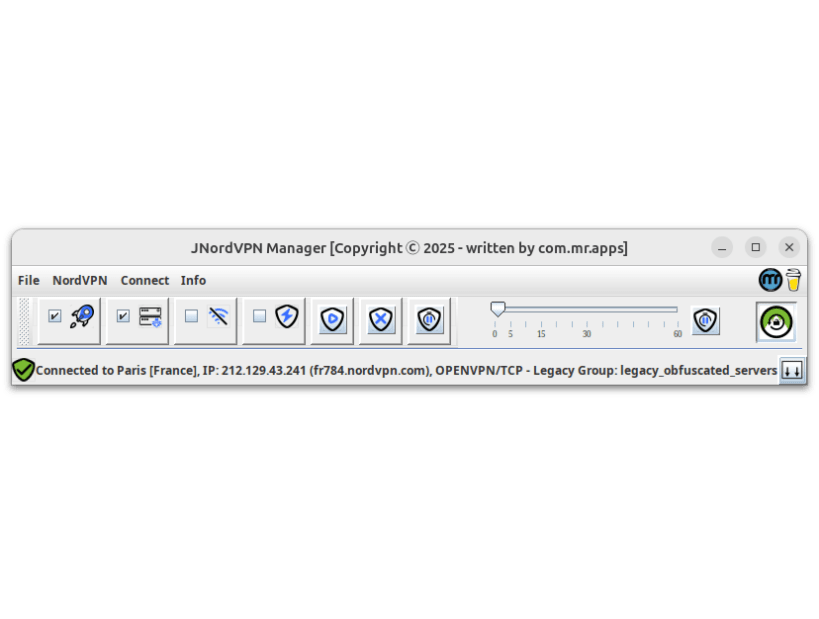
Introducing JNordVPN Manager - a user-friendly, open-source graphical interface for managing NordVPN connections on Linux. This application simplifies VPN administration with features like a server/city tree-list with filter functionality, connection management (login, logout, connect, disconnect, pause), and a world map showing all servers and the active one. Recent connections are also stored for easy re-connection by a single click.
JNordVPN Manager is an open-source graphical user interface (GUI) application designed to make managing NordVPN connections on Linux easier and more intuitive than using the native nordvpn commands. Built with Java, this GUI provides a comprehensive set of features that cater to the needs of NordVPN users on the Linux platform.
Key Features:
- Server Search: Easily find and connect to VPN servers from all around the world using filters by country and city.
- Connection Management: Control your NordVPN connections with ease - (re)connect, disconnect, pause, or resume your sessions with a single click.
- Recent Connections: The application stores your recent connections for easy reconnection. Simply select one to reconnect instantly.
- World Map View: Visualize all available VPN servers on a world map and focus on the active server, providing an intuitive way to navigate through NordVPN's vast network.
- Security: The application does not store any login information (Account, Password). It is just an interface for the native nordvpn commands.
Important:
Because snaps restricts the execution of commands outside of their own sandbox, the installed JNordVPN Manager icon will run the application in "Installation" mode: The created Desktop Icon has the extension '(install)'. Run in 'Install mode', the application creates a new desktop file in the local desktop folder (https://github.com/com-mr-apps/JNordVPNManager/blob/main/snap/local/JNordVpnManager_Java.desktop) with that the JNordVPN Manager will be called outside of the sandbox. Alternatively the command:
`/snap/j-nordvpn-manager/current/bin/java /snap/j-nordvpn-manager/current/JNordVpnManager-current.jar`
can be executed.
References
NordVPN backend
- https://snapcraft.io/nordvpn
- https://support.nordvpn.com/hc/en-us/articles/20196094470929-Installing-NordVPN-on-Linux-distributions
GeoTools
The world map is based on GeoTools, an open source (LGPL) Java code library that provides tools for geospatial data:
World map data
Thanks to Natural Earth. Free vector and raster map data from:
Speed Test
Based on JSpeedTest: Speed test client library for Java/Android
The application is released under the Common Development and Distribution License 1.1 (CDDL-1.1) with a Commons Clause License, ensuring that it remains free for private use only. This means that while you can download and enjoy JNordVPN Manager without any costs, commercial exploitation of the software requires my explicit permission.
Thank you for considering JNordVPN Manager as your go-to GUI for managing NordVPN connections on Linux.
Donations are welcome for funding the ongoing development and maintenance of this application:
| Revision | Channel | Version | Build | Commit | Download SBOM |
|---|
The build and commit information is derived from build infrastructure records.
Install JNordVPN Manager on your Linux distribution
Choose your Linux distribution to get detailed installation instructions. If yours is not shown, get more details on the installing snapd documentation.











