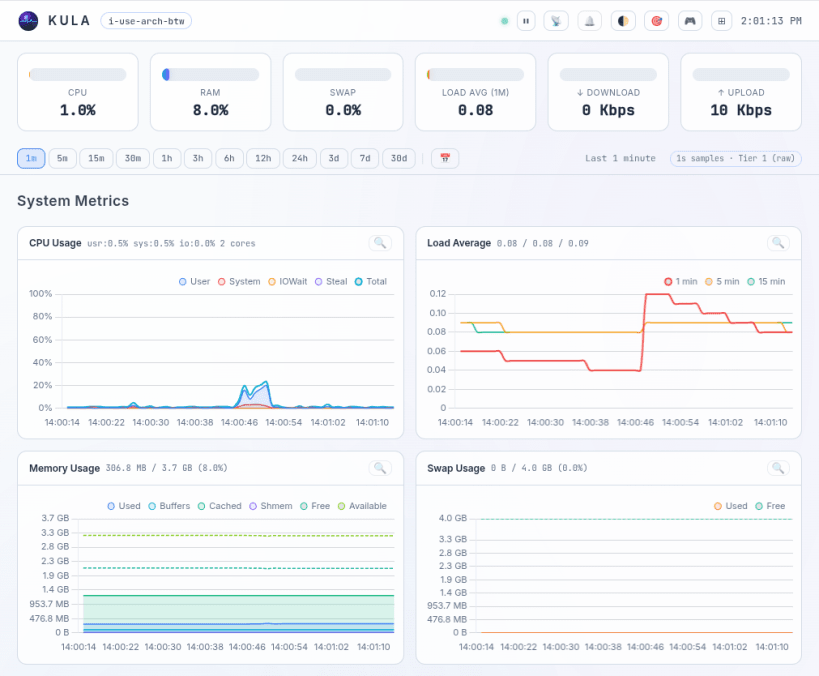
Kula is a lightweight, single-binary Linux server monitor. It collects system metrics every second straight from /proc and /sys, stores them in a built-in tiered ring-buffer engine, and serves them over a real-time web UI dashboard and a terminal TUI. Zero external dependencies, no external database — just install and go.
Collected metrics include CPU, GPU, load, memory, swap, network, disk I/O and usage, thermals, battery, processes, containers (Docker/podman/cgroups) and application probes (PostgreSQL, MySQL/MariaDB, nginx, apache2).
This snap uses STRICT confinement. After installing, connect the observation interfaces so Kula can read system-wide metrics:
 sudo snap connect kula:system-observe
 sudo snap connect kula:hardware-observe
 sudo snap connect kula:mount-observe
 sudo snap connect kula:network-observe
 sudo snap connect kula:docker        # optional: Docker collector
The daemon starts automatically and listens on http://localhost:27960 by
default. Edit /var/snap/kula/current/config.yaml and run
sudo snap restart kula.daemon to apply changes.
You are about to open
Do you wish to proceed?
Thank you for your report. Information you provided will help us investigate further.
There was an error while sending your report. Please try again later.
Snaps are applications packaged with all their dependencies to run on all popular Linux distributions from a single build. They update automatically and roll back gracefully.
Snaps are discoverable and installable from the Snap Store, an app store with an audience of millions.
On Debian 9 (Stretch) and newer, snap can be installed directly from the command line:
sudo apt update
sudo apt install snapd
After this, install the snapd snap in order to get the latest snapd:
sudo snap install snapd
To install Kula, simply use the following command:
sudo snap install kula
Browse and find snaps from the convenience of your desktop using the snap store snap.

Interested to find out more about snaps? Want to publish your own application? Visit snapcraft.io now.