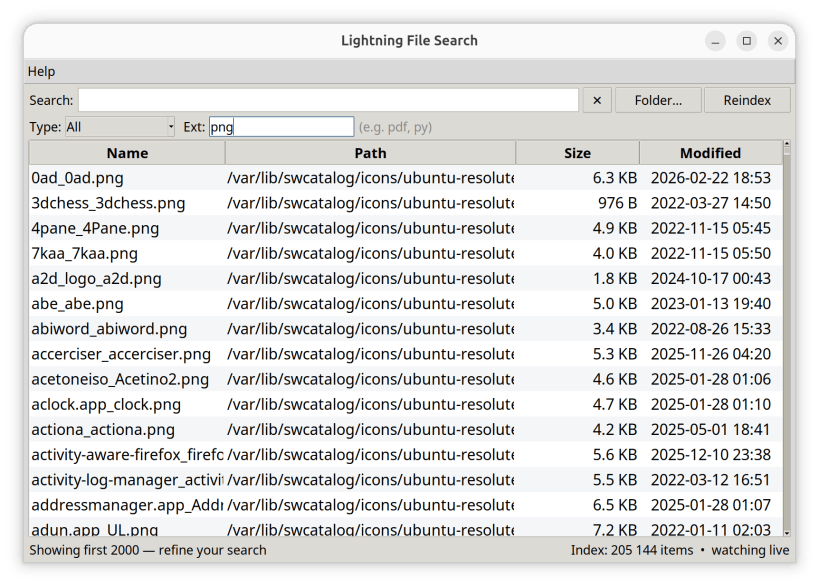
Instant type-and-find file search for Linux — pure Python, zero deps.
Find anything on your Linux machine the instant you start typing.
Lightning File Search is the fast, type-and-find file finder Linux has
been missing — the kind of instant search Windows users know from
"Everything". Type part of a name and matching files and folders appear
immediately.
Instant results as you type — hundreds of thousands of files in
milliseconds.
Always up to date — the index keeps itself current through the Linux
kernel's inotify: files you create, rename or delete appear and
disappear on their own, live.
Instant startup — the index is saved between sessions, so the app is
ready the moment you open it and quietly syncs changes in the
background.
Multi-word matching, sortable columns, and one-click Open / Open
folder / Copy path.
Zero dependencies — and that's the point. No pip packages, no Qt, no
Electron. Just Python 3 and its standard library.
(Ownership verified)
The publisher has verified that they own this domain.
It does not guarantee the Snap is an official upload
from the upstream project.
Enable snaps on KDE Neon and install Lightning File Search
Snaps are applications packaged with all their dependencies to run on all popular Linux distributions from a single build. They update automatically and roll back gracefully.
Snaps are discoverable and installable from the Snap Store, an app store with an audience of millions.
Enable snapd
Snap can be installed from the command line. Open the Konsole terminal and enter the following:
sudo apt update
sudo apt install snapd
Install Lightning File Search
To install Lightning File Search, simply use the following command: