

Lightning File Search
Install latest/stable of Lightning File Search
Ubuntu 16.04 or later?
Make sure snap support is enabled in your Desktop store.
Install using the command line
sudo snap install lightning-file-searchDon't have snapd? Get set up for snaps.
Details for Lightning File Search
Package name
- lightning-file-search
License
- MIT
Last updated
- 26 June 2026 - latest/stable
Contact
Donations
External link warning
You are about to open
Do you wish to proceed?
Report a Snap Store violation
Report Lightning File Search for a Snap Store violation
Snap Store Violation Report submitted successfully
Thank you for your report. Information you provided will help us investigate further.
Error submitting report
There was an error while sending your report. Please try again later.
Share this snap
Generate an embeddable card to be shared on external websites.
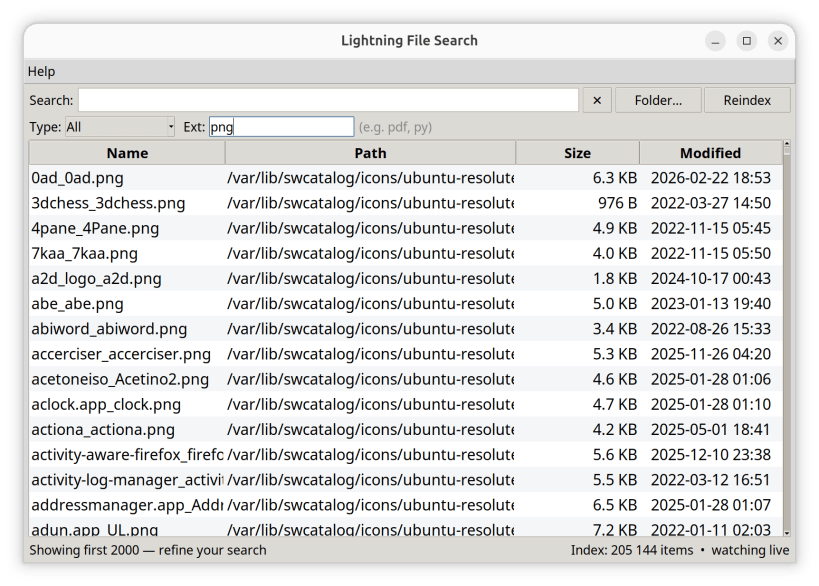
Instant type-and-find file search for Linux — pure Python, zero deps.
Find anything on your Linux machine the instant you start typing.
Lightning File Search is the fast, type-and-find file finder Linux has been missing — the kind of instant search Windows users know from "Everything". Type part of a name and matching files and folders appear immediately.
- Instant results as you type — hundreds of thousands of files in milliseconds.
- Always up to date — the index keeps itself current through the Linux kernel's inotify: files you create, rename or delete appear and disappear on their own, live.
- Instant startup — the index is saved between sessions, so the app is ready the moment you open it and quietly syncs changes in the background.
- Multi-word matching, sortable columns, and one-click Open / Open folder / Copy path.
- Zero dependencies — and that's the point. No pip packages, no Qt, no Electron. Just Python 3 and its standard library.
Author: Martin Ďurček
| Revision | Channel | Version | Build | Commit | Download SBOM |
|---|
The build and commit information is derived from build infrastructure records.
Install Lightning File Search on your Linux distribution
Choose your Linux distribution to get detailed installation instructions. If yours is not shown, get more details on the installing snapd documentation.











