
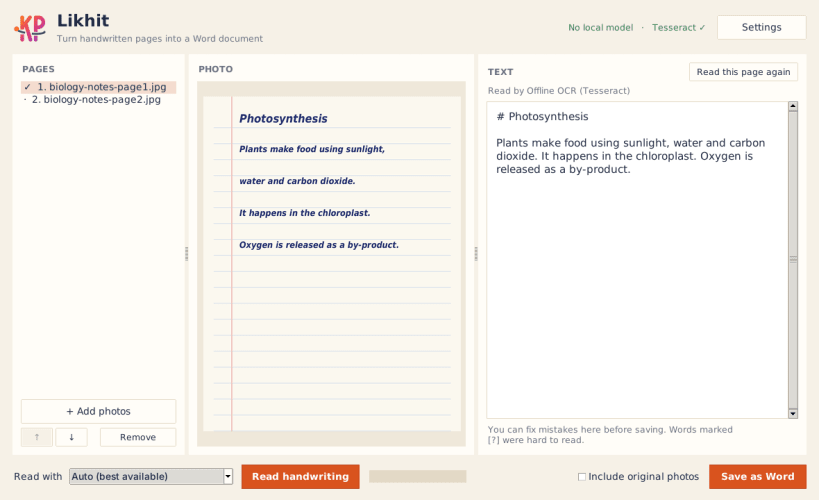
Likhit turns photos of handwritten pages — class notes, assignments, letters, diaries — into a clean, editable Word (.docx) document. Add your photos or a scanned PDF, check the text, and save. That's it.
Three ways to read handwriting
Likhit automatically picks the best reader available on your computer. You can also choose one yourself from the "Read with" menu.
A real Word document, not a text dump
Private by design
In Local AI and Offline OCR modes Likhit works completely offline — your handwriting and text never leave your computer. Cloud AI is used only when you add your own API key and choose it. API keys are saved in your system keyring when one is available.
Made for students and teachers
Likhit is built for students who write notes by hand and need them typed up, and works well on low-end laptops and without internet.
Free and open source under the GPL-3.0 licence. Feedback and bug reports are welcome on GitHub.
You are about to open
Do you wish to proceed?
Thank you for your report. Information you provided will help us investigate further.
There was an error while sending your report. Please try again later.
Snaps are applications packaged with all their dependencies to run on all popular Linux distributions from a single build. They update automatically and roll back gracefully.
Snaps are discoverable and installable from the Snap Store, an app store with an audience of millions.
On Arch Linux, snap can be installed from the Arch User Repository (AUR). The manual build process is the Arch-supported install method for AUR packages, and you’ll need the prerequisites installed before you can install any AUR package. You can then install snap with the following:
git clone https://aur.archlinux.org/snapd.git
cd snapd
makepkg -si
Once installed, the systemd unit that manages the main snap communication socket needs to be enabled:
sudo systemctl enable --now snapd.socket
If AppArmor is enabled in your system, enable the service which loads AppArmor profiles for snaps:
sudo systemctl enable --now snapd.apparmor.service
To enable classic snap support, enter the following to create a symbolic link between /var/lib/snapd/snap and /snap:
sudo ln -s /var/lib/snapd/snap /snap
Either log out and back in again, or restart your system, to ensure snap’s paths are updated correctly.
To install Likhit, simply use the following command:
sudo snap install likhit
Browse and find snaps from the convenience of your desktop using the snap store snap.

Interested to find out more about snaps? Want to publish your own application? Visit snapcraft.io now.


