

Likhit
Install latest/stable of Likhit
Ubuntu 16.04 or later?
Make sure snap support is enabled in your Desktop store.
Details for Likhit
Package name
- likhit
License
- GPL-3.0-or-later
Last updated
- Today - latest/stable
Websites
Contact
Source code
Report a bug
External link warning
You are about to open
Do you wish to proceed?
Report a Snap Store violation
Report Likhit for a Snap Store violation
Snap Store Violation Report submitted successfully
Thank you for your report. Information you provided will help us investigate further.
Error submitting report
There was an error while sending your report. Please try again later.
Share this snap
Generate an embeddable card to be shared on external websites.
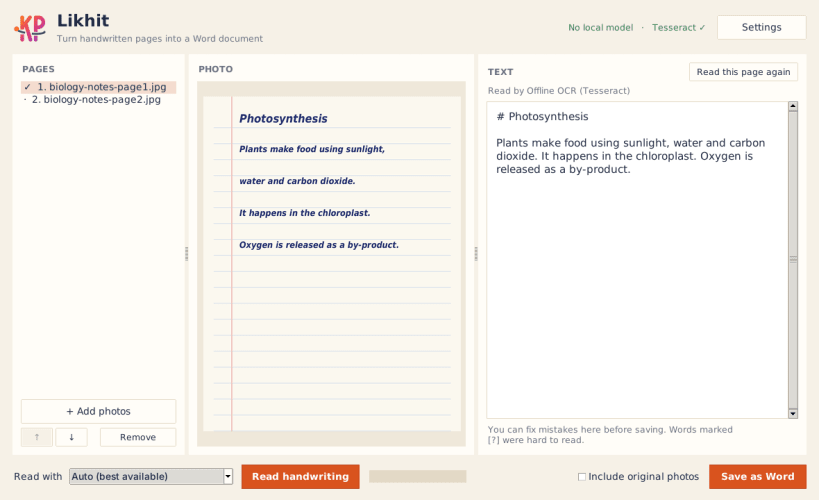
Turn photos of handwritten notes into an editable Word document
Likhit turns photos of handwritten pages — class notes, assignments, letters, diaries — into a clean, editable Word (.docx) document. Add your photos or a scanned PDF, check the text, and save. That's it.
Three ways to read handwriting
Likhit automatically picks the best reader available on your computer. You can also choose one yourself from the "Read with" menu.
- Cloud AI — highest accuracy. Uses your own API key for OpenAI, Anthropic Claude, Google Gemini, or any OpenAI-compatible service.
- Local AI — runs a vision model (for example qwen2.5vl) on your own machine through Ollama or LM Studio. Nothing leaves your computer and no internet is needed.
- Offline OCR — built-in Tesseract. Works fully offline with no setup. Best for neat or printed writing.
A real Word document, not a text dump
- Real Word headings and bullet lists
- Broken lines joined back into proper paragraphs
- Unclear words marked [?] and highlighted in yellow, so you know exactly what to check
- Fix any mistake in the text panel before saving
- Optional: the original photo under each page
- One page per photo, with page breaks
Private by design
In Local AI and Offline OCR modes Likhit works completely offline — your handwriting and text never leave your computer. Cloud AI is used only when you add your own API key and choose it. API keys are saved in your system keyring when one is available.
Made for students and teachers
Likhit is built for students who write notes by hand and need them typed up, and works well on low-end laptops and without internet.
Free and open source under the GPL-3.0 licence. Feedback and bug reports are welcome on GitHub.
| Revision | Channel | Version | Build | Commit | Download SBOM |
|---|
The build and commit information is derived from build infrastructure records.
Install Likhit on your Linux distribution
Choose your Linux distribution to get detailed installation instructions. If yours is not shown, get more details on the installing snapd documentation.











