
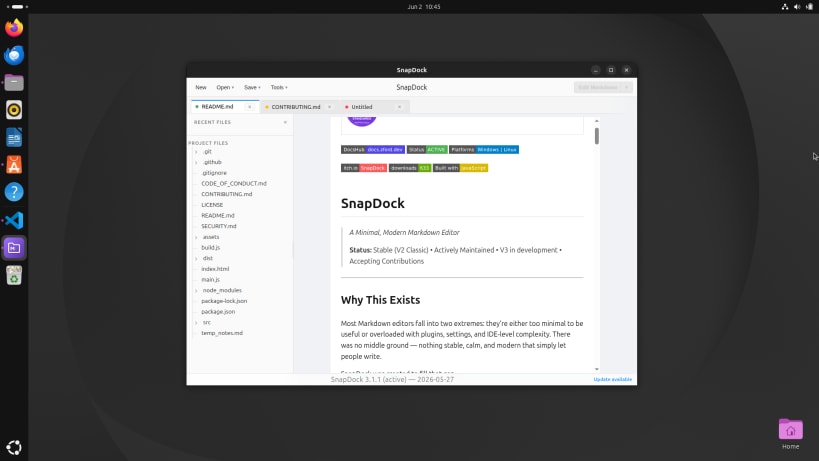


Your files. Your focus.
Write notes, project briefs, documentation or anything else that belongs in a Markdown file. SnapDock brings your files, folders, tabs and previews together in one desktop editor.
Open a folder, move between files and see your Markdown as you work with a full or side-by-side preview. Everything stays in ordinary Markdown files on your computer.
Simply Markdown.
Your Markdown stays yours
SnapDock works with ordinary Markdown files on your computer. No account, proprietary document format or subscription required. It is free and open source under the MIT licence.
You are about to open
Do you wish to proceed?
Thank you for your report. Information you provided will help us investigate further.
There was an error while sending your report. Please try again later.
Snaps are applications packaged with all their dependencies to run on all popular Linux distributions from a single build. They update automatically and roll back gracefully.
Snaps are discoverable and installable from the Snap Store, an app store with an audience of millions.
Snap can be installed on Pop!_OS from the command line. Open Terminal from the Applications launcher and type the following:
sudo apt update
sudo apt install snapd
Either log out and back in again, or restart your system, to ensure snap’s paths are updated correctly.
To install SnapDock - Markdown Workspace, simply use the following command:
sudo snap install markdown-workspace
Browse and find snaps from the convenience of your desktop using the snap store snap.

Interested to find out more about snaps? Want to publish your own application? Visit snapcraft.io now.