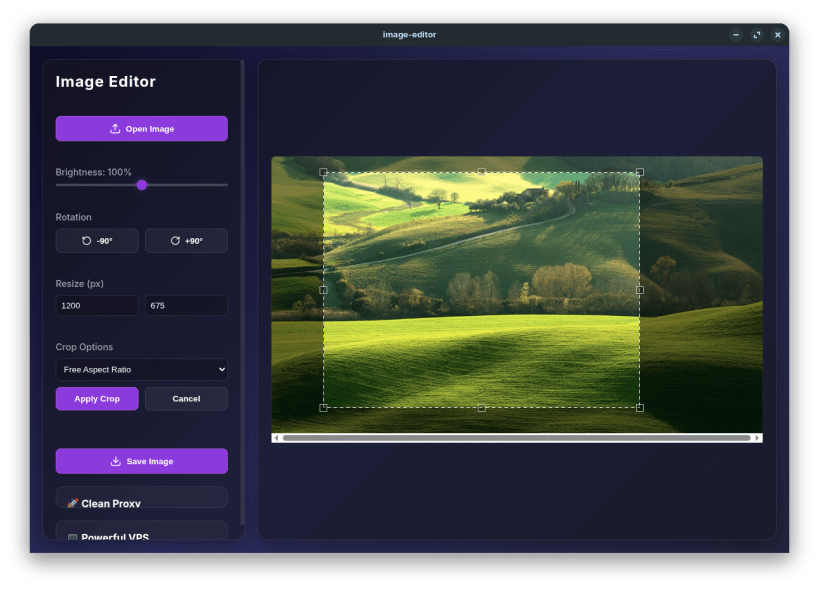
Image Editor is a modern, lightweight, and incredibly fast desktop application designed for all your basic image manipulation needs. Built with a stunning Glassmorphism UI, it provides a seamless and visually pleasing experience for casual users and professionals alike.
Whether you need to quickly crop a photo, adjust its dimensions, or tweak the brightness, Image Editor handles it locally and securely on your machine without requiring an internet connection.
Key Features: ✨ Stunning UI: Modern, responsive Glassmorphism design that feels premium. ✂️ Smart Cropping: Drag-and-drop bounding box with support for freeform, 1:1, 16:9, and 4:3 aspect ratios. 📏 Fast Resizing: Enter specific dimensions to instantly scale your images. ☀️ Brightness Control: Real-time slider to enhance low-light photos. 🔄 Rotation Tools: One-click 90-degree rotations. 🔒 100% Offline: Process everything on your local machine for maximum privacy.
Thank you for your report. Information you provided will help us investigate further.
There was an error while sending your report. Please try again later.
Snaps are applications packaged with all their dependencies to run on all popular Linux distributions from a single build. They update automatically and roll back gracefully.
Snaps are discoverable and installable from the Snap Store, an app store with an audience of millions.
Snap can be installed on Fedora from the command line:
sudo dnf install snapd
Either log out and back in again, or restart your system, to ensure snap’s paths are updated correctly.
To enable classic snap support, enter the following to create a symbolic link between /var/lib/snapd/snap and /snap:
sudo ln -s /var/lib/snapd/snap /snap
To install Image Editor, simply use the following command:
sudo snap install omni-image-editor
Browse and find snaps from the convenience of your desktop using the snap store snap.

Interested to find out more about snaps? Want to publish your own application? Visit snapcraft.io now.