

Image Editor (omni-image-editor)
Install latest/stable of Image Editor
Ubuntu 16.04 or later?
Make sure snap support is enabled in your Desktop store.
Install using the command line
sudo snap install omni-image-editorDon't have snapd? Get set up for snaps.

Details for Image Editor
Package name
- omni-image-editor
License
- unset
Last updated
- 5 June 2026 - latest/stable
Report a Snap Store violation
Report Image Editor for a Snap Store violation
Snap Store Violation Report submitted successfully
Thank you for your report. Information you provided will help us investigate further.
Error submitting report
There was an error while sending your report. Please try again later.
Share this snap
Generate an embeddable card to be shared on external websites.
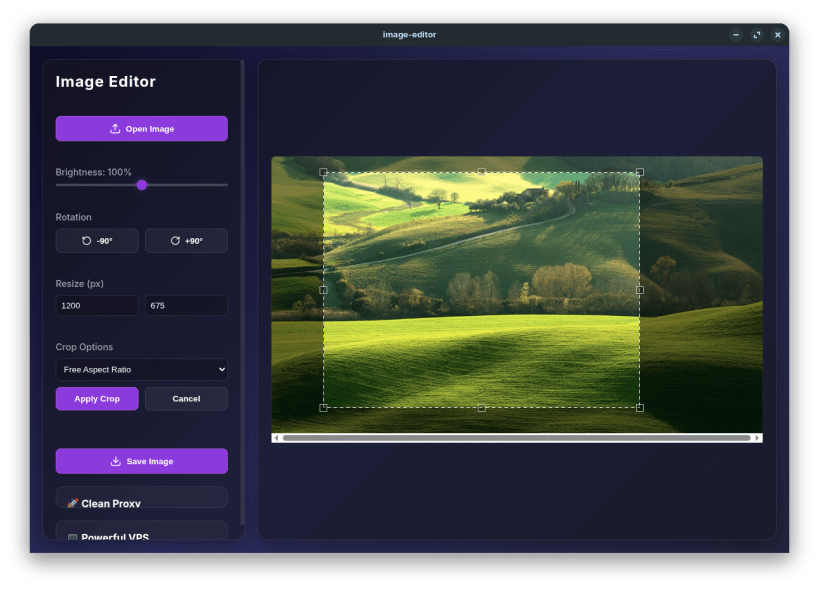
A lightning-fast, beautifully designed image editor with essential tools.
Image Editor is a modern, lightweight, and incredibly fast desktop application designed for all your basic image manipulation needs. Built with a stunning Glassmorphism UI, it provides a seamless and visually pleasing experience for casual users and professionals alike.
Whether you need to quickly crop a photo, adjust its dimensions, or tweak the brightness, Image Editor handles it locally and securely on your machine without requiring an internet connection.
Key Features: ✨ Stunning UI: Modern, responsive Glassmorphism design that feels premium. ✂️ Smart Cropping: Drag-and-drop bounding box with support for freeform, 1:1, 16:9, and 4:3 aspect ratios. 📏 Fast Resizing: Enter specific dimensions to instantly scale your images. ☀️ Brightness Control: Real-time slider to enhance low-light photos. 🔄 Rotation Tools: One-click 90-degree rotations. 🔒 100% Offline: Process everything on your local machine for maximum privacy.
| Revision | Channel | Version | Build | Commit | Download SBOM |
|---|
The build and commit information is derived from build infrastructure records.
Install Image Editor on your Linux distribution
Choose your Linux distribution to get detailed installation instructions. If yours is not shown, get more details on the installing snapd documentation.











