
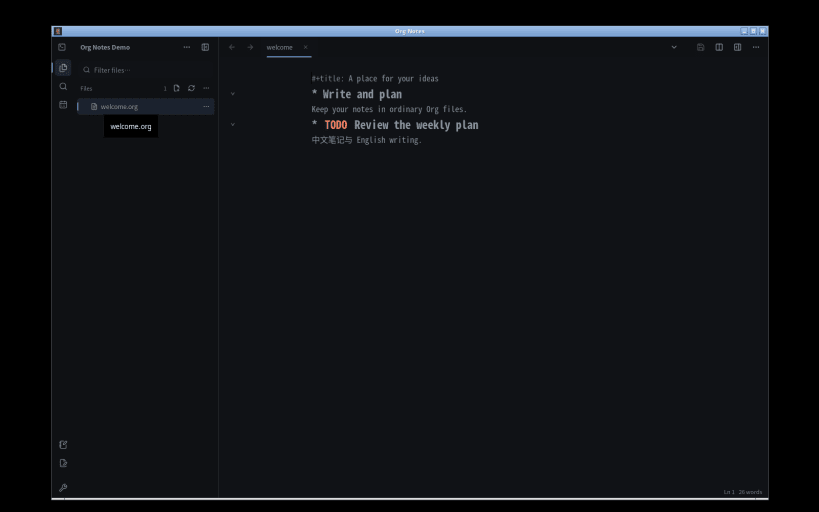
Give your ideas a place to grow, and a next step. Org Notes brings writing, connected notes and task planning into one local-first workspace.
Focus on your words Shape drafts and notes with headings, folding outlines, lists and checkboxes. Use tabs and split editors to keep research beside the text you are writing.
Connect your notes Link related ideas and follow backlinks to rediscover useful context. Find the next note with Quick Open instead of searching through folders.
Turn ideas into action Capture thoughts and TODOs where they belong. Add schedules and deadlines, then review them together in Agenda. Keep a diary and return to your plans.
Keep your files Saved notes are ordinary UTF-8 .org files in a folder you choose. Read and edit them without this app, or export supported content as HTML or Markdown. No account is required, and there is no automatic cloud synchronization.
Before you begin:
You are about to open
Do you wish to proceed?
Thank you for your report. Information you provided will help us investigate further.
There was an error while sending your report. Please try again later.
Snaps are applications packaged with all their dependencies to run on all popular Linux distributions from a single build. They update automatically and roll back gracefully.
Snaps are discoverable and installable from the Snap Store, an app store with an audience of millions.
Snap can be installed on Fedora from the command line:
sudo dnf install snapd
Either log out and back in again, or restart your system, to ensure snap’s paths are updated correctly.
To enable classic snap support, enter the following to create a symbolic link between /var/lib/snapd/snap and /snap:
sudo ln -s /var/lib/snapd/snap /snap
To install Org Notes, simply use the following command:
sudo snap install org-notes --edge
Browse and find snaps from the convenience of your desktop using the snap store snap.

Interested to find out more about snaps? Want to publish your own application? Visit snapcraft.io now.