A Linux alternative to Everything Toolbar. Independent open-source project, not affiliated with or endorsed by EverythingToolbar or voidtools.
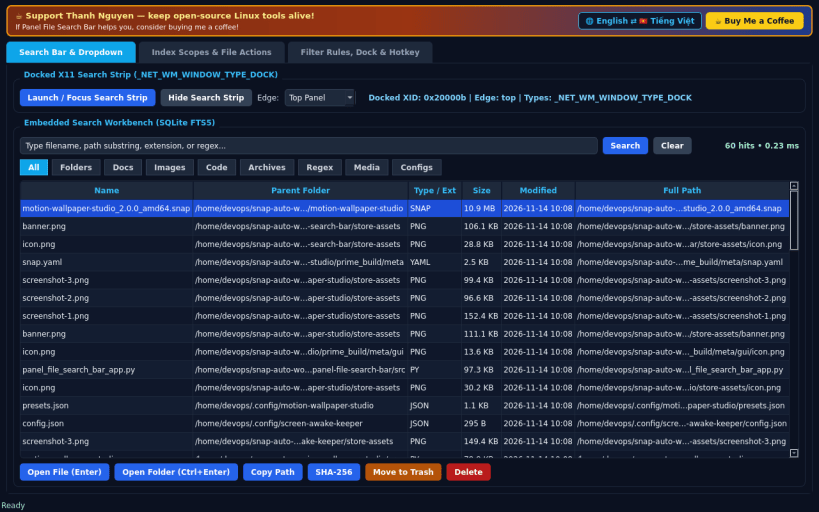
FLOATING SEARCH BAR & INSTANT DROPDOWN • Always-accessible docked top/bottom X11 Search Strip (_NET_WM_WINDOW_TYPE_DOCK) toggleable via global hotkey (Ctrl+Alt+F) or control panel, paired with a live instant dropdown result list. • Powered by SQLite FTS5 incremental indexing over your real home folders and mounted drives with filter chips: All, Folders, Docs, Images, Code, Archives, Regex, plus custom extension chips. • Keyboard-first workflow: Enter opens the selected file (xdg-open), Ctrl+Enter opens the containing folder, Up/Down navigates hits. • Full embedded Search Workbench directly inside Tab 1.
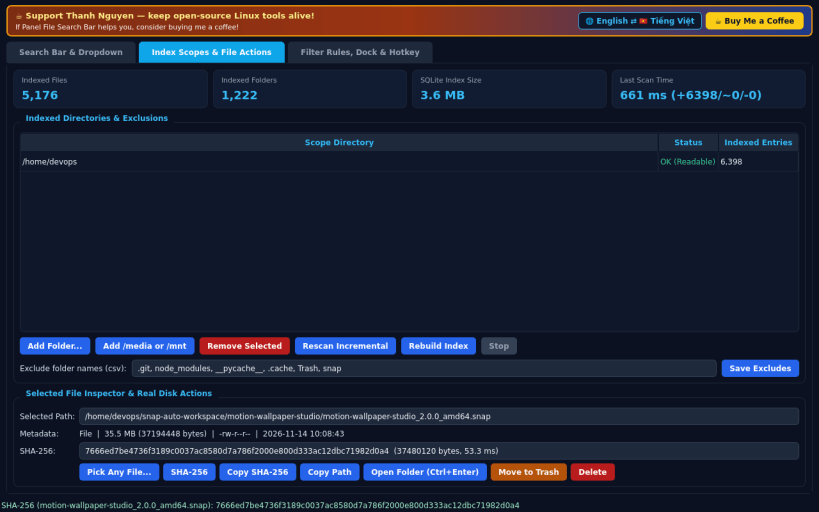
INDEX SCOPES & REAL FILE ACTIONS • Add or remove indexed folders in your home directory, /media, or /mnt, and configure directory exclusion patterns. • Background incremental indexer displays exact indexed file count, folder count, SQLite index size on disk, and scan elapsed milliseconds. • Real file actions on any selected result: Copy Path, Compute SHA-256 checksum, Move to Trash, or Permanent Delete.
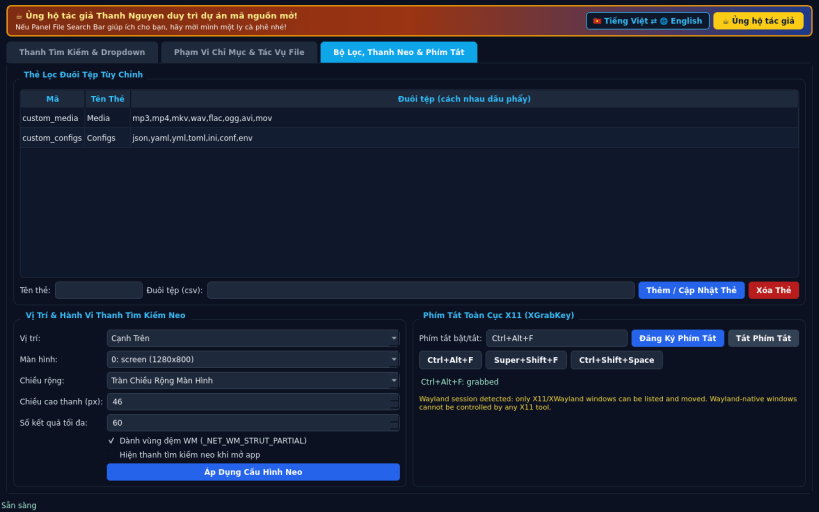
FILTER RULES, DOCK PLACEMENT & HOTKEY • Create custom extension filter chips that appear live on both the Search Strip and Search Workbench. • Configure dock edge (Top / Bottom / Floating), target monitor, EWMH strut reservation, and global XGrabKey hotkey.
LIMITATIONS (honest) • Docked window type hints and global XGrabKey hotkeys require an X11 / XWayland display session; pure Wayland compositors restrict global grabs.
SUPPORT & DONATE • Created by Thanh Nguyen — https://buymeacoffee.com/thanhnv128b
You are about to open
Do you wish to proceed?
Thank you for your report. Information you provided will help us investigate further.
There was an error while sending your report. Please try again later.
Snaps are applications packaged with all their dependencies to run on all popular Linux distributions from a single build. They update automatically and roll back gracefully.
Snaps are discoverable and installable from the Snap Store, an app store with an audience of millions.
Snap can be installed from the command line on openSUSE Leap 15.x and Tumbleweed.
You need first add the snappy repository from the terminal. Choose the appropriate command depending on your installed openSUSE flavor.
Tumbleweed:
sudo zypper addrepo --refresh https://download.opensuse.org/repositories/system:/snappy/openSUSE_Tumbleweed snappy
Leap 15.x:
sudo zypper addrepo --refresh https://download.opensuse.org/repositories/system:/snappy/openSUSE_Leap_15.6 snappy
If needed, Swap out openSUSE_Leap_15. for, openSUSE_Leap_16.0 if you’re using a different version of openSUSE.
With the repository added, import its GPG key:
sudo zypper --gpg-auto-import-keys refresh
Finally, upgrade the package cache to include the new snappy repository:
sudo zypper dup --from snappy
Snap can now be installed with the following:
sudo zypper install snapd
You then need to either reboot, logout/login or source /etc/profile to have /snap/bin added to PATH.
Additionally, enable and start both the snapd and the snapd.apparmor services with the following commands:
sudo systemctl enable --now snapd
sudo systemctl enable --now snapd.apparmor
To install Panel File Search Bar, simply use the following command:
sudo snap install panel-file-search-bar
Browse and find snaps from the convenience of your desktop using the snap store snap.
Interested to find out more about snaps? Want to publish your own application? Visit snapcraft.io now.