

Panel File Search Bar
Install latest/stable of Panel File Search Bar
Ubuntu 16.04 or later?
Make sure snap support is enabled in your Desktop store.
Install using the command line
sudo snap install panel-file-search-barDon't have snapd? Get set up for snaps.
Details for Panel File Search Bar
Package name
- panel-file-search-bar
License
- MIT
Last updated
- Today - latest/stable
Websites
Contact
External link warning
You are about to open
Do you wish to proceed?
Report a Snap Store violation
Report Panel File Search Bar for a Snap Store violation
Snap Store Violation Report submitted successfully
Thank you for your report. Information you provided will help us investigate further.
Error submitting report
There was an error while sending your report. Please try again later.
Share this snap
Generate an embeddable card to be shared on external websites.
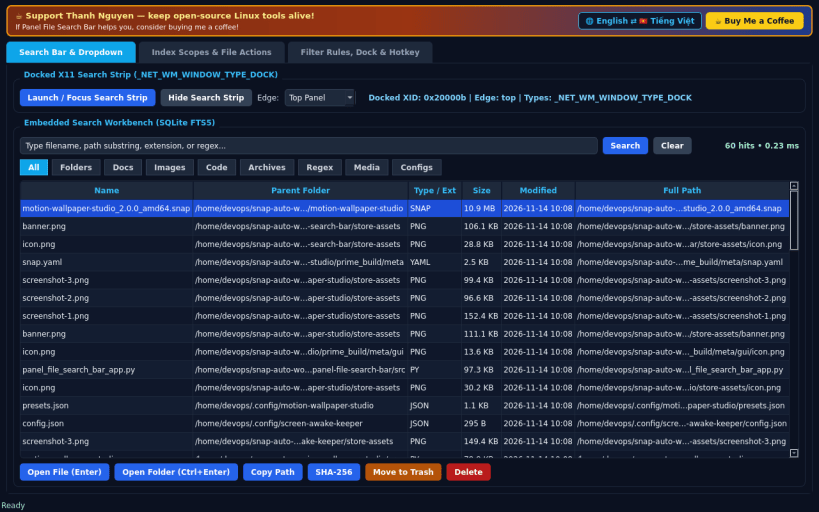
Docked X11 mini file search bar with instant SQLite FTS5 desktop dropdown
A Linux alternative to Everything Toolbar. Independent open-source project, not affiliated with or endorsed by EverythingToolbar or voidtools.
FLOATING SEARCH BAR & INSTANT DROPDOWN • Always-accessible docked top/bottom X11 Search Strip (_NET_WM_WINDOW_TYPE_DOCK) toggleable via global hotkey (Ctrl+Alt+F) or control panel, paired with a live instant dropdown result list. • Powered by SQLite FTS5 incremental indexing over your real home folders and mounted drives with filter chips: All, Folders, Docs, Images, Code, Archives, Regex, plus custom extension chips. • Keyboard-first workflow: Enter opens the selected file (xdg-open), Ctrl+Enter opens the containing folder, Up/Down navigates hits. • Full embedded Search Workbench directly inside Tab 1.
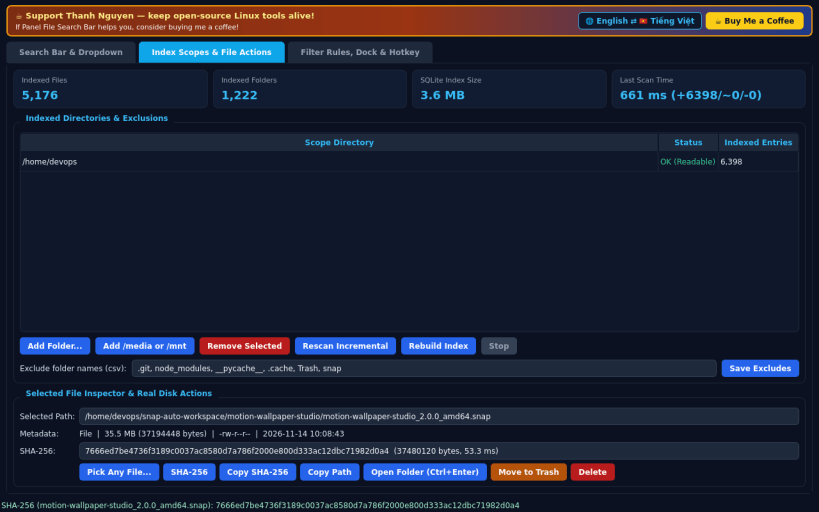
INDEX SCOPES & REAL FILE ACTIONS • Add or remove indexed folders in your home directory, /media, or /mnt, and configure directory exclusion patterns. • Background incremental indexer displays exact indexed file count, folder count, SQLite index size on disk, and scan elapsed milliseconds. • Real file actions on any selected result: Copy Path, Compute SHA-256 checksum, Move to Trash, or Permanent Delete.
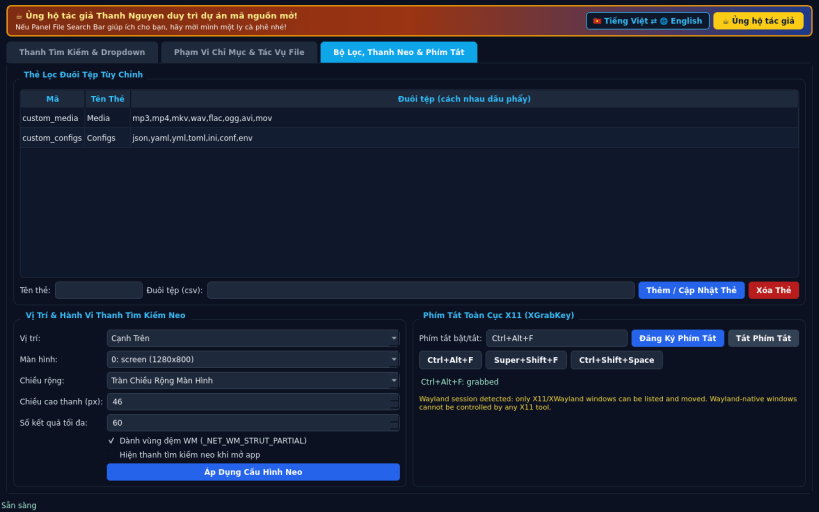
FILTER RULES, DOCK PLACEMENT & HOTKEY • Create custom extension filter chips that appear live on both the Search Strip and Search Workbench. • Configure dock edge (Top / Bottom / Floating), target monitor, EWMH strut reservation, and global XGrabKey hotkey.
LIMITATIONS (honest) • Docked window type hints and global XGrabKey hotkeys require an X11 / XWayland display session; pure Wayland compositors restrict global grabs.
SUPPORT & DONATE • Created by Thanh Nguyen — https://buymeacoffee.com/thanhnv128b
| Revision | Channel | Version | Build | Commit | Download SBOM |
|---|
The build and commit information is derived from build infrastructure records.
Install Panel File Search Bar on your Linux distribution
Choose your Linux distribution to get detailed installation instructions. If yours is not shown, get more details on the installing snapd documentation.


