
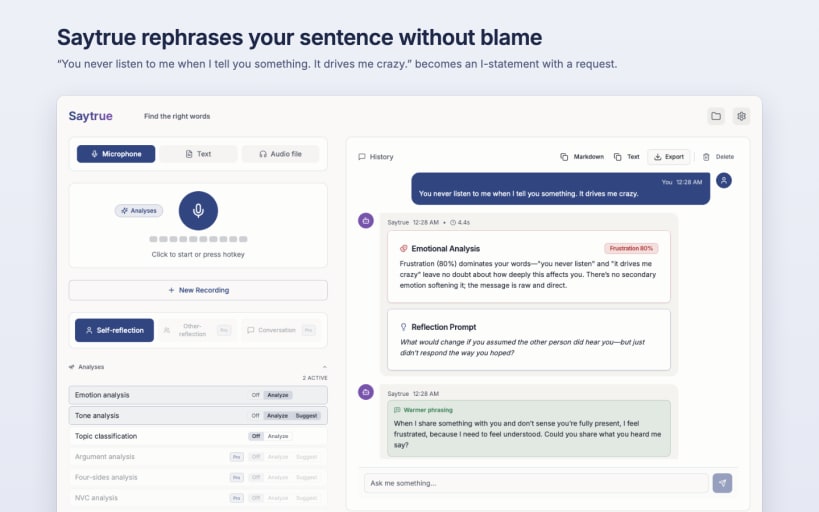

Sometimes a sentence sounds harsher than you meant it. Say it or type it the way it comes to mind. Saytrue suggests a version that says what's bothering you and what you'd like.
"You never listen to me when I tell you something. It drives me crazy." becomes something like this under "Warmer phrasing": "When I share something with you and don't receive a response, I feel frustrated because being heard is important to me. Would you please tell me what you heard?" This version is longer, but it no longer contains any blame and ends with a request the other person can respond to.
Saytrue doesn't check spelling or style; it looks at how a sentence comes across to the other person. Whether you use the suggestion is your call.
MADE FOR
PRIVATE ON YOUR COMPUTER
If you like, your text never leaves your computer: speech recognition and AI then run locally. Saytrue only uses a cloud provider if you explicitly agree.
HOW IT WORKS
IN THIS EDITION
MORE FEATURES
TECHNOLOGY AND PRIVACY
SAYTRUE PRO
Pro looks at your text from seven more perspectives from communication psychology, for example "Observation, not judgment" (Nonviolent Communication) or "Adult-to-adult" (Transactional Analysis). It adds phrasing alternatives in three styles, Coaching, and a look at messages you received. Saytrue Pro is a separate edition for the Mac App Store and the Microsoft Store, a one-time purchase with no subscription. There is no Pro edition for Linux.
IMPORTANT
Saytrue describes language and suggests phrasings. It does not diagnose and is not a substitute for counselling or therapy. The results are generated by AI and can be inaccurate.
AFTER INSTALLATION
Connect the microphone and the keyring:
 sudo snap connect saytrue:audio-record
 sudo snap connect saytrue:password-manager-service
You are about to open
Do you wish to proceed?
Thank you for your report. Information you provided will help us investigate further.
There was an error while sending your report. Please try again later.
Snaps are applications packaged with all their dependencies to run on all popular Linux distributions from a single build. They update automatically and roll back gracefully.
Snaps are discoverable and installable from the Snap Store, an app store with an audience of millions.
Snap can be installed from the command line on openSUSE Leap 15.x and Tumbleweed.
You need first add the snappy repository from the terminal. Choose the appropriate command depending on your installed openSUSE flavor.
Tumbleweed:
sudo zypper addrepo --refresh https://download.opensuse.org/repositories/system:/snappy/openSUSE_Tumbleweed snappy
Leap 15.x:
sudo zypper addrepo --refresh https://download.opensuse.org/repositories/system:/snappy/openSUSE_Leap_15.6 snappy
If needed, Swap out openSUSE_Leap_15. for, openSUSE_Leap_16.0 if you’re using a different version of openSUSE.
With the repository added, import its GPG key:
sudo zypper --gpg-auto-import-keys refresh
Finally, upgrade the package cache to include the new snappy repository:
sudo zypper dup --from snappy
Snap can now be installed with the following:
sudo zypper install snapd
You then need to either reboot, logout/login or source /etc/profile to have /snap/bin added to PATH.
Additionally, enable and start both the snapd and the snapd.apparmor services with the following commands:
sudo systemctl enable --now snapd
sudo systemctl enable --now snapd.apparmor
To install Saytrue, simply use the following command:
sudo snap install saytrue
Browse and find snaps from the convenience of your desktop using the snap store snap.

Interested to find out more about snaps? Want to publish your own application? Visit snapcraft.io now.


