

Saytrue
Install latest/stable of Saytrue
Ubuntu 16.04 or later?
Make sure snap support is enabled in your Desktop store.
Details for Saytrue
Package name
- saytrue
License
- Proprietary
Last updated
- Today - latest/stable
- Today - latest/edge
Websites
Contact
Report a bug
External link warning
You are about to open
Do you wish to proceed?
Report a Snap Store violation
Report Saytrue for a Snap Store violation
Snap Store Violation Report submitted successfully
Thank you for your report. Information you provided will help us investigate further.
Error submitting report
There was an error while sending your report. Please try again later.
Share this snap
Generate an embeddable card to be shared on external websites.
Find the right words when a sentence sounds harsher than you meant
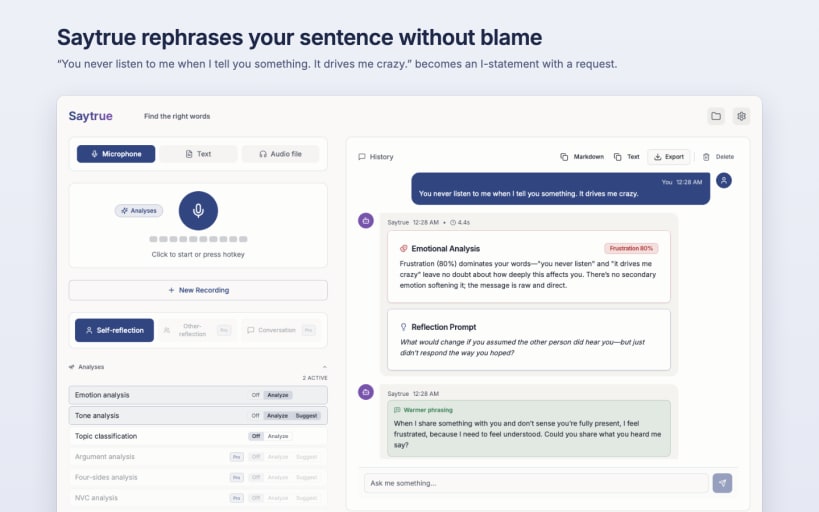
Sometimes a sentence sounds harsher than you meant it. Say it or type it the way it comes to mind. Saytrue suggests a version that says what's bothering you and what you'd like.
"You never listen to me when I tell you something. It drives me crazy." becomes something like this under "Warmer phrasing": "When I share something with you and don't receive a response, I feel frustrated because being heard is important to me. Would you please tell me what you heard?" This version is longer, but it no longer contains any blame and ends with a request the other person can respond to.
Saytrue doesn't check spelling or style; it looks at how a sentence comes across to the other person. Whether you use the suggestion is your call.
MADE FOR
- The email to a colleague that came out too sharp
- The message after an argument
- Criticism within a team or a family
PRIVATE ON YOUR COMPUTER
If you like, your text never leaves your computer: speech recognition and AI then run locally. Saytrue only uses a cloud provider if you explicitly agree.
HOW IT WORKS
- Input by recording, audio file or typed text
- For each perspective on your text, called a lens in the app, you choose: Off, Analyze or Suggest
- If a text is too short, Saytrue tells you instead of guessing
IN THIS EDITION
- Rephrasing with the tone lens: "Warmer phrasing"
- Emotion from voice and text
- Tone on five dimensions: formality, closeness, directness, energy, mood
- Topic in seven categories
MORE FEATURES
- Dictation with spoken punctuation
- Help chat about the app's features
- Recordings are stored locally; export as PDF, Markdown, text, HTML or Word
- 15 languages for interface and speech recognition
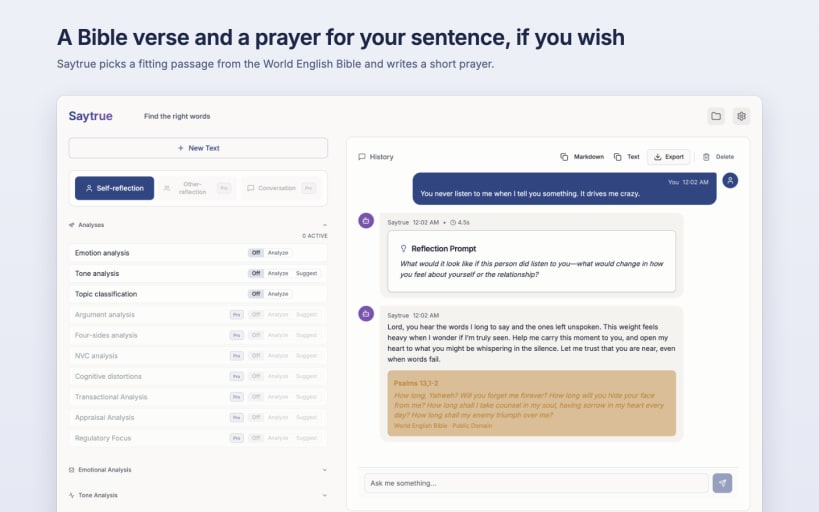
- Bible Impulse and prayer for your text, optional and off by default
TECHNOLOGY AND PRIVACY
- Speech recognition with whisper.cpp on your computer
- Local AI with Ollama
- Locally, speed depends on your computer: without a graphics card, Ollama takes about half a minute for a rephrasing; the app then shows beforehand roughly how long an analysis will take and recommends a cloud provider if your hardware is weak
- Optional cloud providers for AI (OpenAI, Anthropic, Mistral based in the EU) and for speech recognition (OpenAI), only with your explicit consent
- API keys stored in the Secret Service (your desktop's keyring)
SAYTRUE PRO
Pro looks at your text from seven more perspectives from communication psychology, for example "Observation, not judgment" (Nonviolent Communication) or "Adult-to-adult" (Transactional Analysis). It adds phrasing alternatives in three styles, Coaching, and a look at messages you received. Saytrue Pro is a separate edition for the Mac App Store and the Microsoft Store, a one-time purchase with no subscription. There is no Pro edition for Linux.
IMPORTANT
Saytrue describes language and suggests phrasings. It does not diagnose and is not a substitute for counselling or therapy. The results are generated by AI and can be inaccurate.
AFTER INSTALLATION
Connect the microphone and the keyring:
 sudo snap connect saytrue:audio-record
 sudo snap connect saytrue:password-manager-service
| Revision | Channel | Version | Build | Commit | Download SBOM |
|---|
The build and commit information is derived from build infrastructure records.
Install Saytrue on your Linux distribution
Choose your Linux distribution to get detailed installation instructions. If yours is not shown, get more details on the installing snapd documentation.











