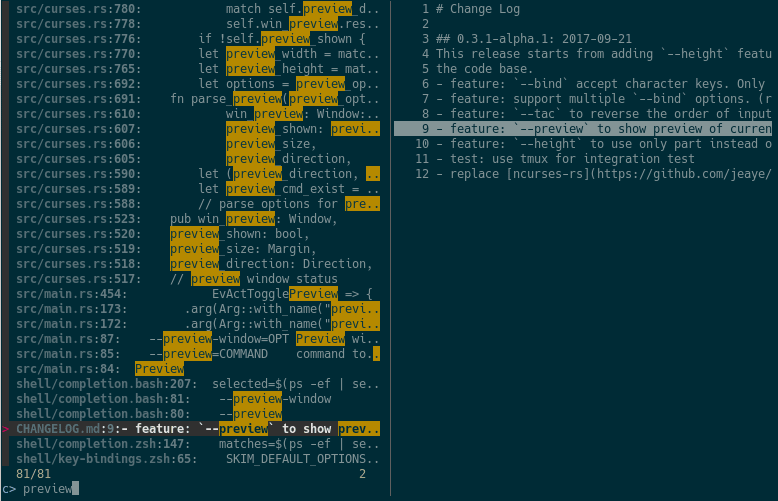
skim (sk) is an interactive fuzzy finder. It reads a list of lines from standard input or from a command, lets you filter them as you type, and prints the selected lines. It supports multi-select, previews, custom key bindings, regex and exact matching, and shell integrations.
The upstream command is called sk. This snap provides it as skim; to
use the upstream name, run:
sudo snap alias skim sk
Examples
git log --oneline | skim
vim "$(skim)"
skim --preview 'cat {}' --multi
skim --filter main < files.txt
Shell integration
Key bindings (CTRL-T, CTRL-R, ALT-C) call sk, so create the alias first,
then add this line to ~/.bashrc (zsh and fish are also supported):
eval "$(sk --shell bash --shell-bindings)"
Commands run inside the snap
Without piped input, skim runs $SKIM_DEFAULT_COMMAND (default: find .).
That command, --cmd, --preview and execute(...) bindings run inside
the snap, where only basic tools such as find, grep, sed, cat and ls are
available. Host programs such as fd, rg, bat or git are not; pipe their
output into skim instead.
File access
skim can read files in your home directory. To also browse USB drives and other removable media (/media, /mnt), run:
sudo snap connect skim:removable-media
You are about to open
Do you wish to proceed?
Thank you for your report. Information you provided will help us investigate further.
There was an error while sending your report. Please try again later.
Snaps are applications packaged with all their dependencies to run on all popular Linux distributions from a single build. They update automatically and roll back gracefully.
Snaps are discoverable and installable from the Snap Store, an app store with an audience of millions.
If you’re running Kubuntu 16.04 LTS (Xenial Xerus) or later, including Kubuntu 18.04 LTS (Bionic Beaver) and Kubuntu 18.10 (Cosmic Cuttlefish), you don’t need to do anything. Snap is already installed and ready to go.
Versions of Kubuntu between 14.04 LTS (Trusty Tahr) and 15.10 (Wily Werewolf) don’t include snap by default, but snap can be installed from the command line as follows:
sudo apt update
sudo apt install snapd
To install skim, simply use the following command:
sudo snap install skim
Browse and find snaps from the convenience of your desktop using the snap store snap.
Interested to find out more about snaps? Want to publish your own application? Visit snapcraft.io now.