

System Package and Update History Viewer (installed-package-auditor)
Install latest/stable of System Package and Update History Viewer
Ubuntu 16.04 or later?
Make sure snap support is enabled in your Desktop store.
Install using the command line
sudo snap install installed-package-auditorDon't have snapd? Get set up for snaps.
Details for System Package and Update History Viewer
Package name
- installed-package-auditor
License
- MIT
Last updated
- Today - latest/stable
Report a Snap Store violation
Report System Package and Update History Viewer for a Snap Store violation
Snap Store Violation Report submitted successfully
Thank you for your report. Information you provided will help us investigate further.
Error submitting report
There was an error while sending your report. Please try again later.
Share this snap
Generate an embeddable card to be shared on external websites.
Installed Debian/Ubuntu dpkg package inventory & APT update history viewer
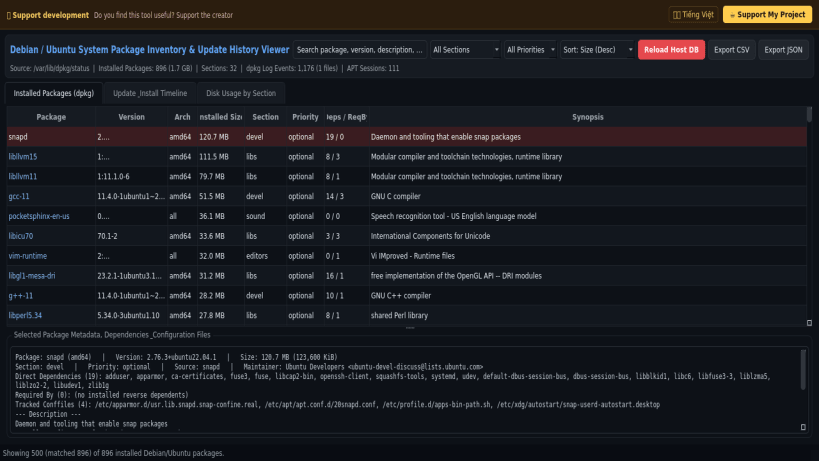
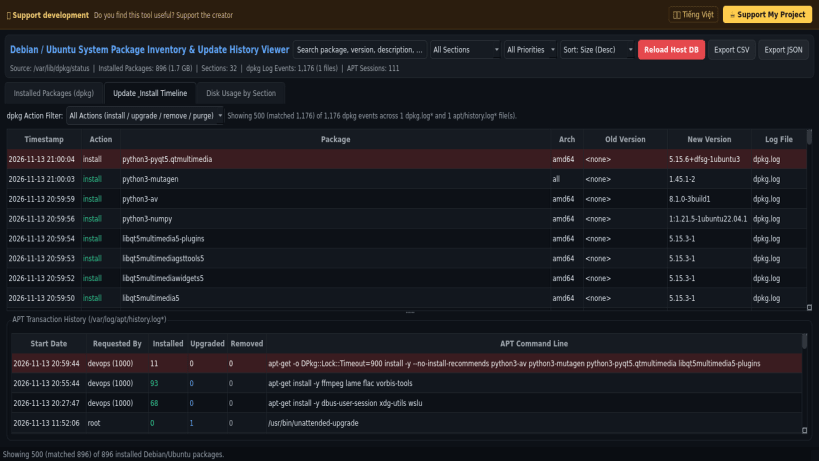
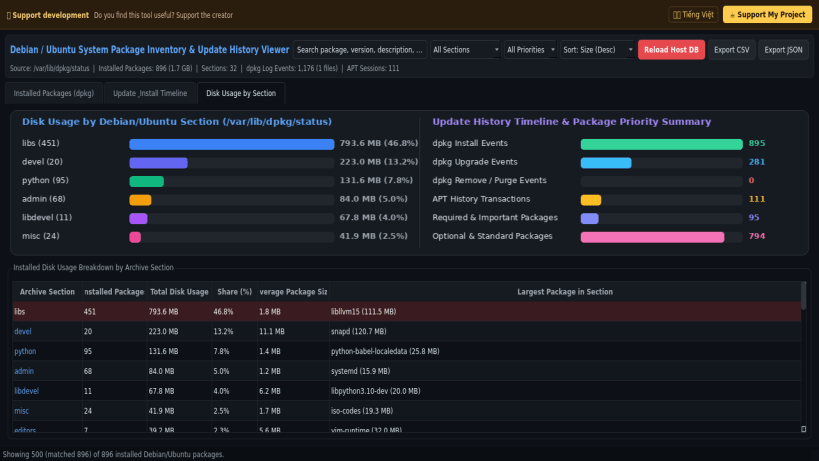
System Package and Update History Viewer is a desktop package inventory and update timeline inspector for Debian and Ubuntu systems. An independent Linux alternative inspired by WinUpdatesList, dpkg-query, and APT log viewers, it reads the live host package database and rotated package manager logs to catalog installed software, dependencies, disk usage by section, and chronological update history.
Key Features:
- Installed Package Catalog (/var/lib/dpkg/status): Lists all installed Debian and Ubuntu packages with version strings, architectures, installed byte sizes, archive sections, priorities, maintainers, configuration files, and full descriptions.
- Dependency & Reverse-Dependency Resolver: Parses Depends, Pre-Depends, Recommends, and Suggests fields and maps reverse dependencies across the installed package set.
- Chronological dpkg & APT Update Timeline: Reads /var/log/dpkg.log* and /var/log/apt/history.log* (including gzip-compressed rotated archives) to display timestamped install, upgrade, remove, and purge events alongside APT command lines.
- Section Disk-Usage Analytics & Export: Renders a visual breakdown of disk space by archive section and exports package inventories and update logs to CSV and JSON.
Disclaimer: This project is an independent open-source tool and is not affiliated with, sponsored by, or endorsed by NirSoft.
| Revision | Channel | Version | Build | Commit | Download SBOM |
|---|
The build and commit information is derived from build infrastructure records.
Install System Package and Update History Viewer on your Linux distribution
Choose your Linux distribution to get detailed installation instructions. If yours is not shown, get more details on the installing snapd documentation.


