

Instant Screen Translator
Install latest/stable of Instant Screen Translator
Ubuntu 16.04 or later?
Make sure snap support is enabled in your Desktop store.
Install using the command line
sudo snap install instant-screen-translatorDon't have snapd? Get set up for snaps.
Details for Instant Screen Translator
Package name
- instant-screen-translator
License
- GPL-3.0-or-later
Last updated
- Today - latest/stable
Websites
Contact
External link warning
You are about to open
Do you wish to proceed?
Report a Snap Store violation
Report Instant Screen Translator for a Snap Store violation
Snap Store Violation Report submitted successfully
Thank you for your report. Information you provided will help us investigate further.
Error submitting report
There was an error while sending your report. Please try again later.
Share this snap
Generate an embeddable card to be shared on external websites.
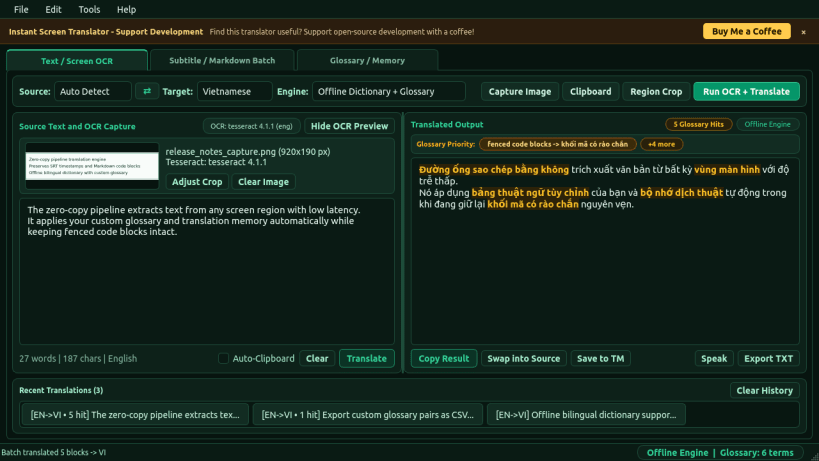
Bilingual screen OCR, subtitle, Markdown, and custom glossary translator
Instant Screen Translator is an offline-first Linux desktop translation workbench combining Tesseract screen OCR, dual-pane bilingual text translation, subtitle and Markdown batch processing, and a persistent SQLite custom glossary and translation memory vault.
Key capabilities:
- Text and Screen OCR Translator: Load images, grab clipboard snapshots, or crop a screen region, extract text via bundled Tesseract OCR, and translate instantly with an offline bilingual phrase and dictionary engine across Auto Detect, English, Vietnamese, French, German, Spanish, and Japanese.
- Optional Custom Translation Endpoint: Switch to any user-configured LibreTranslate-compatible local or self-hosted HTTP translation endpoint with bounded timeout and fallback safety.
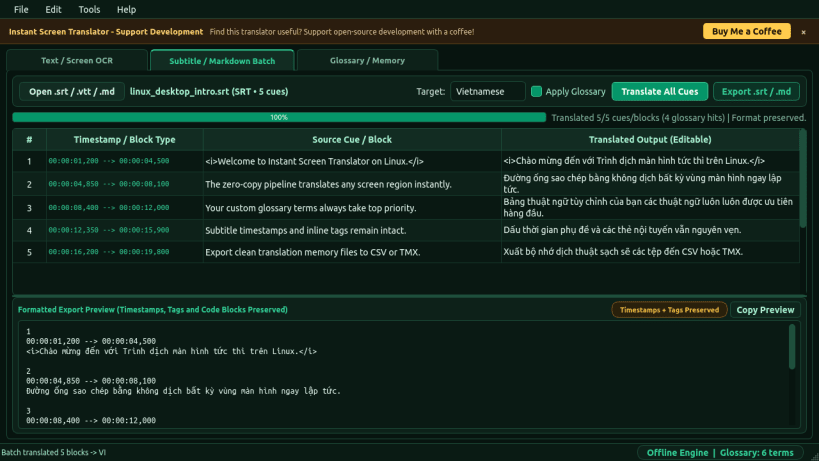
- Subtitle and Markdown Batch Studio: Open .srt, .vtt, .md, and .txt files, translate cues and prose side by side with inline editable cells, and export while preserving exact SRT/VTT timestamps, inline HTML tags, and fenced Markdown code blocks.
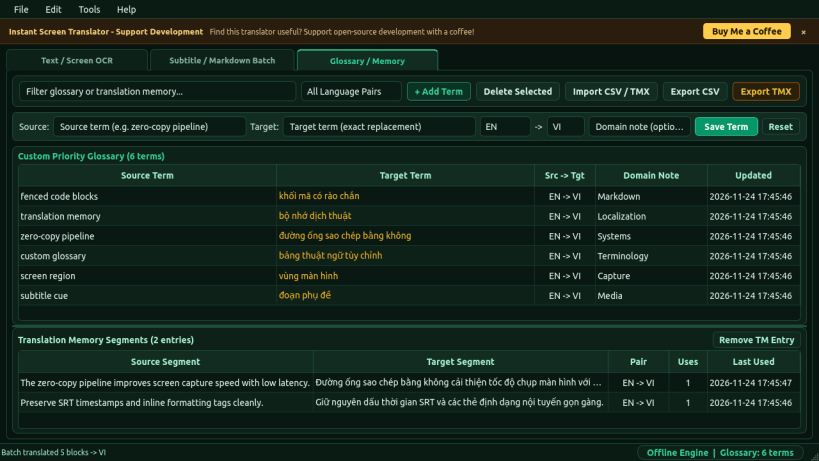
- Custom Glossary and Translation Memory: Manage domain terminology pairs in SQLite with priority glossary matching, highlight indicators, and lossless CSV and TMX 1.4 export and import roundtrips.
| Revision | Channel | Version | Build | Commit | Download SBOM |
|---|
The build and commit information is derived from build infrastructure records.
Install Instant Screen Translator on your Linux distribution
Choose your Linux distribution to get detailed installation instructions. If yours is not shown, get more details on the installing snapd documentation.











