

IP Network Info Analyzer (ip-asn-analyzer)
Install latest/stable of IP Network Info Analyzer
Ubuntu 16.04 or later?
Make sure snap support is enabled in your Desktop store.
Install using the command line
sudo snap install ip-asn-analyzerDon't have snapd? Get set up for snaps.
Details for IP Network Info Analyzer
Package name
- ip-asn-analyzer
License
- MIT
Last updated
- Today - latest/stable
Report a Snap Store violation
Report IP Network Info Analyzer for a Snap Store violation
Snap Store Violation Report submitted successfully
Thank you for your report. Information you provided will help us investigate further.
Error submitting report
There was an error while sending your report. Please try again later.
Share this snap
Generate an embeddable card to be shared on external websites.
Multi-address IPv4/IPv6 RDAP ownership, ASN, RIR, and reverse PTR analyzer
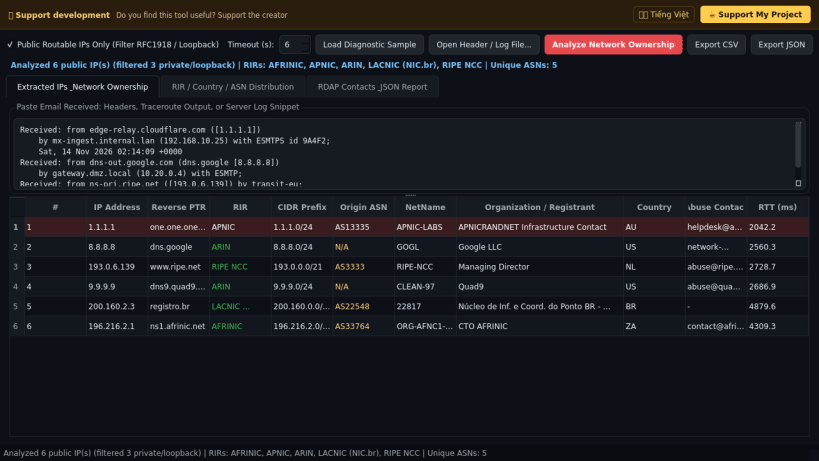
A multi-address IPv4 and IPv6 network ownership, Regional Internet Registry (RIR) allocation, RDAP entity, and reverse DNS PTR diagnostics tool for Linux. A lightweight Linux alternative to IPNetInfo for extracting public IP addresses from email Received headers or server logs and inspecting their autonomous systems and registry records.
Key features:
- Extracts public routable IPv4 and IPv6 addresses directly from pasted email Received headers, traceroute outputs, or server diagnostic logs while filtering private RFC 1918 and loopback addresses.
- Queries authoritative RIR RDAP endpoints (ARIN, RIPE NCC, APNIC, LACNIC, AFRINIC), WHOIS ASN records, and reverse DNS PTR hostnames concurrently.
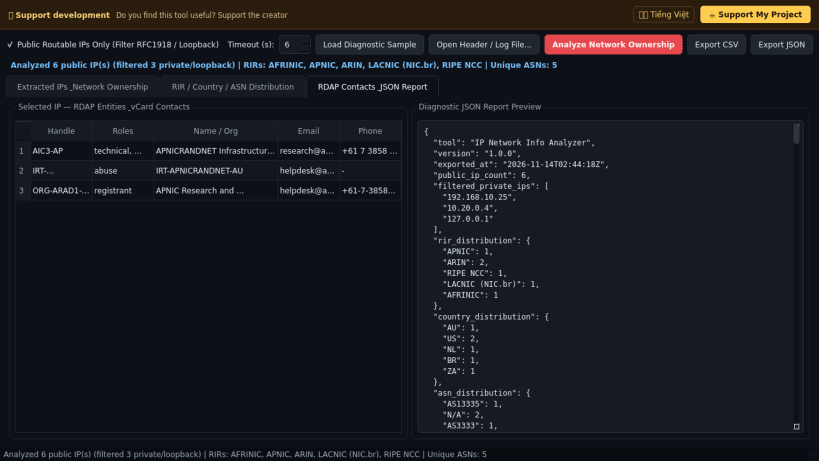
- Parses CIDR prefixes, allocation ranges, NetName, Origin ASN, registrant organization, country code, vCard abuse contacts, and registration dates.
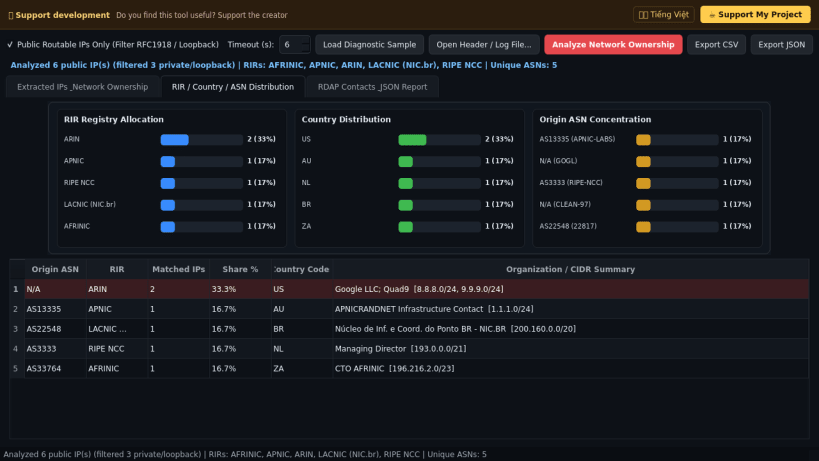
- Visualizes RIR, Country, and Autonomous System (ASN) distribution charts and exports structured CSV and JSON network diagnostic reports.
Disclaimer: This project is an independent open-source tool and is not affiliated with, sponsored by, or endorsed by NirSoft, ARIN, RIPE NCC, APNIC, LACNIC, or AFRINIC.
| Revision | Channel | Version | Build | Commit | Download SBOM |
|---|
The build and commit information is derived from build infrastructure records.
Install IP Network Info Analyzer on your Linux distribution
Choose your Linux distribution to get detailed installation instructions. If yours is not shown, get more details on the installing snapd documentation.


