

ISPCine
Install latest/stable of ISPCine
Ubuntu 16.04 or later?
Make sure snap support is enabled in your Desktop store.




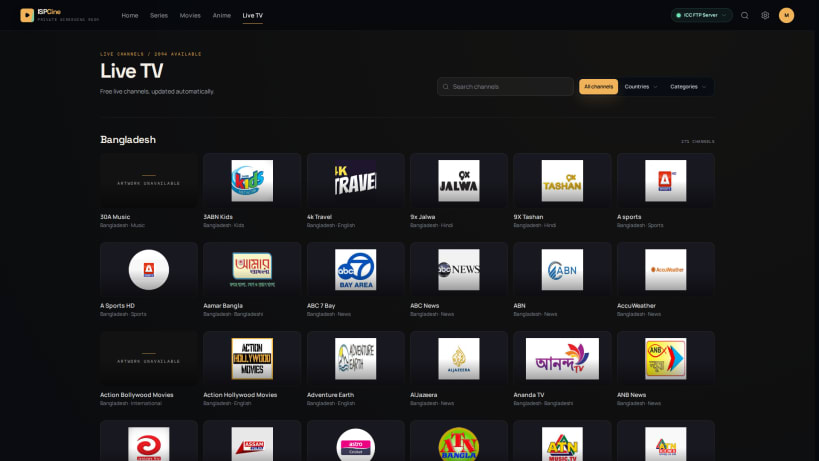
Details for ISPCine
Package name
- ispcine
License
- Proprietary
Last updated
- Today - latest/stable
- Today - latest/edge
Websites
Contact
Donations
Report a bug
External link warning
You are about to open
Do you wish to proceed?
Report a Snap Store violation
Report ISPCine for a Snap Store violation
Snap Store Violation Report submitted successfully
Thank you for your report. Information you provided will help us investigate further.
Error submitting report
There was an error while sending your report. Please try again later.
Share this snap
Generate an embeddable card to be shared on external websites.
Browse and play media from supported ISP portals
ISPCine is a local-first desktop cinema for supported ISP media portals.
Browse movies and series, search an active catalog, maintain your watch history and personal list, resume playback, manage downloads, and use local or online subtitles from a focused desktop interface.
ISPCine connects directly to supported media portals and does not host or redistribute their content. Availability depends on your internet service provider and network. Use ISPCine only with portals and media libraries you are authorized to access.
Features include:
- Movies, series, search, history, and My List
- Resume progress and episode navigation
- Persistent downloads with pause and resume
- Subtitle import, search, and local generation
- Multiple supported provider connections
- Keyboard, mouse, and fullscreen support
| Revision | Channel | Version | Build | Commit |
|---|
The build and commit information is derived from build infrastructure records.
Install ISPCine on your Linux distribution
Choose your Linux distribution to get detailed installation instructions. If yours is not shown, get more details on the installing snapd documentation.











