

jstuxchecker
Install latest/stable of jstuxchecker
Ubuntu 16.04 or later?
Make sure snap support is enabled in your Desktop store.
Install using the command line
sudo snap install jstuxcheckerDon't have snapd? Get set up for snaps.

Details for jstuxchecker
Package name
- jstuxchecker
License
- Proprietary
Last updated
- 21 October 2026 - latest/stable
Websites
External link warning
You are about to open
Do you wish to proceed?
Report a Snap Store violation
Report jstuxchecker for a Snap Store violation
Snap Store Violation Report submitted successfully
Thank you for your report. Information you provided will help us investigate further.
Error submitting report
There was an error while sending your report. Please try again later.
Share this snap
Generate an embeddable card to be shared on external websites.
Linux kernel version checker for the system tray
Keeps an eye on kernel.org and shows the latest Linux kernel versions right in your system tray.
What it does:
- Shows the current kernel version in the tray at a glance
- Tux turns green as soon as a newer kernel is released
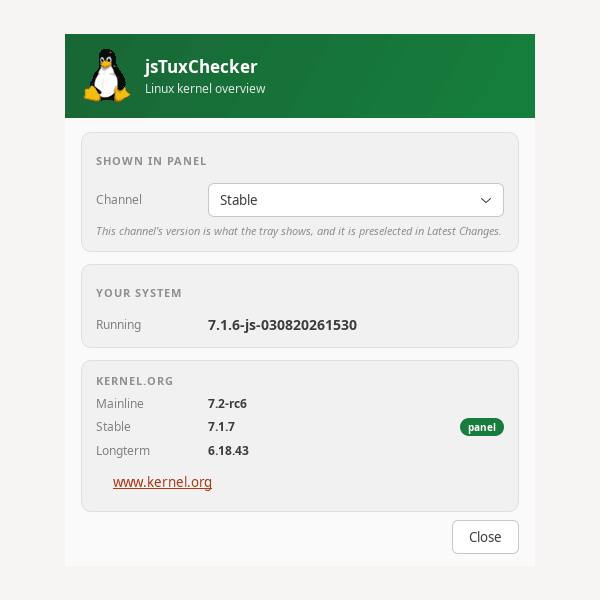
- Compares the kernel you are running with the latest mainline, stable and longterm releases
- Latest Changes: read what actually changed in the newest release of the channel you follow
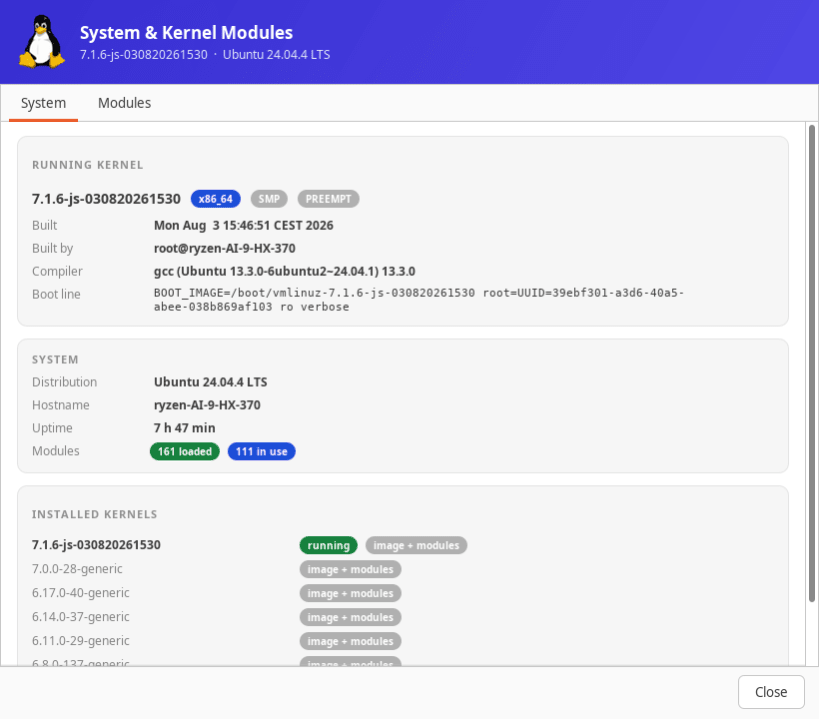
- System & Modules: your running kernel, the kernels installed next to it, and every loaded kernel module with its details
- Choose which channel the tray follows: mainline, stable or longterm
- Mark an update as seen to clear the notification
To see the loaded kernel modules, allow one read-only permission: sudo snap connect jstuxchecker:system-observe
The app tells you this in the window itself and offers the command for copying.
Requirements:
- A Linux desktop with a system tray (GNOME, KDE, XFCE, MATE, Cinnamon)
- On GNOME: AppIndicator extension (Ubuntu: enabled by default)
- x86_64 (64-bit)
Also available as .deb, .rpm, Flatpak and AppImage at www.budbrain.de
Developed by Josef Sejrek / Budbrain Software Contact: jstuxchecker@budbrain.de | www.budbrain.de
─────────────────────────────────────────── kernel update · linux kernel · kernel version · kernel checker · kernel notifier kernel.org · tray indicator · system tray · update notification · linux update mainline kernel · stable kernel · longterm kernel · lts kernel · kernel monitor appindicator · tux · linux news · kernel tracker · version checker
| Revision | Channel | Version | Build | Commit | Download SBOM |
|---|
The build and commit information is derived from build infrastructure records.
Install jstuxchecker on your Linux distribution
Choose your Linux distribution to get detailed installation instructions. If yours is not shown, get more details on the installing snapd documentation.











