

Logic Circuit
Install latest/stable of Logic Circuit
Ubuntu 16.04 or later?
Make sure snap support is enabled in your Desktop store.
Install using the command line
sudo snap install logic-circuitDon't have snapd? Get set up for snaps.
Details for Logic Circuit
Package name
- logic-circuit
License
- Proprietary
Last updated
- 20 October 2026 - latest/stable
- 20 October 2026 - latest/edge
Websites
External link warning
You are about to open
Do you wish to proceed?
Report a Snap Store violation
Report Logic Circuit for a Snap Store violation
Snap Store Violation Report submitted successfully
Thank you for your report. Information you provided will help us investigate further.
Error submitting report
There was an error while sending your report. Please try again later.
Share this snap
Generate an embeddable card to be shared on external websites.
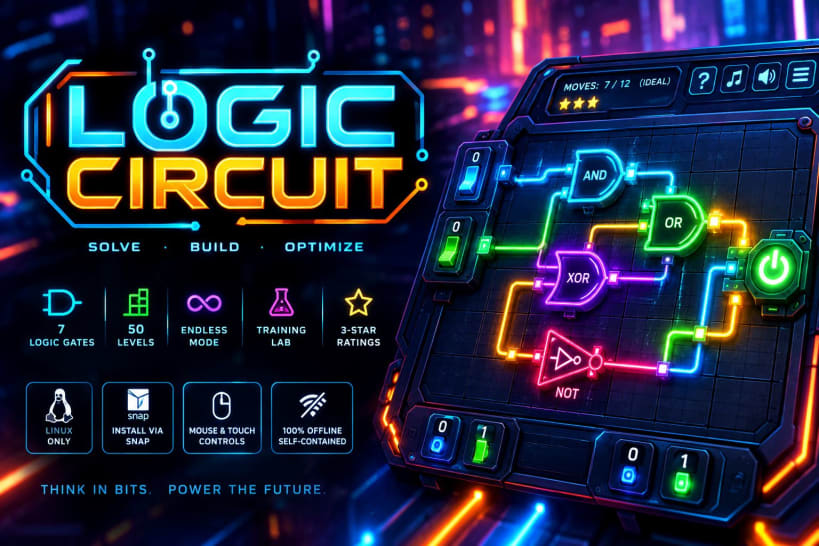
Cyberpunk digital logic gate puzzle game with 50 levels and endless mode.
Logic Circuit is a sleek cyberpunk boolean logic and digital circuit puzzle game where you step into the role of a core systems architect. Manipulate binary input switches (0 and 1), trace real-time electrical signal propagation across glowing neon pathways, and synchronize logic gates to energize the master output node in the minimum number of moves!
⚡ Key Features
- 50 Handcrafted Progressive Levels & Continuous Loop: master a 50-stage campaign (
1/50to50/50) that evolves from fundamental single-gate circuits to intricate multi-layer boolean networks, with seamless continuous cycle progression (50 → 1) and 3-star optimal-move ratings. - Authentic Digital Logic Gates: solve and experiment with real boolean components including AND, OR, NOT, NAND, NOR, XOR, and XNOR, complete with interactive truth tables and real-time signal state visualization.
- Endless Procedural Generator: test your engineering skills in Endless Mode (Modo Infinito), featuring procedurally generated logic circuits with guaranteed solvable configurations and escalating complexity.
- Interactive Training Lab (Sandbox): explore how each logic gate behaves in an interactive laboratory where you can toggle inputs freely and inspect live output reactions alongside reference truth tables.
- Optimal Move Solver & Smart Hint System: real-time move counter compares your actions against the mathematical minimum moves required (
Ideal), offering instant feedback and targeted hints that highlight the exact input switch needed to progress. - Custom Neon Wire Themes & Multilingual UI: unlock and switch between vibrant cyberpunk circuit themes (Cyan, Emerald, Magenta, Gold, and more) using stars earned in-game, with full support for Portuguese (PT-BR), English (EN), and Spanish (ES).
- 100% Embedded Audio System: crisp mechanical relay clicks, binary state-toggle tones, victory arpeggio fanfares, and an atmospheric synthwave ambient soundtrack packaged locally with zero external dependencies.
🖱️ Quick Mouse & Touch Controls
- Click / Tap Input Nodes (
0/1): Toggle binary input switches at the bottom of the circuit board to send or cut electrical current. - Click / Tap Logic Gates or Info Button (
[i]): Open the interactive Gate Reference & Truth Table modal at any time during a match. - Hint Button (
⚡/[?]): Automatically flip a required input switch toward the valid circuit solution. - Audio Buttons (
🎵/🔊): Toggle background synthwave music and sound effects independently from the top HUD. - Menu Button (
☰): Switch between Campaign Levels, Endless Mode, Training Lab, Wire Theme Store, and Language Settings.
💻 Built for Linux
- Wide compatibility: fully compatible with Wayland and X11 desktop environments (Ubuntu, Fedora, Debian, Pop!_OS, Manjaro, Arch, Linux Mint, and others).
- 100% offline & self-contained: zero network requirements; audio, visuals, progress saves, and circuit solver engine run locally.
📦 Install via Snap
sudo snap install logic-circuit
Developed by Luiz Brandão.
| Revision | Channel | Version | Build | Commit | Download SBOM |
|---|
The build and commit information is derived from build infrastructure records.
Install Logic Circuit on your Linux distribution
Choose your Linux distribution to get detailed installation instructions. If yours is not shown, get more details on the installing snapd documentation.











