

loglab
Install latest/stable of loglab
Ubuntu 16.04 or later?
Make sure snap support is enabled in your Desktop store.


Details for loglab
Package name
- loglab
License
- unset
Last updated
- 14 May 2026 - latest/stable
Websites
Contact
Donations
External link warning
You are about to open
Do you wish to proceed?
Report a Snap Store violation
Report loglab for a Snap Store violation
Snap Store Violation Report submitted successfully
Thank you for your report. Information you provided will help us investigate further.
Error submitting report
There was an error while sending your report. Please try again later.
Share this snap
Generate an embeddable card to be shared on external websites.
Advanced serial and log analysis tool
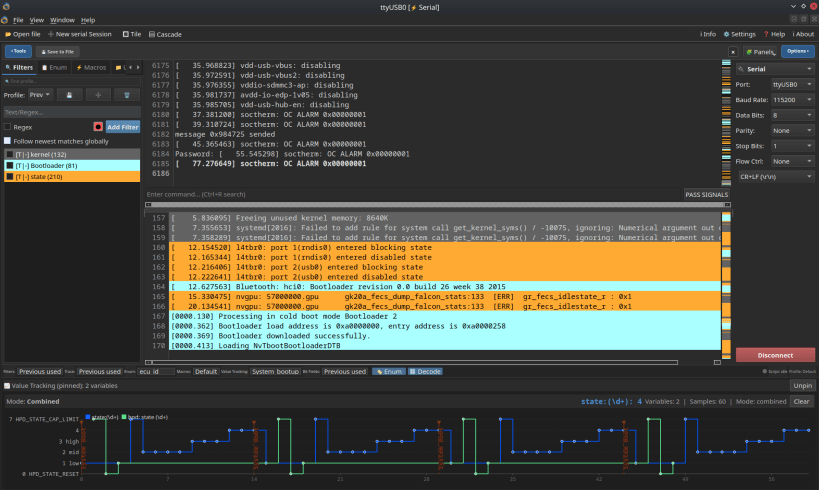
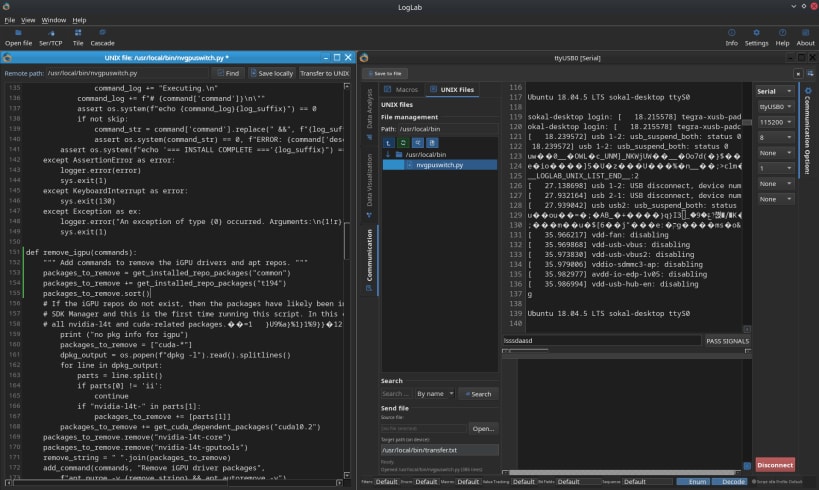
Discover LogLab – your modern hub for serial/tcp and logs data analysis and visualization! Our application is not just a powerful tool for monitoring logs, but also a unique visual experience thanks to its beautiful, intuitive user interface.
Key features
Stunning, modern, and user-friendly interface – working with data has never been so enjoyable! Colorful data presentation – highlight, group, and analyze information by assigning different colors to various message types.
Advanced filtering and search – instantly find the log entries you need.
- Multi-port support – manage all your serial devices with ease.
- Real-time charts, analytics panels, and live data view – see more, understand faster!
- Custom profiles, macros, and workflow automation.
- Easy data export and import – share results and archive logs effortlessly.
LogLab is the perfect tool for both professionals and hobbyists. Experience how convenient and visually appealing serial data analysis can be – download now and unlock new possibilities!
[Note] If your app not have access to serial port please try below command:
sudo bash -c 'SLOT=$(snap interface serial-port 2>/dev/null | grep -oP "snapd:\S+" | head -1); snap connect loglab:raw-usb snapd:raw-usb && snap connect loglab:hardware-observe snapd:hardware-observe && snap connect loglab:serial-port "$SLOT"'
| Revision | Channel | Version | Build | Commit | Download SBOM |
|---|
The build and commit information is derived from build infrastructure records.
Install loglab on your Linux distribution
Choose your Linux distribution to get detailed installation instructions. If yours is not shown, get more details on the installing snapd documentation.











