

Image Flow (magic-image-viewer)
Install latest/stable of Image Flow
Ubuntu 16.04 or later?
Make sure snap support is enabled in your Desktop store.
Install using the command line
sudo snap install magic-image-viewerDon't have snapd? Get set up for snaps.



Details for Image Flow
Package name
- magic-image-viewer
License
- Proprietary
Last updated
- 30 September 2026 - latest/stable
Websites
Contact
Donations
Report a bug
External link warning
You are about to open
Do you wish to proceed?
Report a Snap Store violation
Report Image Flow for a Snap Store violation
Snap Store Violation Report submitted successfully
Thank you for your report. Information you provided will help us investigate further.
Error submitting report
There was an error while sending your report. Please try again later.
Share this snap
Generate an embeddable card to be shared on external websites.
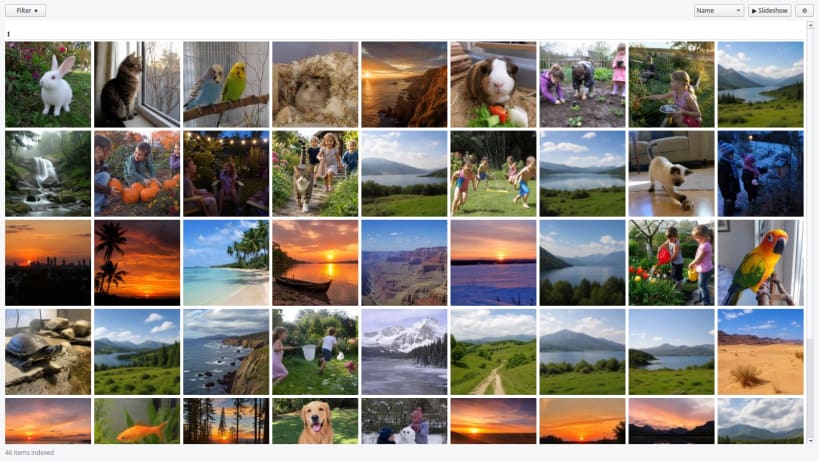
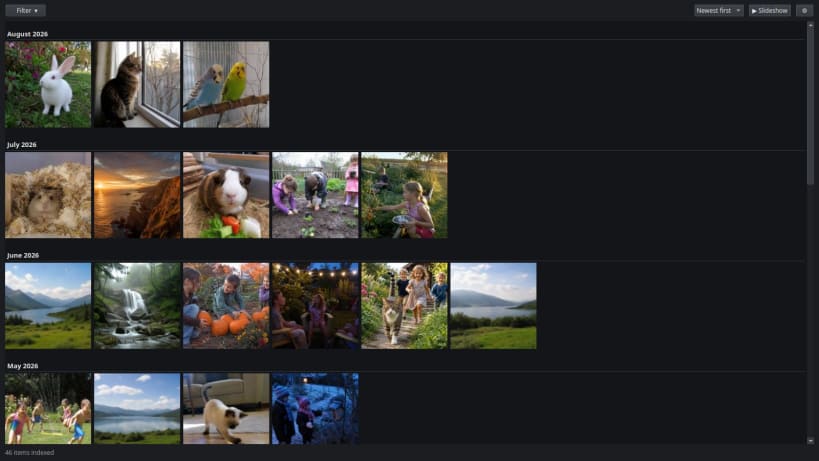
Scan, tag and browse your photo and video library
Image Flow indexes the folders you choose into a local database, tags everything automatically, and gives you a fast way to look through it.
- Scans images and videos, including RAW (ARW, CR2, CR3, NEF, NRW, RAF, ORF, RW2, DNG) and HEIC, reading EXIF for camera, capture date and location.
- Tags automatically by camera, year, season, time of day, media type and folder — no typing required.
- Filters on several tags at once: values within a category widen the result (2016 or 2020), categories narrow it (Olympus and 2020).
- A virtualised grid that stays smooth over a large library.
- Full-screen viewer with zoom, pan, rotate, a metadata panel, video playback and a slideshow — all fully keyboard operable.
Everything stays on your machine. The app has no network access at all: it is built without the network interface, so it cannot phone home even if asked to.
| Revision | Channel | Version | Build | Commit | Download SBOM |
|---|
The build and commit information is derived from build infrastructure records.
Install Image Flow on your Linux distribution
Choose your Linux distribution to get detailed installation instructions. If yours is not shown, get more details on the installing snapd documentation.











