

Markdown Table Editor
Install latest/stable of Markdown Table Editor
Ubuntu 16.04 or later?
Make sure snap support is enabled in your Desktop store.
Install using the command line
sudo snap install markdown-table-editorDon't have snapd? Get set up for snaps.
Details for Markdown Table Editor
Package name
- markdown-table-editor
License
- MIT
Last updated
- Yesterday - latest/stable
Report a Snap Store violation
Report Markdown Table Editor for a Snap Store violation
Snap Store Violation Report submitted successfully
Thank you for your report. Information you provided will help us investigate further.
Error submitting report
There was an error while sending your report. Please try again later.
Share this snap
Generate an embeddable card to be shared on external websites.
Visual Markdown, ASCII, Unicode, LaTeX, reST, and HTML table editor
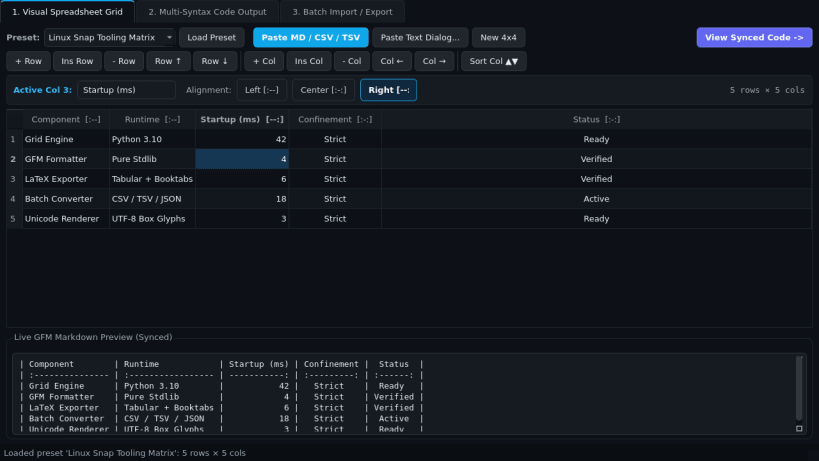
Markdown Table Editor is a desktop visual spreadsheet and multi-syntax table generator built for technical writers, developers, and researchers on Linux. Edit tables interactively in a familiar grid and instantly convert them into clean, padded markup formats without manual alignment formatting.
Key Features:
- Visual Spreadsheet Grid Editor: Add, insert, delete, and reorder rows and columns; sort rows by any column with numeric-aware comparison; configure per-column alignment (Left, Center, Right); and paste directly from spreadsheet TSV, CSV, or existing Markdown pipe tables.
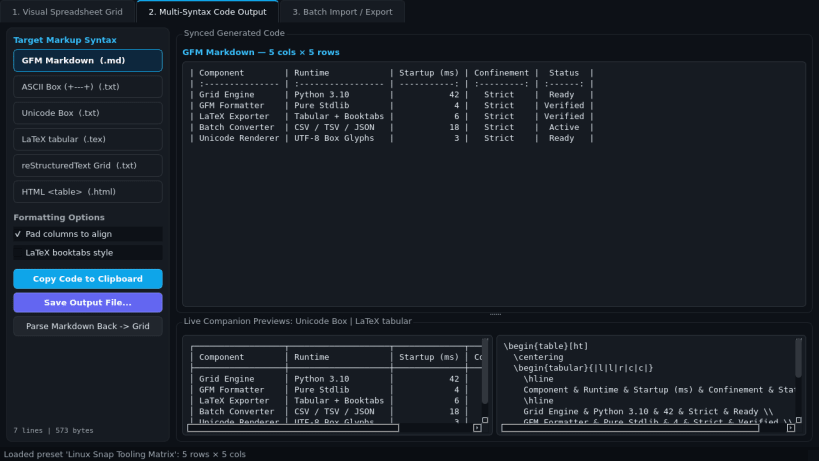
- Multi-Syntax Synced Code Output: Instantly generates aligned GFM Markdown tables, ASCII Box (+---+) tables, Unicode Box tables, LaTeX tabular environments, reStructuredText grids, and clean HTML tables.
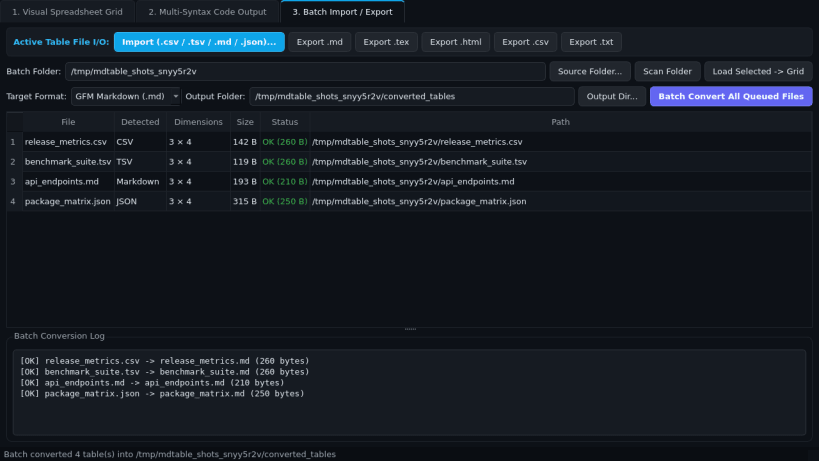
- Import/Export & Batch Converter: Import CSV, TSV, Markdown, and JSON table files, or batch-convert an entire folder of data tables into .md, .tex, .html, .csv, or .txt formatted outputs.
Disclaimer: Markdown Table Editor is an independent open-source project by TC Studio and is not affiliated with, endorsed by, or sponsored by TablesGenerator.
| Revision | Channel | Version | Build | Commit | Download SBOM |
|---|
The build and commit information is derived from build infrastructure records.
Install Markdown Table Editor on your Linux distribution
Choose your Linux distribution to get detailed installation instructions. If yours is not shown, get more details on the installing snapd documentation.


