

Media Format Converter Studio (media-format-converter)
Install latest/stable of Media Format Converter Studio
Ubuntu 16.04 or later?
Make sure snap support is enabled in your Desktop store.
Install using the command line
sudo snap install media-format-converterDon't have snapd? Get set up for snaps.

Details for Media Format Converter Studio
Package name
- media-format-converter
License
- MIT
Last updated
- 12 November 2026 - latest/stable
Websites
Contact
External link warning
You are about to open
Do you wish to proceed?
Report a Snap Store violation
Report Media Format Converter Studio for a Snap Store violation
Snap Store Violation Report submitted successfully
Thank you for your report. Information you provided will help us investigate further.
Error submitting report
There was an error while sending your report. Please try again later.
Share this snap
Generate an embeddable card to be shared on external websites.
Batch image, PCM WAV audio resampler & RIFF MJPEG AVI converter for Linux
A lightweight Linux alternative to Format Factory for batch image, PCM WAV audio, and MJPEG AVI conversion. Disclaimer: Independent open-source project, not affiliated with or endorsed by Format Factory.
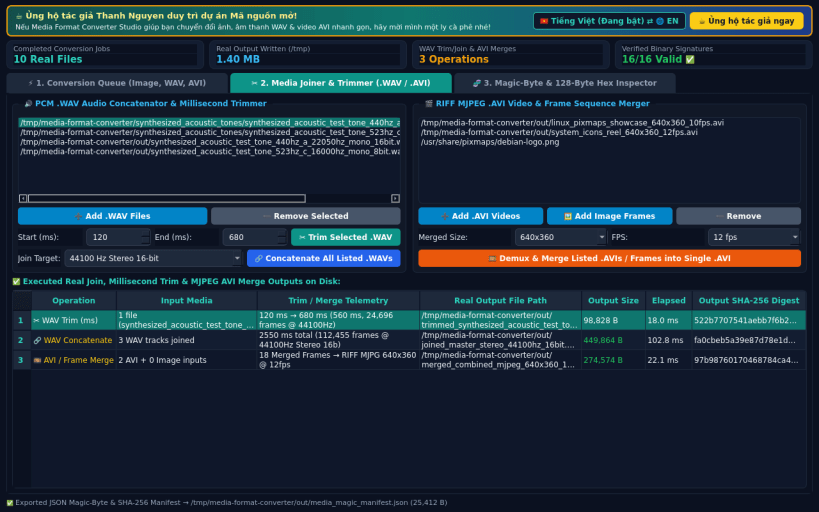
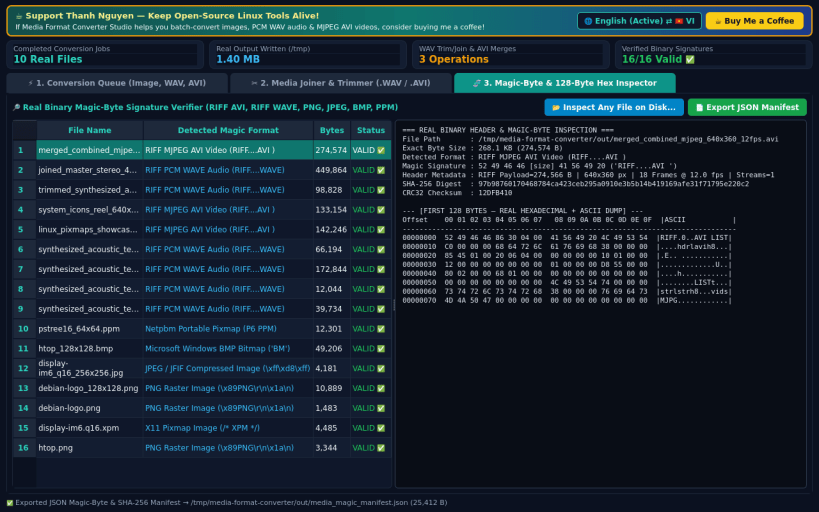
Media Format Converter Studio provides native desktop batch conversion, audio resampling, RIFF MJPEG AVI muxing/merging, and binary magic-byte header inspection using Python 3 and Qt5.
KEY FEATURES: • Multi-Format Conversion Queue (Image, PCM WAV Audio & MJPEG AVI Video): Batch convert raster images between PNG, JPG, BMP, and PPM with optional QImage resolution scaling; resample uncompressed PCM .wav audio across 44100 Hz, 48000 Hz, 22050 Hz, and 16000 Hz in Mono/Stereo and 16-bit/8-bit PCM; and encode image sequences or screen captures into standard RIFF MJPEG .avi video files with SHA-256 verification. • Media Joiner & Millisecond Trimmer: Trim uncompressed PCM .wav files by exact start/end milliseconds, concatenate multiple .wav tracks with automatic sample-rate alignment, and merge multiple MJPEG .avi files or frame sequences into a single .avi container. • Binary Magic-Byte & Hex Header Inspector: Verify real file signatures (RIFF AVI, RIFF WAVE, PNG, JPEG, BMP, Netpbm PPM), inspect 128-byte hexadecimal + ASCII headers, and export JSON integrity manifests.
SUPPORT & DONATE: • Created by Thanh Nguyen — Support ongoing open-source development: https://buymeacoffee.com/thanhnv128b
| Revision | Channel | Version | Build | Commit | Download SBOM |
|---|
The build and commit information is derived from build infrastructure records.
Install Media Format Converter Studio on your Linux distribution
Choose your Linux distribution to get detailed installation instructions. If yours is not shown, get more details on the installing snapd documentation.


