

Miniclip
Install latest/stable of Miniclip
Ubuntu 16.04 or later?
Make sure snap support is enabled in your Desktop store.
Details for Miniclip
Package name
- miniclip
License
- GPL-3.0
Last updated
- 26 October 2026 - latest/stable
- 4 November 2026 - latest/edge
Source code
Report a bug
External link warning
You are about to open
Do you wish to proceed?
Report a Snap Store violation
Report Miniclip for a Snap Store violation
Snap Store Violation Report submitted successfully
Thank you for your report. Information you provided will help us investigate further.
Error submitting report
There was an error while sending your report. Please try again later.
Share this snap
Generate an embeddable card to be shared on external websites.
A simple clipboard manager for Linux
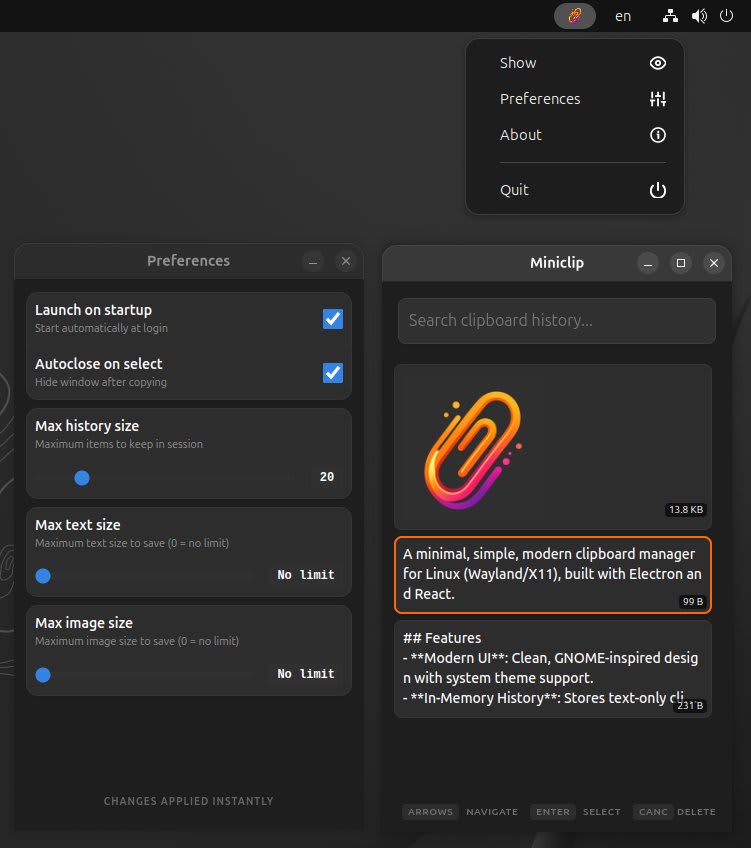
A minimal, simple, modern clipboard manager for Linux (Wayland/X11), built with Electron and React.
Features
- Modern UI: Clean, GNOME-inspired design with system theme support.
- In-Memory History: Stores clipboard entries during your current session.
- Image support: Stores both text and screenshots.
Usage
Miniclip monitors your clipboard and stores a history of entries.
- Arrows: Move across items in the list.
- Enter: Copy an item back to the clipboard.
- Delete: Remove an item.
- Filter: Find a specific item.
By default, Miniclip starts hidden in the system tray. To show the window, click the tray icon or run:
miniclip show
Global Shortcut (Wayland & X11)
Due to security limitations in modern display servers like Wayland, applications are often restricted from registering global keybindings while they don't have focus.
This is why it is recommend setting up a system-level shortcut. This ensures the best performance and compatibility with your desktop environment.
Setting up a shortcut in GNOME
- Open Settings -> Keyboard -> View and Customize Shortcuts.
- Go to Custom Shortcuts -> Add Shortcut.
- Name:
Miniclip Show - Command:
miniclip show - Shortcut: Your preferred combo (e.g.,
Super+VorCtrl+Alt+G).
| Revision | Channel | Version | Build | Commit | Download SBOM |
|---|
The build and commit information is derived from build infrastructure records.
Install Miniclip on your Linux distribution
Choose your Linux distribution to get detailed installation instructions. If yours is not shown, get more details on the installing snapd documentation.











