

Folder Mirror Sync GUI (mirror-sync-gui)
Install latest/stable of Folder Mirror Sync GUI
Ubuntu 16.04 or later?
Make sure snap support is enabled in your Desktop store.
Install using the command line
sudo snap install mirror-sync-guiDon't have snapd? Get set up for snaps.
Details for Folder Mirror Sync GUI
Package name
- mirror-sync-gui
License
- MIT
Last updated
- Today - latest/stable
Websites
Contact
External link warning
You are about to open
Do you wish to proceed?
Report a Snap Store violation
Report Folder Mirror Sync GUI for a Snap Store violation
Snap Store Violation Report submitted successfully
Thank you for your report. Information you provided will help us investigate further.
Error submitting report
There was an error while sending your report. Please try again later.
Share this snap
Generate an embeddable card to be shared on external websites.
Visual rsync folder mirror & differential sync with safe backup archives
A visual Linux alternative to RoboMirror for differential folder mirroring, pre-sync dry-run change previews, and timestamped safety backup archives powered by real rsync. Independent open-source tool, not affiliated with, sponsored by, or endorsed by RoboMirror.
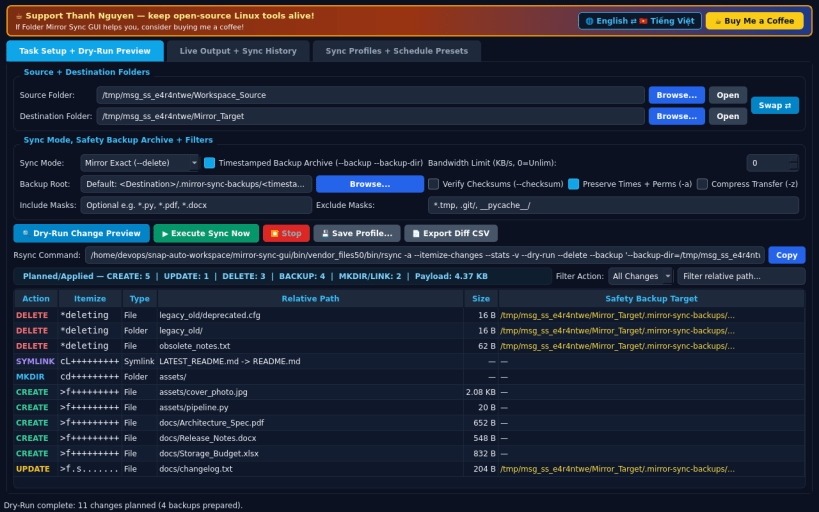
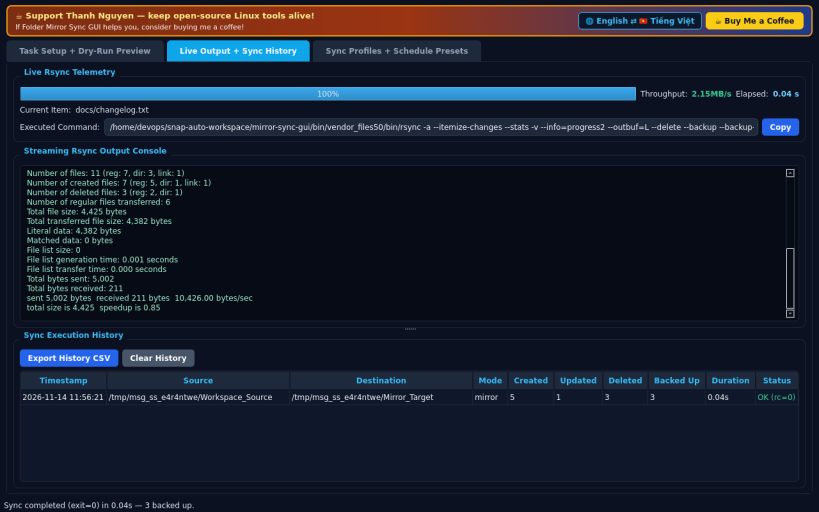
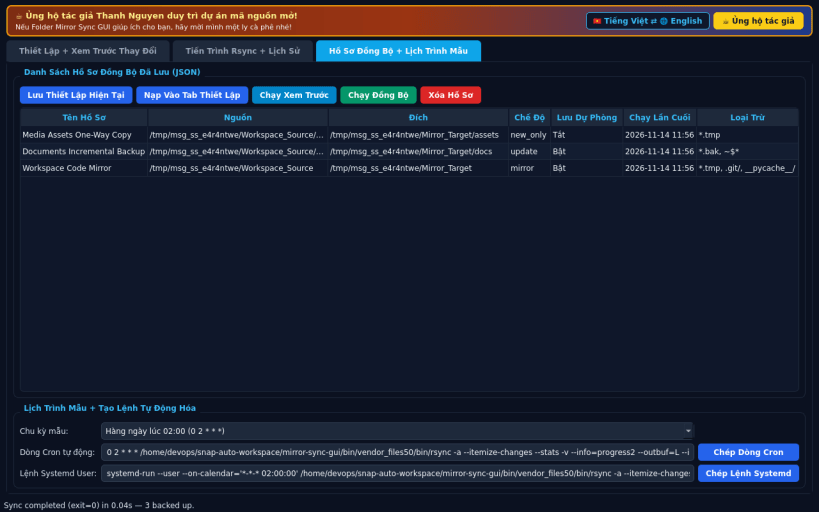
FEATURES • Task Setup & Dry-Run Change Preview: Configure Source and Destination folders, choose sync mode (Mirror exact with --delete, Update newer only, or Copy new only), enable timestamped Backup Archives (--backup --backup-dir) so overwritten or deleted files are never lost, set checksum verification, bandwidth caps (KB/s), and include/exclude masks. Inspect exact planned CREATE, UPDATE, DELETE, MKDIR, and BACKUP entries parsed from real rsync --dry-run --itemize-changes before running. • Live Output & Sync Execution History: Stream real-time rsync progress, transferred byte stats, executed CLI command, and persistent sync run history with CSV export. • Sync Profiles & Schedule Presets: Save reusable sync profiles in JSON, trigger one-click dry-run or sync, generate cron/systemd schedule lines, and export diff reports as CSV.
SUPPORT & DONATE • Created by Thanh Nguyen — https://buymeacoffee.com/thanhnv128b
| Revision | Channel | Version | Build | Commit | Download SBOM |
|---|
The build and commit information is derived from build infrastructure records.
Install Folder Mirror Sync GUI on your Linux distribution
Choose your Linux distribution to get detailed installation instructions. If yours is not shown, get more details on the installing snapd documentation.


