

NoCloud Bulk Image Converter (noc-convert)
Install latest/stable of NoCloud Bulk Image Converter
Ubuntu 16.04 or later?
Make sure snap support is enabled in your Desktop store.
Install using the command line
sudo snap install noc-convertDon't have snapd? Get set up for snaps.
Details for NoCloud Bulk Image Converter
Package name
- noc-convert
License
- CC-BY-NC-4.0
Last updated
- 12 December 2025 - latest/stable
- 12 December 2025 - latest/beta
Websites
Contact
Donations
Source code
Report a bug
External link warning
You are about to open
Do you wish to proceed?
Report a Snap Store violation
Report NoCloud Bulk Image Converter for a Snap Store violation
Snap Store Violation Report submitted successfully
Thank you for your report. Information you provided will help us investigate further.
Error submitting report
There was an error while sending your report. Please try again later.
Share this snap
Generate an embeddable card to be shared on external websites.
Simple, Fast, and no-cloud bulk image converter
NoCloud Bulk Image Converter (noc-convert) The essential desktop utility for photographers and designers needing fast, private, large-scale photo conversion without compromising security.
Privacy-First Design (No Cloud) Unlike many online converters, NoCloud Bulk Image Converter processes every file entirely on your local machine.
- Your Data Stays Yours: Never upload sensitive or private images to external servers.
- Offline Ready: Convert entire batches of pictures anytime, anywhere, without an internet connection.
High-Speed & Simple Bulk Conversion Unmatched Cross-Platform Performance: Built using the latest Java technology, noc-convert excels in intensive multi-threading environments. It is rigorously tested to maintain maximum speed across Linux, Windows, and macOS, easily handling conversion jobs of milioni di immagini without the crashes, freezes, or performance degradation typical of less optimized tools.
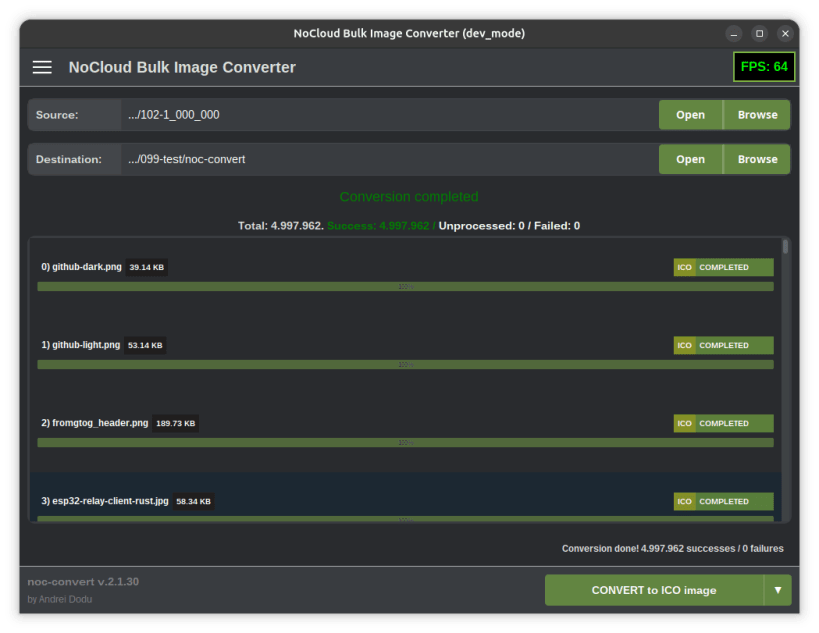
- Batch Processing: Convert entire image directories in a single action (tested it with with a set of 5.000.000 images).
- Optimized Performance: Built with speed in mind for heavy workflows.
- Simple Interface: An intuitive Graphical User Interface (GUI) makes bulk operations easy, even for novice users.
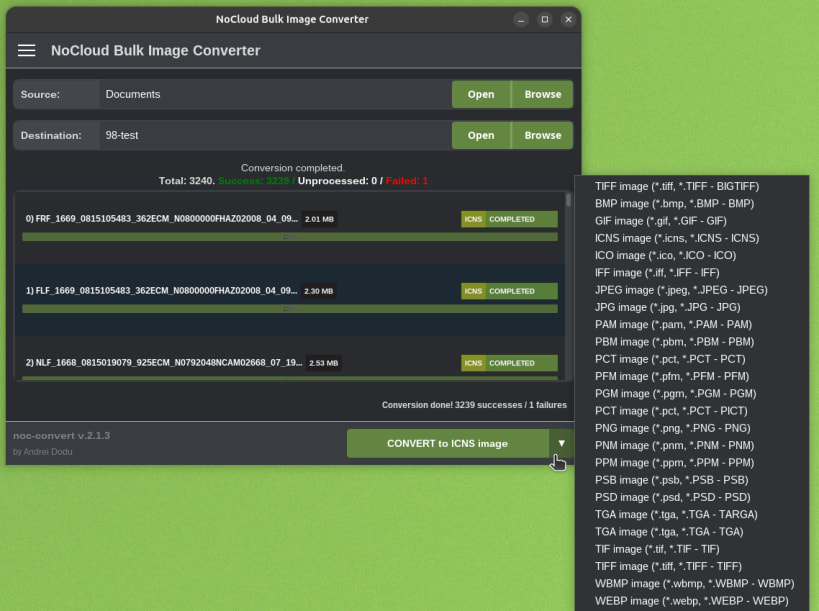
Wide Format Support Supports a broad and detailed array of common and professional image formats, including:
- BMP, BIGTIFF, GIF, ICNS, ICO, IFF, JPEG, JPG, PAM, PBM, PCT, PFM, PGM, PICT, PNM, PNG, PSB, PSD, TARGA, TGA, TIF, TIFF, WBMP, WEBP
Get back control over your image files. Download NoCloud Bulk Image Converter today! (:
P.S. noc-convert is available also for Windows, MacOS and Linux (as .deb package). Please check the GitHub page.
| Revision | Channel | Version | Build | Commit | Download SBOM |
|---|
The build and commit information is derived from build infrastructure records.
Install NoCloud Bulk Image Converter on your Linux distribution
Choose your Linux distribution to get detailed installation instructions. If yours is not shown, get more details on the installing snapd documentation.












