

OBS Studio GPU Edition (obs-studio-pro)
Install latest/stable of OBS Studio GPU Edition
Ubuntu 16.04 or later?
Make sure snap support is enabled in your Desktop store.
Install using the command line
sudo snap install obs-studio-proDon't have snapd? Get set up for snaps.
Details for OBS Studio GPU Edition
Package name
- obs-studio-pro
License
- MIT
Last updated
- 12 November 2026 - latest/stable
Websites
Contact
External link warning
You are about to open
Do you wish to proceed?
Report a Snap Store violation
Report OBS Studio GPU Edition for a Snap Store violation
Snap Store Violation Report submitted successfully
Thank you for your report. Information you provided will help us investigate further.
Error submitting report
There was an error while sending your report. Please try again later.
Share this snap
Generate an embeddable card to be shared on external websites.
Live Multi-Source Scene Compositor, MJPEG/AVI Recorder & GPU Encoder Inspector
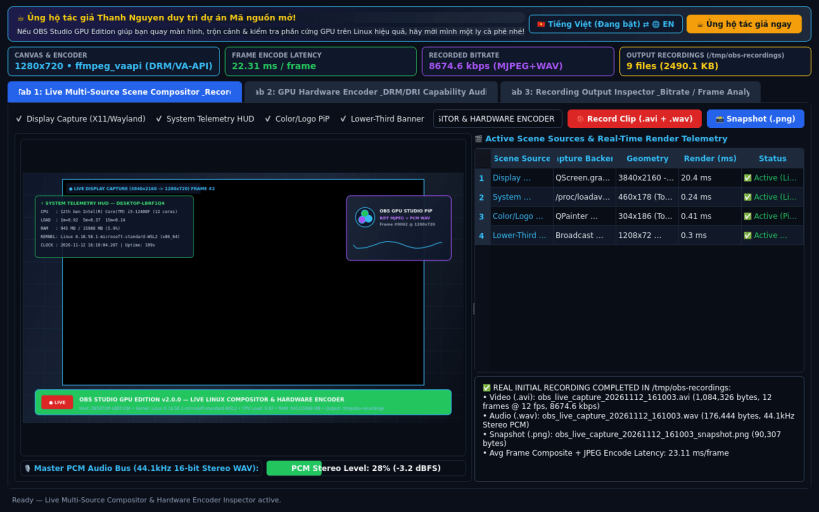
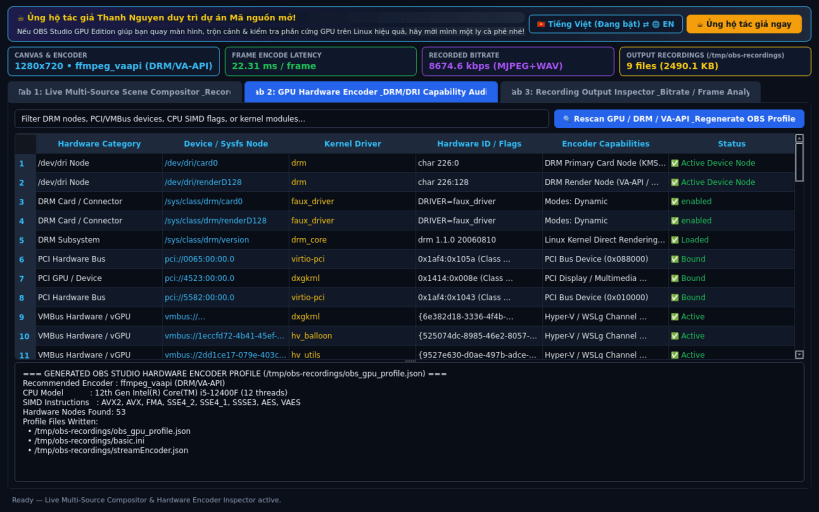
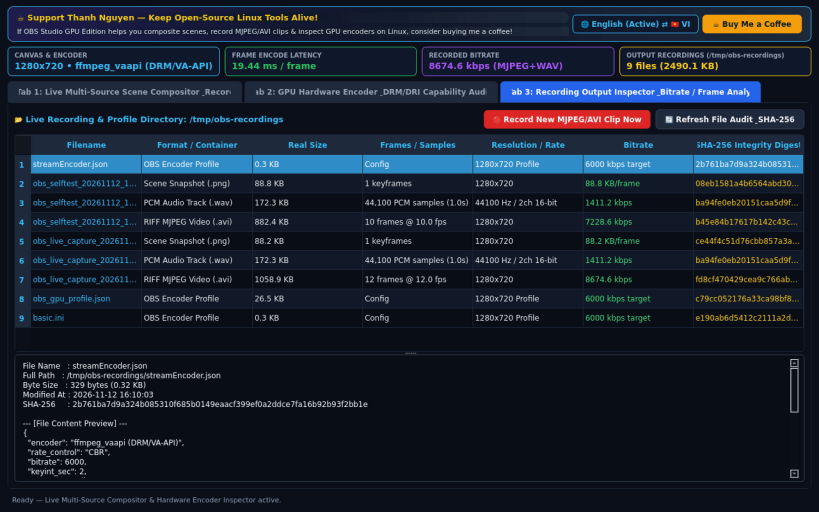
OBS Studio GPU Edition (obs-studio-pro) for Linux is a native desktop scene compositor, real-time RIFF MJPEG (.avi) + PCM (.wav) recorder, and hardware GPU encoder capability inspector (/dev/dri, /sys/class/drm, VA-API, NVENC, VMBus, PCI, and CPU SIMD).
KEY FEATURES: • Live Multi-Source Scene Compositor & Recorder: Captures real desktop frames via X11/Wayland primary screen grab, composites real-time System Telemetry HUD, Lower-Third Broadcast Banner, and Picture-in-Picture overlays onto a 1280x720 canvas, and encodes real RIFF MJPEG (.avi), PCM audio (.wav), and PNG snapshots to /tmp/obs-recordings. • GPU Hardware Encoder & DRM/DRI Auditor: Scans real /dev/dri/* render nodes, /sys/class/drm/* connectors, /sys/bus/pci/devices/, /sys/bus/vmbus/devices/, /proc/cpuinfo SIMD flags, and /proc/modules to generate real OBS Studio profiles (obs_gpu_profile.json, basic.ini, streamEncoder.json). • Recording Output Inspector & Bitrate Analyzer: Audits real recorded .avi, .wav, .png, and .json files on disk with live byte sizes, frame counts, resolutions, bitrates, and SHA-256 integrity digests.
SUPPORT & DONATE: • Created by Thanh Nguyen — Support ongoing development: https://buymeacoffee.com/thanhnv128b
| Revision | Channel | Version | Build | Commit | Download SBOM |
|---|
The build and commit information is derived from build infrastructure records.
Install OBS Studio GPU Edition on your Linux distribution
Choose your Linux distribution to get detailed installation instructions. If yours is not shown, get more details on the installing snapd documentation.


