
Install latest/stable of Open 2D Studio

Ubuntu 16.04 or later?

Make sure snap support is enabled in your Desktop store.


Install using the command line

sudo snap install open-2d-studio

Don't have snapd? Get set up for snaps.
Channel Version Published

Details for Open 2D Studio

License

  • LGPL-3.0-or-later

Last updated

  • 5 March 2026 - latest/stable

Websites


Contact


Source code


Report a bug


Report a Snap Store violation

Share this snap

Generate an embeddable card to be shared on external websites.

Free, open-source 2D CAD application

Open 2D Studio is a free, open-source 2D CAD application built for architects, engineers, and designers who need professional drafting tools without expensive subscriptions.

Features:

  • Drawing tools: Line, Rectangle, Circle, Arc, Polyline, Ellipse, Spline, Hatch
  • Modify tools: Move, Copy, Rotate, Scale, Mirror, Offset, Trim, Extend, Fillet
  • Structural tools: Beams, Piles, Walls, Slabs, Plate Systems, Gridlines, Levels
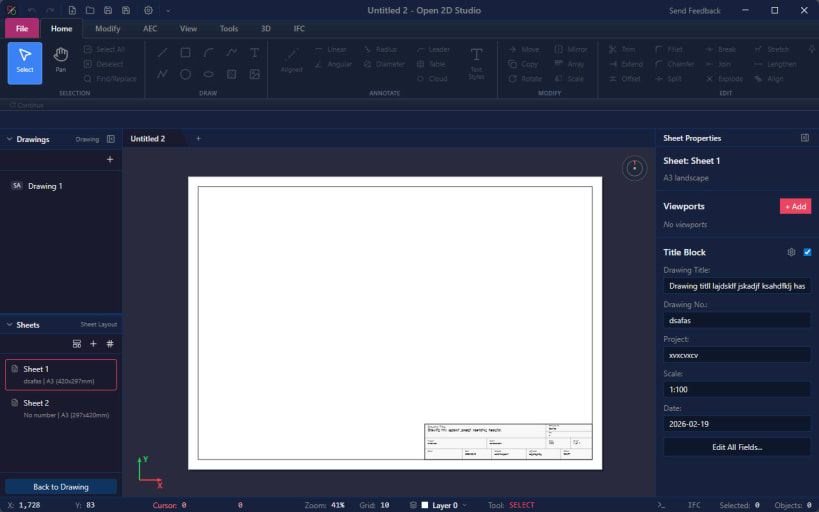
  • Sheet management: Multiple drawings, sheets with title blocks, viewports
  • Dimension tools: Linear, aligned, angular, radius, diameter, spot elevation
  • Annotation tools: Text, leaders, section callouts
  • Layer management with visibility, lock, and color control
  • Snap and tracking: endpoint, midpoint, center, intersection, perpendicular, polar
  • Grid and ortho mode
  • Undo/redo with full history
  • IFC export for BIM interoperability
  • Print dialog with PDF export
  • Customizable Quick Access Toolbar
  • Multiple themes: Dark, Light, Blue, High Contrast
  • No telemetry, no data collection, no subscriptions

Install Open 2D Studio on your Linux distribution

Choose your Linux distribution to get detailed installation instructions. If yours is not shown, get more details on the installing snapd documentation.



Where people are using Open 2D Studio

Users by distribution (log)

Ubuntu 24.04
Ubuntu 25.10
Zorin OS 18
Ubuntu 22.04







