

Open Presentation Studio
Install latest/stable of Open Presentation Studio
Ubuntu 16.04 or later?
Make sure snap support is enabled in your Desktop store.
Install using the command line
sudo snap install open-presentation-studioDon't have snapd? Get set up for snaps.
Details for Open Presentation Studio
Package name
- open-presentation-studio
License
- Apache-2.0
Last updated
- 11 November 2026 - latest/stable
Report a Snap Store violation
Report Open Presentation Studio for a Snap Store violation
Snap Store Violation Report submitted successfully
Thank you for your report. Information you provided will help us investigate further.
Error submitting report
There was an error while sending your report. Please try again later.
Share this snap
Generate an embeddable card to be shared on external websites.
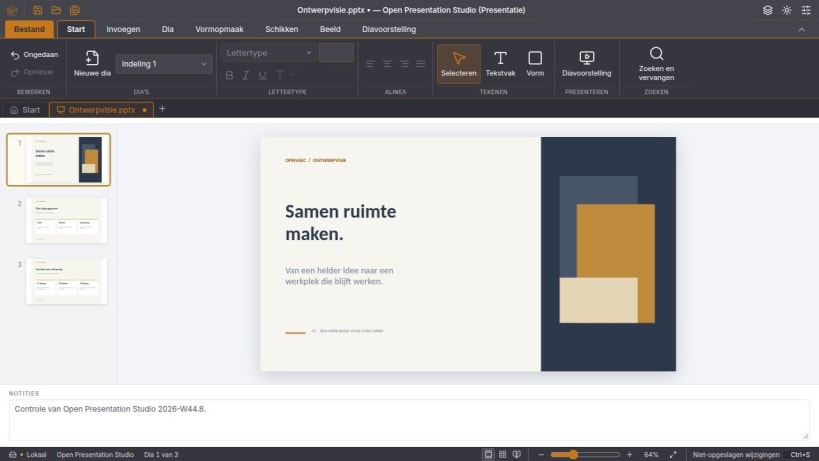
Maak PowerPoint-presentaties (PPTX) met dia’s, vormen en sprekersnotities.
Werk een bestaande PowerPoint-presentatie bij of maak zelf een reeks dia’s. Lijn tekst en vormen uit en zet je toelichting in de sprekersnotities. Tijdens het overleg start je de diavoorstelling vanaf het begin of meteen bij de dia die je wilt bespreken.
Broncode en downloads: https://github.com/OpenAEC-Foundation/open-office-studio/releases/tag/v2026.45.4
| Revision | Channel | Version | Build | Commit | Download SBOM |
|---|
The build and commit information is derived from build infrastructure records.
Install Open Presentation Studio on your Linux distribution
Choose your Linux distribution to get detailed installation instructions. If yours is not shown, get more details on the installing snapd documentation.


