

Packet Capture Analyzer
Install latest/stable of Packet Capture Analyzer
Ubuntu 16.04 or later?
Make sure snap support is enabled in your Desktop store.
Install using the command line
sudo snap install packet-capture-analyzerDon't have snapd? Get set up for snaps.
Details for Packet Capture Analyzer
Package name
- packet-capture-analyzer
License
- MIT
Last updated
- Yesterday - latest/stable
Websites
Contact
External link warning
You are about to open
Do you wish to proceed?
Report a Snap Store violation
Report Packet Capture Analyzer for a Snap Store violation
Snap Store Violation Report submitted successfully
Thank you for your report. Information you provided will help us investigate further.
Error submitting report
There was an error while sending your report. Please try again later.
Share this snap
Generate an embeddable card to be shared on external websites.
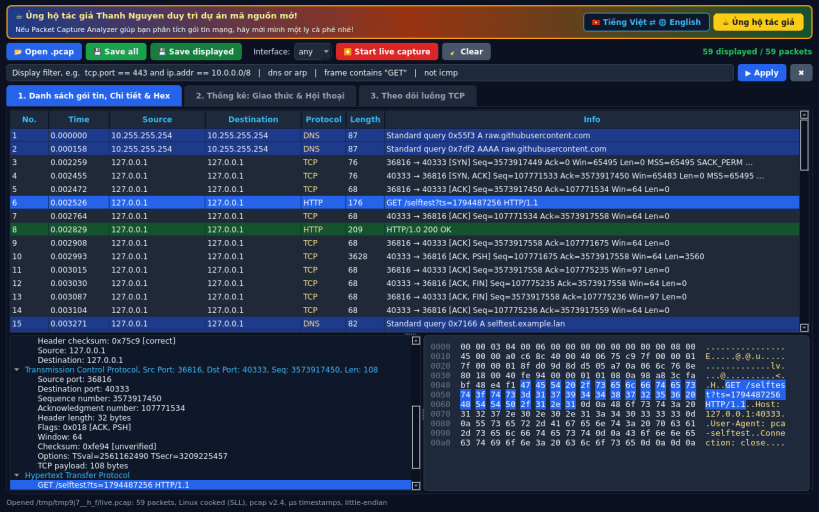
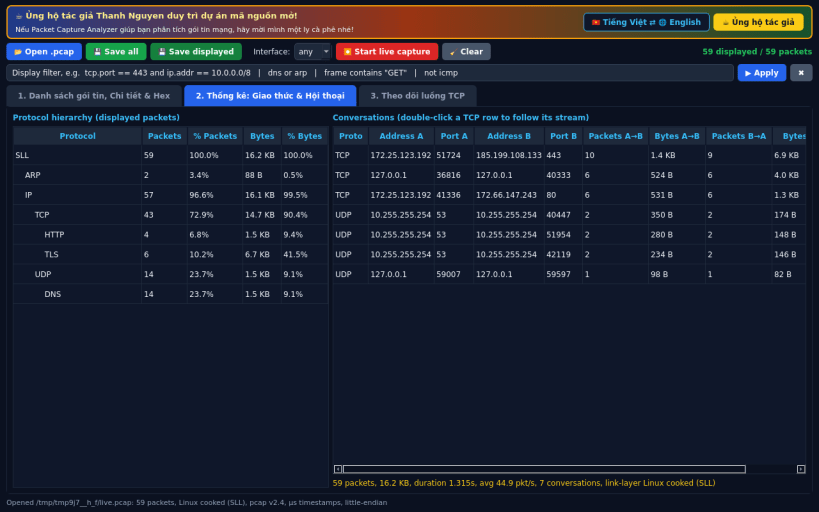
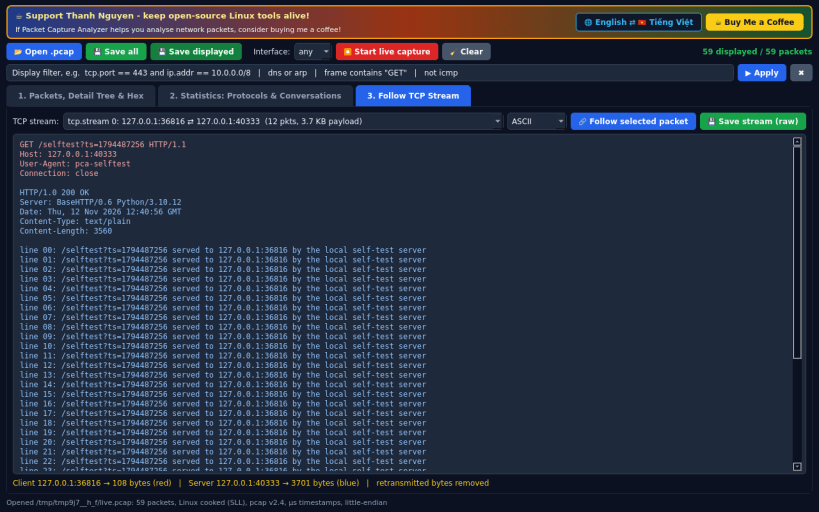
Packet capture analyzer for libpcap files with live AF_PACKET capture
Packet Capture Analyzer is a Linux alternative to Wireshark, written in pure Python.
Features:
- Open and save classic libpcap .pcap files (micro- and nanosecond, both byte orders; Ethernet, Linux cooked SLL/SLL2, raw IP, BSD loopback link types)
- Dissectors: Ethernet/802.1Q, ARP, IPv4 (header checksum check), IPv6 (+extension headers), TCP (flags, options), UDP, ICMP, ICMPv6, DNS (queries/answers, name compression, also over TCP), HTTP/1.x request/response headers, TLS record type
- Packet list, protocol detail tree and hex dump with field highlighting
- Display filters: protocol names, ip.addr / ip.src / ip.dst (incl. CIDR), port / tcp.port / udp.port, frame.len, tcp.flags.syn, dns.qry.name, http.host, frame contains "text", combined with and / or / not and parentheses
- Statistics: protocol hierarchy and TCP/UDP/IP conversations
- Follow TCP Stream with retransmission removal, ASCII or hex, save raw stream
- Live capture through an AF_PACKET raw socket (saved as Linux cooked capture)
Live capture needs root (or CAP_NET_RAW). In the snap connect the interfaces 'sudo snap connect packet-capture-analyzer:network-observe' and 'sudo snap connect packet-capture-analyzer:network-control' and run the app with sudo. Without those permissions the app shows a clear message and you can still analyse .pcap files. pcapng files are not supported (convert with editcap -F pcap).
Not affiliated with or endorsed by the Wireshark Foundation.
Support development: https://buymeacoffee.com/thanhnv128b
| Revision | Channel | Version | Build | Commit | Download SBOM |
|---|
The build and commit information is derived from build infrastructure records.
Install Packet Capture Analyzer on your Linux distribution
Choose your Linux distribution to get detailed installation instructions. If yours is not shown, get more details on the installing snapd documentation.


