

Partition and Mount Mapper (partition-mount-mapper)
Install latest/stable of Partition and Mount Mapper
Ubuntu 16.04 or later?
Make sure snap support is enabled in your Desktop store.
Install using the command line
sudo snap install partition-mount-mapperDon't have snapd? Get set up for snaps.
Details for Partition and Mount Mapper
Package name
- partition-mount-mapper
License
- MIT
Last updated
- Today - latest/stable
Report a Snap Store violation
Report Partition and Mount Mapper for a Snap Store violation
Snap Store Violation Report submitted successfully
Thank you for your report. Information you provided will help us investigate further.
Error submitting report
There was an error while sending your report. Please try again later.
Share this snap
Generate an embeddable card to be shared on external websites.
Storage partition layout & filesystem mountpoint topology mapper
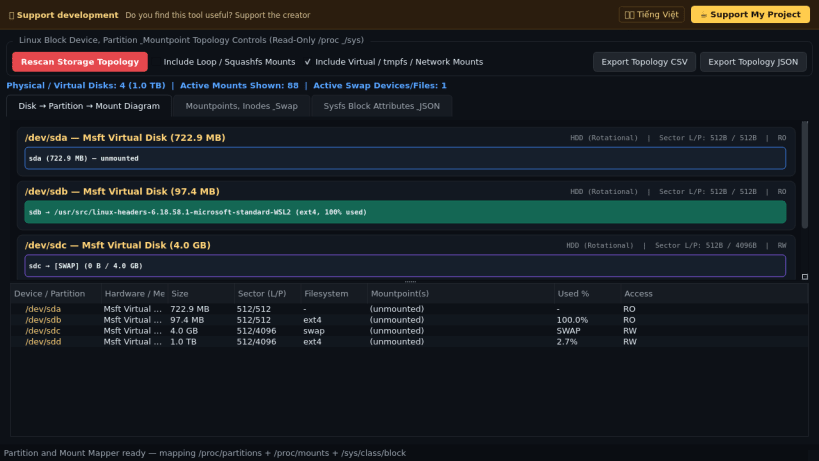
A read-only storage topology visualizer, disk queue geometry inspector, and filesystem mountpoint capacity analyzer for Linux. A lightweight Linux alternative to DiskExt for mapping disks to partitions, active mountpoints, inode utilization, and swap spaces using standard read-only kernel interfaces.
Key features:
- Maps physical and virtual disks to child partitions and active mountpoints using /proc/partitions, /proc/mounts, /proc/swaps, and /sys/class/block attributes.
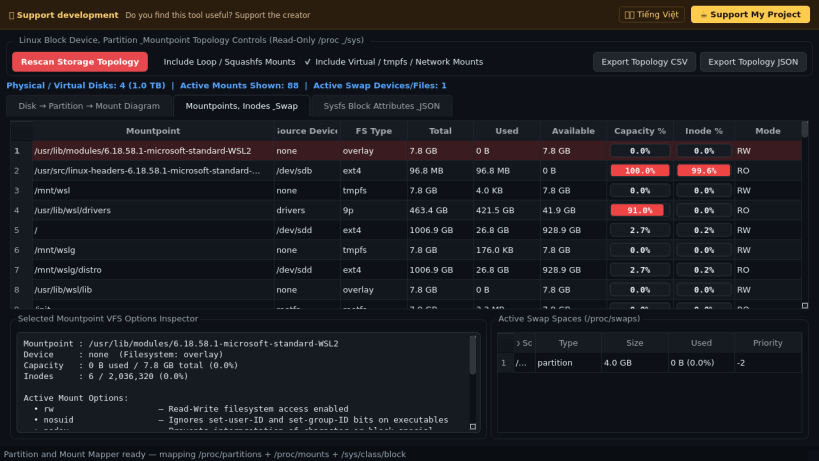
- Renders a visual Disk-to-Partition-to-Mountpoint allocation diagram alongside live filesystem byte capacity and inode utilization bars via statvfs.
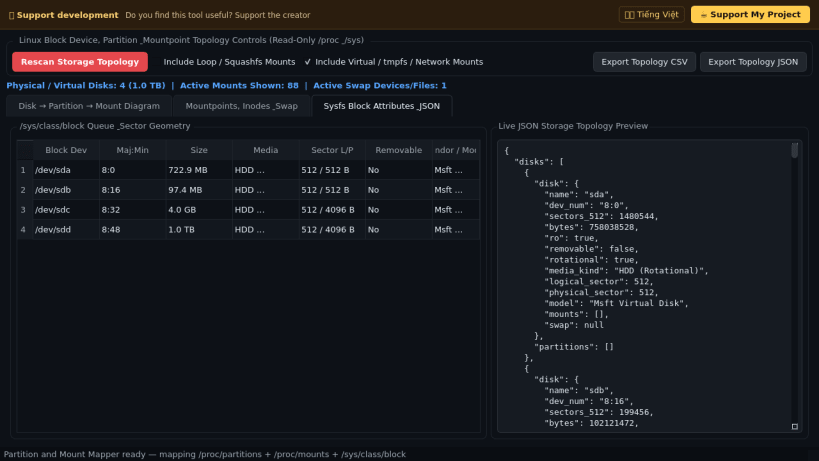
- Inspects sysfs block queue geometry including logical vs physical sector sizes, rotational (HDD vs SSD/NVMe) flags, read-only state, and hardware model strings.
- Parses VFS and filesystem mount options with human-readable flag descriptions and exports full storage topology reports to JSON and CSV.
Disclaimer: This project is an independent open-source tool and is not affiliated with, sponsored by, or endorsed by Microsoft Sysinternals.
| Revision | Channel | Version | Build | Commit | Download SBOM |
|---|
The build and commit information is derived from build infrastructure records.
Install Partition and Mount Mapper on your Linux distribution
Choose your Linux distribution to get detailed installation instructions. If yours is not shown, get more details on the installing snapd documentation.


