

Install latest/stable of PatchCraft Launcher
Ubuntu 16.04 or later?
Make sure snap support is enabled in your Desktop store.
Install using the command line
sudo snap install patchcraft-launcherDon't have snapd? Get set up for snaps.


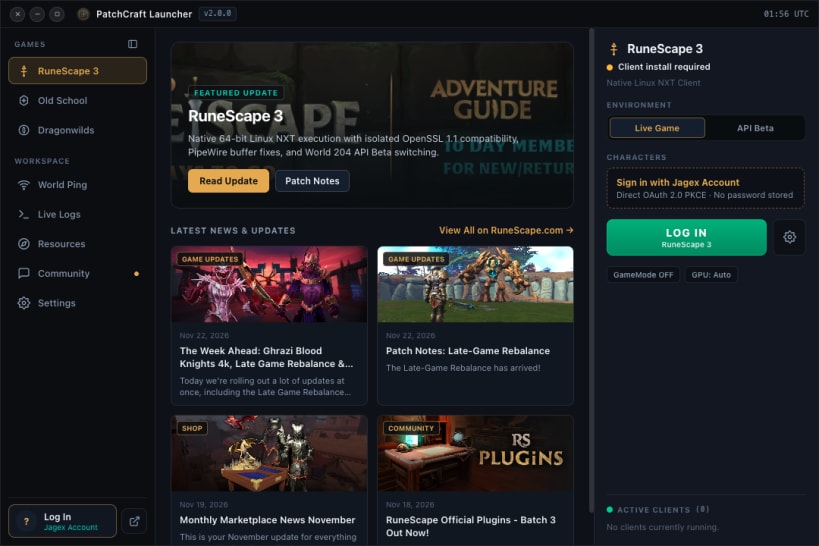
Details for PatchCraft Launcher
Package name
- patchcraft-launcher
License
- Proprietary
Last updated
- Today - latest/stable
Websites
Contact
Donations
Source code
Report a bug
External link warning
You are about to open
Do you wish to proceed?
Report a Snap Store violation
Report PatchCraft Launcher for a Snap Store violation
Snap Store Violation Report submitted successfully
Thank you for your report. Information you provided will help us investigate further.
Error submitting report
There was an error while sending your report. Please try again later.
Share this snap
Generate an embeddable card to be shared on external websites.
Unofficial native Linux launcher for RuneScape & Jagex Accounts
PatchCraft Launcher (formerly Linux Jagex Launcher) is an unofficial native Linux and SteamOS desktop launcher for RuneScape 3, Old School RuneScape, and RuneScape: Dragonwilds using Jagex Accounts.
Features:
- Native 64-bit RuneScape 3 (NXT): Runs Jagex's native Linux ELF client directly with isolated OpenSSL 1.1 compatibility, Wayland/X11 display bridging, PipeWire audio routing, and World 204 API Beta switching — no Wine or Proton required.
- Old School RuneScape Multi-Client Support: Switch directly between RuneLite, HDOS, and the Official Client with JVM heap tuning and HiDPI scaling while preserving your local client profiles.
- RuneScape: Dragonwilds: One-click Steam launch (
App 1374490) with live Steam patch feeds and Linux/Proton requirements. - Direct Jagex Account OAuth 2.0 PKCE: Sign in directly against official Jagex servers with Turnstile and MFA support. Credentials stay local; passwords are never stored.
- Forge Rail & Direct Character Roster: Per-character Play/Stop controls, live Active Clients tracking, membership overrides, World Ping diagnostics, Live Logs, System Compatibility Doctor, and three built-in offline themes (
PatchCraft,Obsidian & Brass,Slate & Teal). - Steam Deck & Handheld Ready: Full gamepad navigation (
LB/RB,X/Y/A/B/Start), on-screen keyboard triggers, and Low-Spec performance mode. - Persistent Snap Storage: Game clients and caches are stored in
$SNAP_USER_COMMON(~/snap/patchcraft-launcher/common/) so multi-gigabyte caches survive automatic Snap updates.
Optional Snap interfaces (for controllers and external drives):
 sudo snap connect patchcraft-launcher:joystick
 sudo snap connect patchcraft-launcher:removable-media
Disclaimer: PatchCraft Launcher is an independent, unofficial freeware project and is not affiliated with, endorsed by, or sponsored by Jagex Limited. RuneScape, Old School RuneScape, and Jagex are registered trademarks of Jagex Limited.
| Revision | Channel | Version | Build | Commit | Download SBOM |
|---|
The build and commit information is derived from build infrastructure records.
Install PatchCraft Launcher on your Linux distribution
Choose your Linux distribution to get detailed installation instructions. If yours is not shown, get more details on the installing snapd documentation.











