

PcPhone | Use Your Phone On Your Pc (pcphone)
Contact us about Snaps and IoT ›
Install latest/stable of PcPhone | Use Your Phone On Your Pc
Ubuntu 16.04 or later?
Make sure snap support is enabled in your Desktop store.
Details for PcPhone | Use Your Phone On Your Pc
Package name
- pcphone
License
- GPL-3.0-or-later
Last updated
- 20 January 2026 - latest/stable
- 20 January 2026 - latest/edge
Websites
Contact
Donations
Source code
Report a bug
External link warning
You are about to open
Do you wish to proceed?
Report a Snap Store violation
Report PcPhone | Use Your Phone On Your Pc for a Snap Store violation
Snap Store Violation Report submitted successfully
Thank you for your report. Information you provided will help us investigate further.
Error submitting report
There was an error while sending your report. Please try again later.
Share this snap
Generate an embeddable card to be shared on external websites.
Make phone calls through Bluetooth
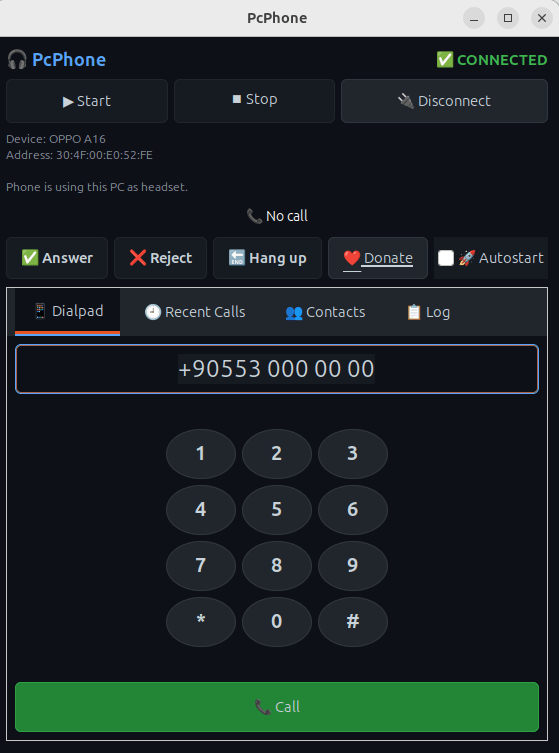
PcPhone allows you to use your Linux PC as a Bluetooth phone. Connect your Android phone via Bluetooth and make or receive calls directly from your computer using your PC's microphone and speakers.
Features:
- Make and receive phone calls through your PC
- Automatic phonebook synchronization via PBAP
- Recent calls list with caller information
- Browser integration - click tel: links to dial
- Autostart on login option
| Revision | Channel | Version | Build | Commit | Download SBOM |
|---|
The build and commit information is derived from build infrastructure records.
Install PcPhone | Use Your Phone On Your Pc on your Linux distribution
Choose your Linux distribution to get detailed installation instructions. If yours is not shown, get more details on the installing snapd documentation.











