

PDF Redaction Studio
Install latest/stable of PDF Redaction Studio
Ubuntu 16.04 or later?
Make sure snap support is enabled in your Desktop store.
Install using the command line
sudo snap install pdf-redaction-studioDon't have snapd? Get set up for snaps.
Details for PDF Redaction Studio
Package name
- pdf-redaction-studio
License
- unset
Last updated
- 12 August 2026 - latest/stable
Websites
Contact
Source code
External link warning
You are about to open
Do you wish to proceed?
Report a Snap Store violation
Report PDF Redaction Studio for a Snap Store violation
Snap Store Violation Report submitted successfully
Thank you for your report. Information you provided will help us investigate further.
Error submitting report
There was an error while sending your report. Please try again later.
Share this snap
Generate an embeddable card to be shared on external websites.
AI-powered PDF redaction tool
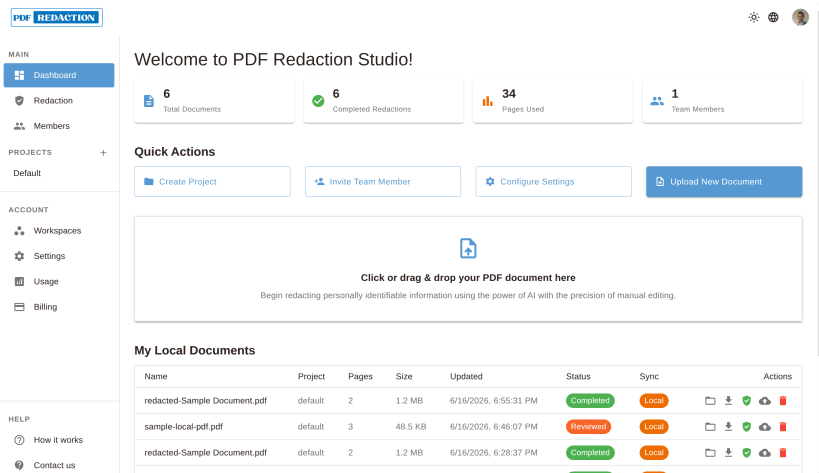
PDF Redaction Studio is a desktop app for redacting sensitive information from PDF documents using AI.
1. AI-Powered PII Detection
Turn hours of manual review into seconds with built-in AI that finds sensitive information automatically.
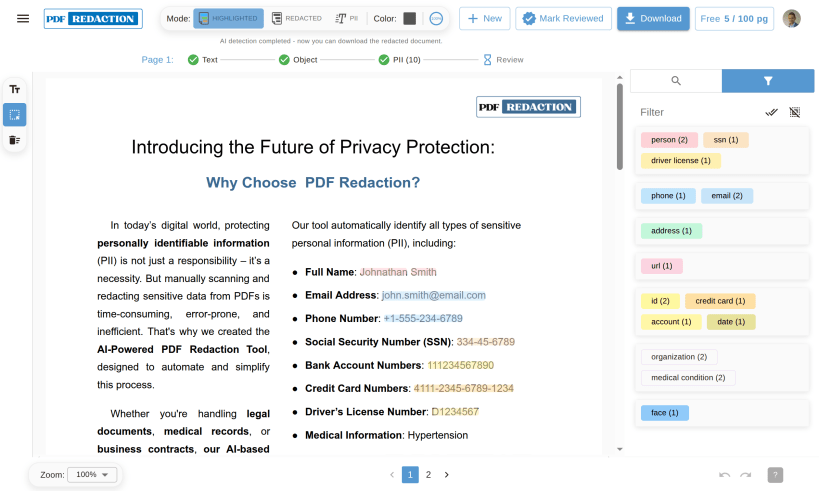
- Automatic PII scanning — AI scans every page and highlights names, emails, phone numbers, IDs, addresses, and more
- Cloud and Local — You can choose how to process your files.
- 15+ entity types — Names, ages, emails, phones, SSNs, passports, driver licenses, credit cards, account numbers, dates, locations, addresses, zip codes, IPs, URLs, organizations, medical conditions
- Face & object detection — CV model detects and redacts faces and visual identifiers
- OCR support — Extracts and redacts text from scanned PDFs and image-based documents
- Per-page status — Each page reports Pending, Processing, Done, or Error status
- Real-time progress log — Live feed shows detection progress page by page
2. Manual Redaction Tools
Full control for edge cases the AI might miss.
- Text selection — Click any text to mark it for redaction
- Draw tool — Drag a box over any region — image, table, or signature
- Eraser tool — Remove redaction boxes without affecting the document
- Search & redact — Search a word or phrase; redact every occurrence at once
- Autocomplete search — Suggestions based on text found in the document
- Undo / Redo — 50-level edit history
3. PDF Viewer & Navigation
- Four view modes — Original, Highlighted, Redacted preview, and PII table
- Zoom controls — 50%–300% range plus auto page-width fit
- Page navigation — Jump to any page via pagination or direct input
- Interactive overlays — Click any highlighted region to inspect or edit it
4. PII Filtering & Review
- Filter by category — Six groups: Personal, Contact, Location, Web, Identifiers, CV/Manual
- Individual type toggles — Enable or disable each of the 15+ entity types independently
- Real-time counts — Each PII type shows a live count of detected instances
- Mark as reviewed — Flag a document as fully reviewed before download
5. Redacted PDF Export
- One-click download — Generate and download the redacted PDF immediately
- Redaction color — Choose black (standard) or white fill
- Filename preserved — Output keeps the original document name
- Batch export — Download multiple documents from a project
6. Document Management
- Local storage — Documents stored in the browser — no upload required to start
- Cloud sync — Optionally sync to the cloud for backup and team access
- Conflict resolution — Choose which version to keep when local and cloud differ
- Resume processing — Return to an interrupted document and continue where you left off
- Drag & drop upload — Drop a PDF anywhere on the page to start
- File limits — Configurable per plan; guests get up to 25 MB / 25 pages
7. Projects & Workspaces
- Workspaces — Top-level containers for an organization or team
- Projects — Group related documents within a workspace
- Default workspace — Auto-created on first login — zero setup required
8. Team Collaboration
- Email invitations — Invite team members via email link
- Role-based access — Three roles: Admin, Member, Viewer
- Member management — View, update, or remove members
- Pending invites — Track who has been invited and who accepted
9. User Account & Billing
- OAuth login — Sign in with Google or LinkedIn — no new password needed
- Email authentication — Standard email/password login also available
- Usage dashboard — Pages used vs. plan quota for the current billing period
- Plan upgrade prompts — In-context notifications when approaching limits
- Enterprise inquiry — Contact flow for custom volume or on-premise needs
| Revision | Channel | Version | Build | Commit | Download SBOM |
|---|
The build and commit information is derived from build infrastructure records.
Install PDF Redaction Studio on your Linux distribution
Choose your Linux distribution to get detailed installation instructions. If yours is not shown, get more details on the installing snapd documentation.











