

PDF Table Converter
Install latest/stable of PDF Table Converter
Ubuntu 16.04 or later?
Make sure snap support is enabled in your Desktop store.
Install using the command line
sudo snap install pdf-table-converterDon't have snapd? Get set up for snaps.
Details for PDF Table Converter
Package name
- pdf-table-converter
License
- MIT
Last updated
- Yesterday - latest/stable
Report a Snap Store violation
Report PDF Table Converter for a Snap Store violation
Snap Store Violation Report submitted successfully
Thank you for your report. Information you provided will help us investigate further.
Error submitting report
There was an error while sending your report. Please try again later.
Share this snap
Generate an embeddable card to be shared on external websites.
Visual PDF coordinate table extractor, cleaner, and multi-format exporter
PDF Table Converter is a desktop visual PDF table extraction, editing, and export workbench for Linux. Built with Poppler, PyPDF2, and PyQt5, it renders PDF pages at high DPI, reads exact word bounding-box coordinates, clusters rows and column gutters into structured tables, and lets you clean and export data cleanly.
Key Features:
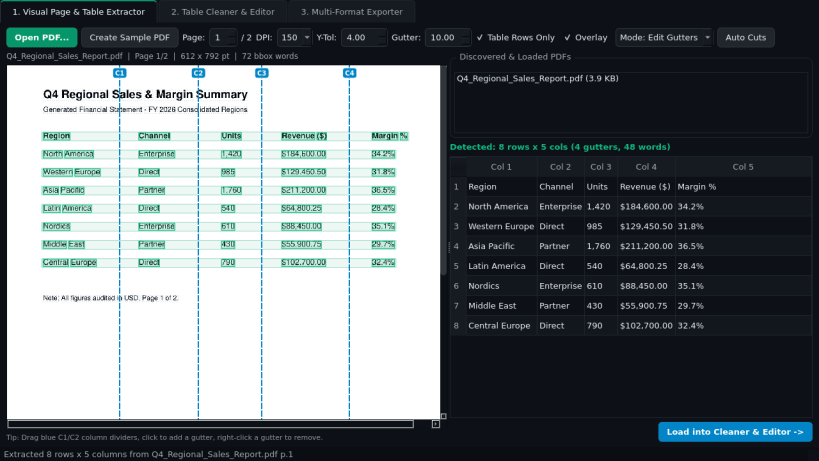
- Visual Page & Coordinate Table Extractor: Renders any PDF page via Poppler pdftoppm, runs pdftotext -bbox-layout XML extraction, detects row baselines and column gutters automatically, and draws an interactive column-divider and word-box overlay so you can add, remove, or drag column cuts and crop regions.
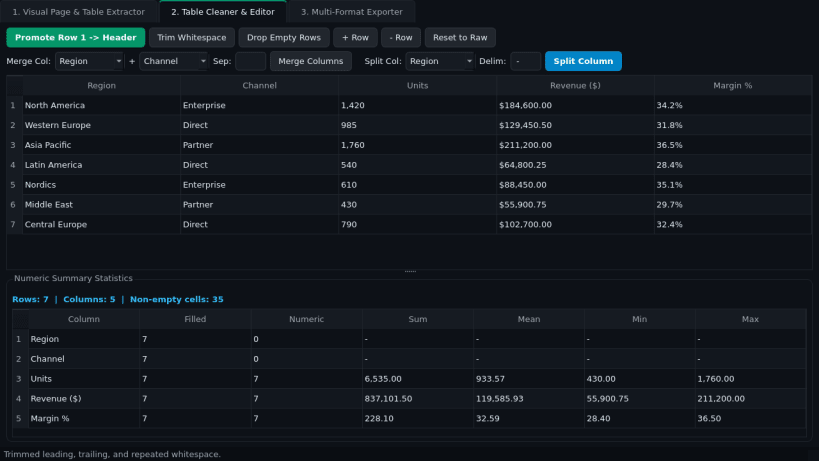
- Interactive Table Cleaner & Editor: Full editable spreadsheet grid with one-click first-row-to-header promotion, whitespace trimming, empty-row removal, column merging and delimiter splitting, and live numeric column statistics (count, sum, mean, min, max).
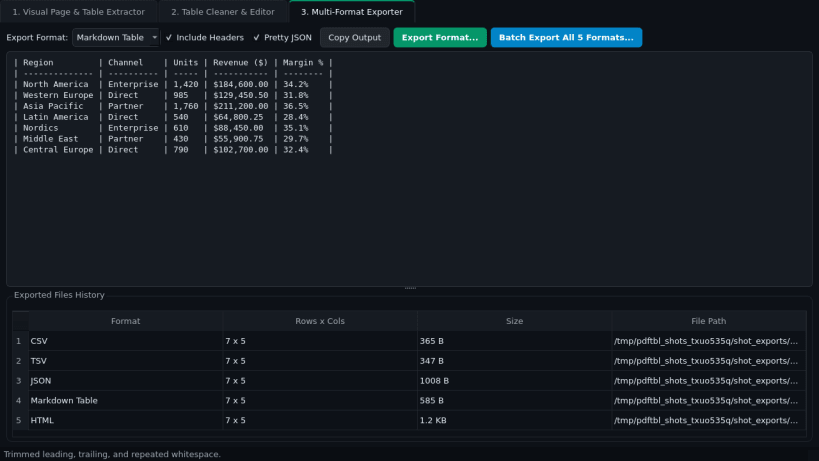
- Multi-Format Table Exporter: Instant live preview and export to CSV, TSV, JSON, Markdown Table, and HTML formats, plus one-click batch export to all formats.
Disclaimer: PDF Table Converter is an independent open-source project by TC Studio and is not affiliated with, endorsed by, or sponsored by Tabula.
| Revision | Channel | Version | Build | Commit | Download SBOM |
|---|
The build and commit information is derived from build infrastructure records.
Install PDF Table Converter on your Linux distribution
Choose your Linux distribution to get detailed installation instructions. If yours is not shown, get more details on the installing snapd documentation.


