

PGP Manager
Install latest/stable of PGP Manager
Ubuntu 16.04 or later?
Make sure snap support is enabled in your Desktop store.
Install using the command line
sudo snap install pgp-managerDon't have snapd? Get set up for snaps.


Details for PGP Manager
Package name
- pgp-manager
License
- MIT
Last updated
- 13 June 2026 - latest/stable
Websites
Source code
Report a bug
External link warning
You are about to open
Do you wish to proceed?
Report a Snap Store violation
Report PGP Manager for a Snap Store violation
Snap Store Violation Report submitted successfully
Thank you for your report. Information you provided will help us investigate further.
Error submitting report
There was an error while sending your report. Please try again later.
Share this snap
Generate an embeddable card to be shared on external websites.
Modern OpenPGP key management and encryption
Important Notice: When you want to have the full experience, you'll either have to install the application directly from https://github.com/developaaah/pgp-manager/releases/latest.
PGP encryption and key management — without the terminal.
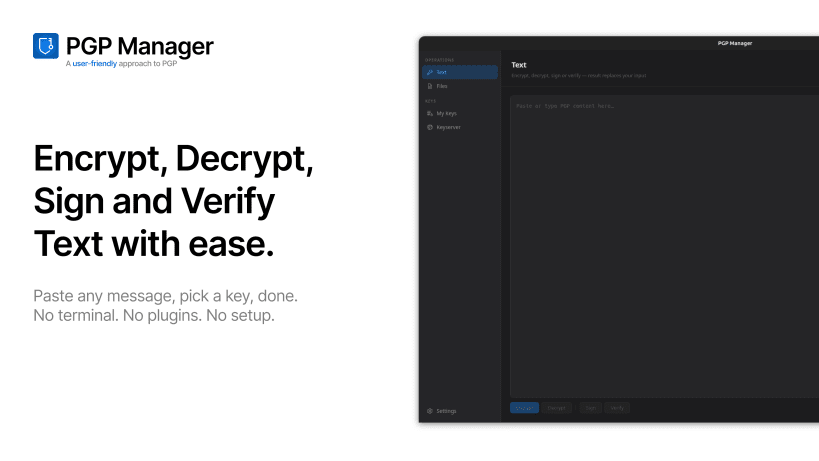
PGP Manager is a modern OpenPGP desktop app for Linux. Generate keys, encrypt files, sign messages and verify signatures through a clean UI, while your clipboard is monitored automatically in the background.
Features:
- Encrypt, decrypt, sign and verify text and files
- Clipboard monitoring with one-click actions from the system tray
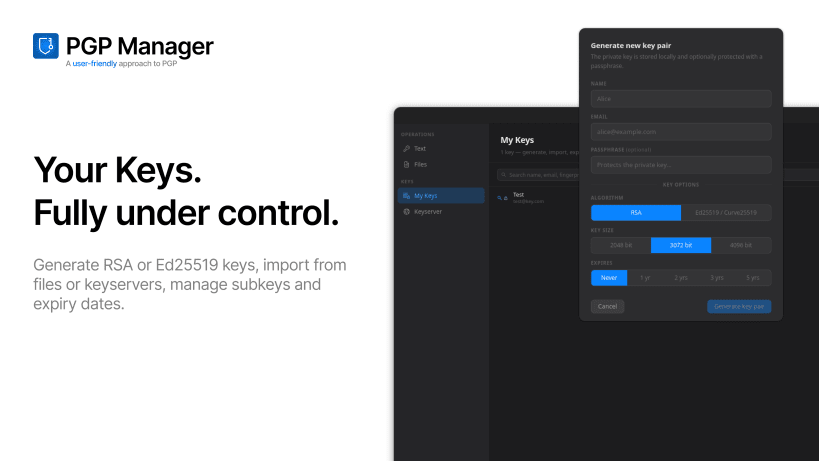
- Generate, import and export OpenPGP keys (RSA and Ed25519)
- GnuPG keyring integration — existing gpg keys appear automatically
- Search and publish keys on public keyservers
- Passphrase cache with configurable TTL
- Portable mode: keep config and keys on a USB drive
| Revision | Channel | Version | Build | Commit | Download SBOM |
|---|
The build and commit information is derived from build infrastructure records.
Install PGP Manager on your Linux distribution
Choose your Linux distribution to get detailed installation instructions. If yours is not shown, get more details on the installing snapd documentation.












