

Photo EXIF Cleaner
Install latest/stable of Photo EXIF Cleaner
Ubuntu 16.04 or later?
Make sure snap support is enabled in your Desktop store.
Install using the command line
sudo snap install photo-exif-cleanerDon't have snapd? Get set up for snaps.
Details for Photo EXIF Cleaner
Package name
- photo-exif-cleaner
License
- MIT
Last updated
- Yesterday - latest/stable
Report a Snap Store violation
Report Photo EXIF Cleaner for a Snap Store violation
Snap Store Violation Report submitted successfully
Thank you for your report. Information you provided will help us investigate further.
Error submitting report
There was an error while sending your report. Please try again later.
Share this snap
Generate an embeddable card to be shared on external websites.
Lossless photo EXIF, GPS, and metadata inspector and batch privacy cleaner
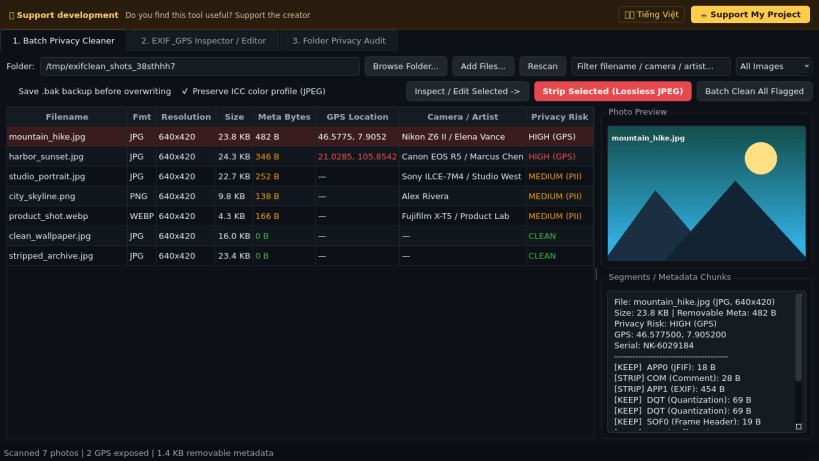
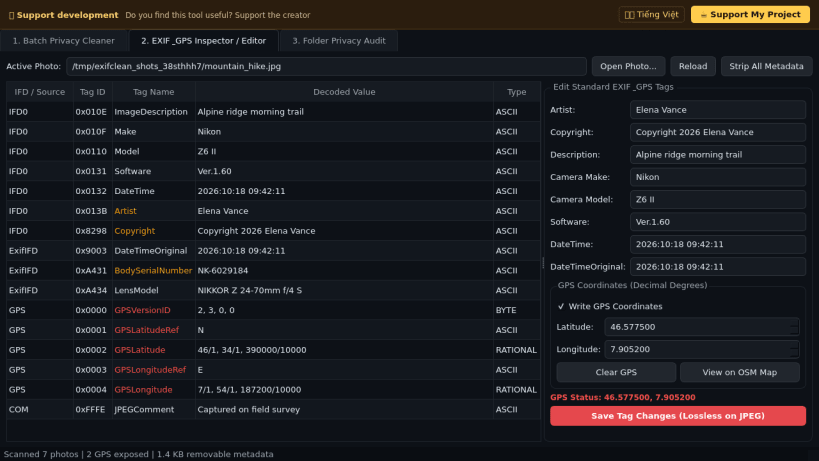
Photo EXIF Cleaner is a desktop photo metadata inspector, EXIF/GPS tag editor, and lossless privacy cleaner for JPEG, PNG, WebP, and TIFF images on Linux. An independent Linux desktop alternative to ExifTool GUI for inspecting and removing photo metadata, it parses JPEG marker segments and TIFF IFD/GPS directories directly to strip GPS coordinates, camera serial numbers, timestamps, artist tags, XMP, IPTC, comments, and PNG text chunks without recompressing JPEG pixel scan data.
Key Features:
- Lossless Batch Privacy Cleaner: Scans photos for GPS coordinates, camera make/model and serial tags, artist/owner fields, software strings, timestamps, and PNG tEXt/iTXt/zTXt chunks; removes JPEG APP1/APP13/COM segments losslessly while preserving exact entropy scan bytes.
- EXIF & GPS Tag Inspector & Editor: Displays decoded ExifTags.TAGS and GPSTAGS tables with DMS-to-decimal latitude/longitude conversion, inline editing of standard tags, and writing or clearing GPS coordinates.
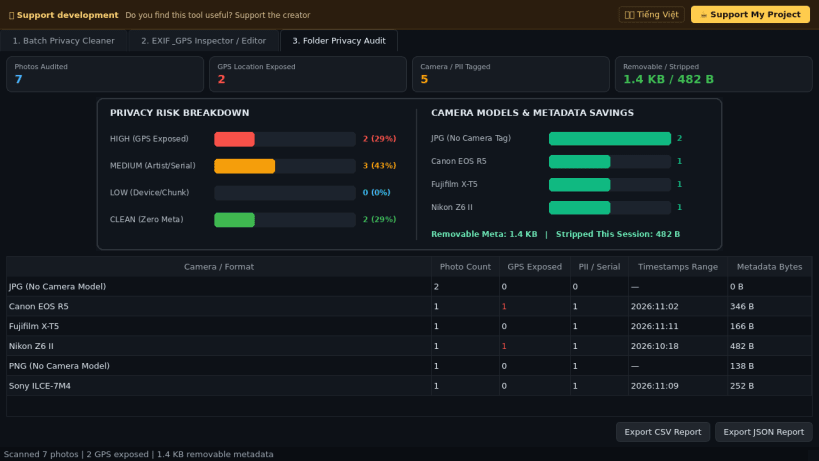
- Folder Privacy Audit Summary: Aggregates GPS-exposed photo counts, camera models, timestamps, and metadata bytes stripped with visual charts and CSV/JSON export.
Disclaimer: This project is an independent open-source tool and is not affiliated with, sponsored by, or endorsed by Phil Harvey or ExifTool.
| Revision | Channel | Version | Build | Commit | Download SBOM |
|---|
The build and commit information is derived from build infrastructure records.
Install Photo EXIF Cleaner on your Linux distribution
Choose your Linux distribution to get detailed installation instructions. If yours is not shown, get more details on the installing snapd documentation.


