

Pixel Dither Studio
Install latest/stable of Pixel Dither Studio
Ubuntu 16.04 or later?
Make sure snap support is enabled in your Desktop store.
Install using the command line
sudo snap install pixel-dither-studioDon't have snapd? Get set up for snaps.
Details for Pixel Dither Studio
Package name
- pixel-dither-studio
License
- MIT
Last updated
- Yesterday - latest/stable
Report a Snap Store violation
Report Pixel Dither Studio for a Snap Store violation
Snap Store Violation Report submitted successfully
Thank you for your report. Information you provided will help us investigate further.
Error submitting report
There was an error while sending your report. Please try again later.
Share this snap
Generate an embeddable card to be shared on external websites.
Error diffusion dithering, halftone screening and retro palette studio
Pixel Dither Studio is a dedicated 1-bit error diffusion, ordered Bayer matrix, circular halftone screening, and retro palette pixel art studio for Linux.
Key Features:
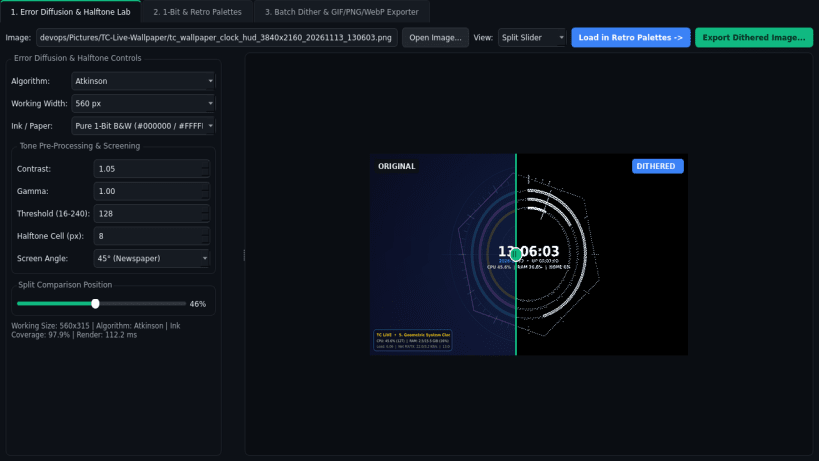
- Error Diffusion & Halftone Lab: Apply authentic Floyd-Steinberg, Atkinson, Sierra-Lite, and Jarvis-Judice-Ninke error diffusion, Ordered Bayer 2x2/4x4/8x8 threshold matrices, or circular newspaper halftone dot screening with live contrast, gamma, and threshold controls.
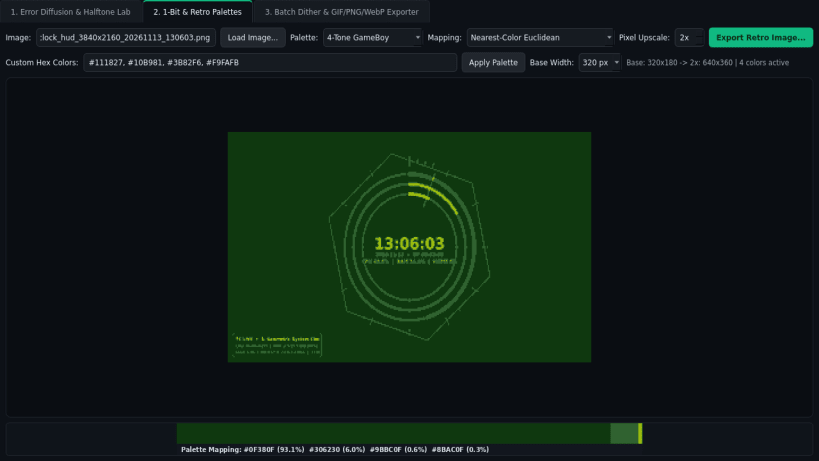
- 1-Bit & Retro Palettes: Map artwork onto classic 1-Bit Newsprint, 4-Tone GameBoy, CGA, EGA, Nord, Sepia Ink, or custom hex palettes using exact nearest-color Euclidean distance or RGB error diffusion with 1x-4x nearest- neighbor pixel upscale preview.
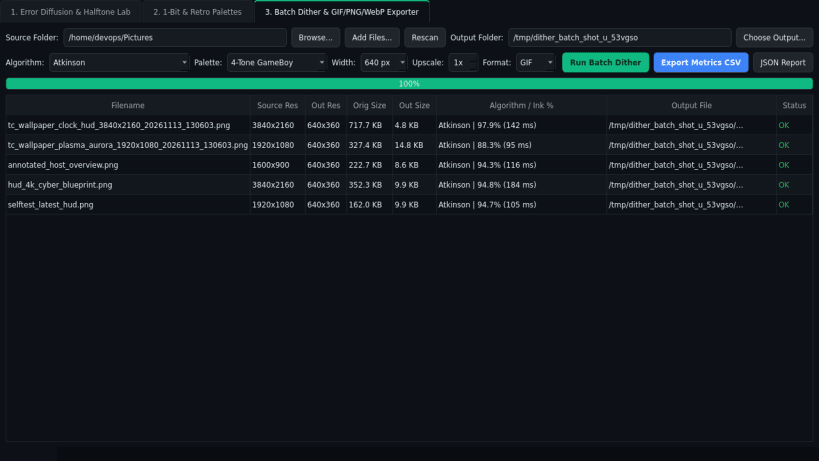
- Batch Dither & Exporter: Convert entire folders of images into crisp pixel- dithered PNG, GIF, and WebP artwork accompanied by detailed CSV and JSON processing metrics reports.
Disclaimer: Pixel Dither Studio is an independent open-source project by TC Studio and is not affiliated with, endorsed by, or sponsored by HyperDither.
| Revision | Channel | Version | Build | Commit | Download SBOM |
|---|
The build and commit information is derived from build infrastructure records.
Install Pixel Dither Studio on your Linux distribution
Choose your Linux distribution to get detailed installation instructions. If yours is not shown, get more details on the installing snapd documentation.


