

Quick Video Converter
Install latest/stable of Quick Video Converter
Ubuntu 16.04 or later?
Make sure snap support is enabled in your Desktop store.
Install using the command line
sudo snap install quick-video-converterDon't have snapd? Get set up for snaps.
Details for Quick Video Converter
Package name
- quick-video-converter
License
- MIT
Last updated
- Yesterday - latest/stable
Report a Snap Store violation
Report Quick Video Converter for a Snap Store violation
Snap Store Violation Report submitted successfully
Thank you for your report. Information you provided will help us investigate further.
Error submitting report
There was an error while sending your report. Please try again later.
Share this snap
Generate an embeddable card to be shared on external websites.
Batch preset video/audio converter, multi-clip merger & contact sheet tool
A fast device-preset batch video and audio converter, multi-clip video joiner, and thumbnail contact sheet generator for Linux. A lightweight Linux alternative to Any Video Converter for batch preset transcoding, multi-clip video merging, and audio extraction.
Key features powered by bundled FFmpeg:
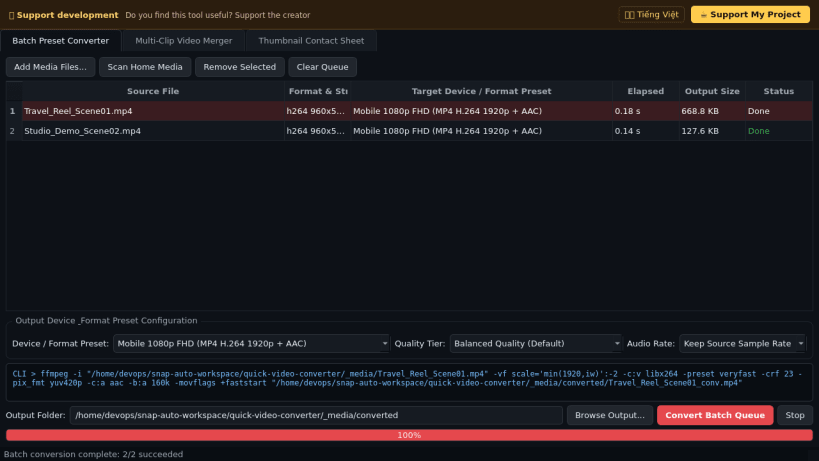
- Ready-to-use device and format presets: Universal Web MP4 (H.264 + AAC FastStart), 1080p/720p Mobile MP4, Smart TV HEVC/H.265 MKV, WebM VP9, and standalone Audio extraction (MP3, Lossless FLAC, M4A AAC, Opus).
- Configurable quality tiers, sample rates, batch progress queue, and live FFmpeg command-line preview.
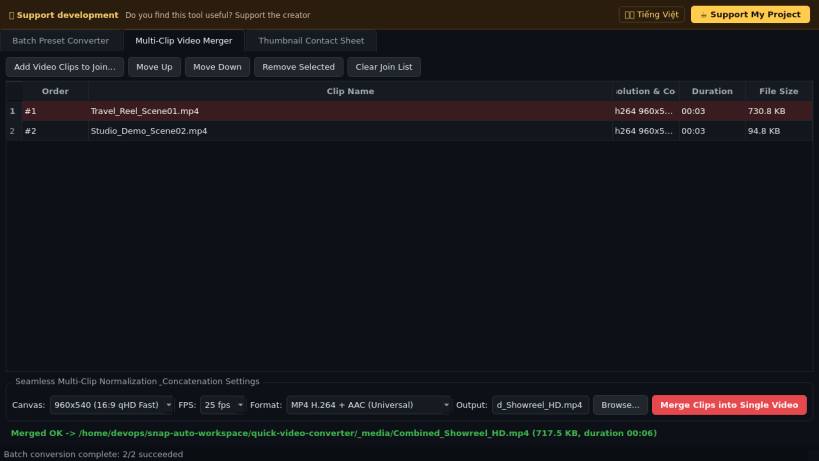
- Multi-Clip Video Merger / Joiner that normalizes mixed resolutions, aspect ratios, and audio streams to concatenate clips cleanly into a single MP4 or MKV video.
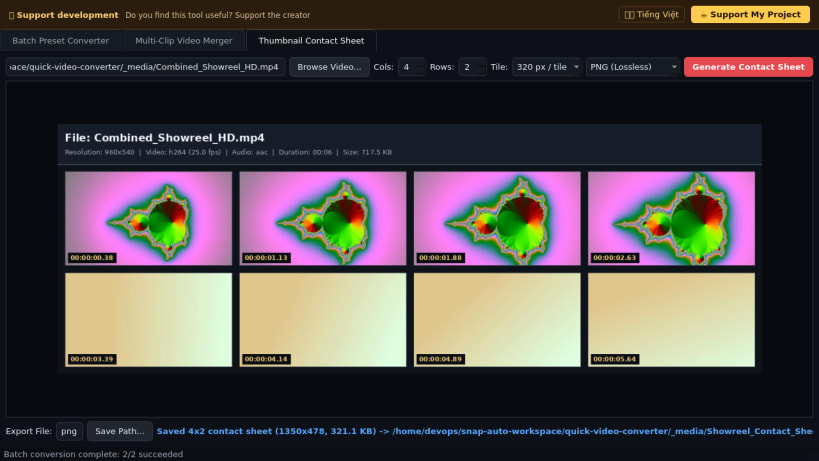
- Video Thumbnail Contact Sheet Generator exporting timestamped multi-tile preview grids (PNG or JPG) with container stream metadata headers.
Disclaimer: This project is an independent open-source tool and is not affiliated with, sponsored by, or endorsed by Anvsoft Inc. or Any Video Converter.
| Revision | Channel | Version | Build | Commit | Download SBOM |
|---|
The build and commit information is derived from build infrastructure records.
Install Quick Video Converter on your Linux distribution
Choose your Linux distribution to get detailed installation instructions. If yours is not shown, get more details on the installing snapd documentation.


