
Install latest/stable of OPL3 RetroWave MIDI Player
Ubuntu 16.04 or later?
Make sure snap support is enabled in your Desktop store.
Install using the command line
sudo snap install retro-midi-player-opl3-gmDon't have snapd? Get set up for snaps.
You are about to open
Do you wish to proceed?
Thank you for your report. Information you provided will help us investigate further.
There was an error while sending your report. Please try again later.
Generate an embeddable card to be shared on external websites.
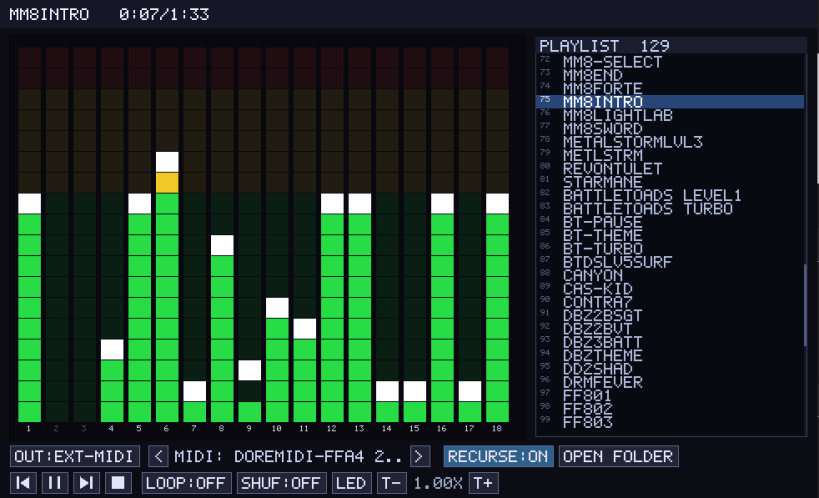
A GUI player that turns Standard MIDI files into OPL3 FM synthesis (via libADLMIDI) and streams them to a RetroWave OPL3 Express board over USB-serial, to your PC's speakers, or — as raw MIDI — to an external hardware synth (a General MIDI module) through ALSA.
Features a Winamp-style playlist with folder loading and shuffle, a live OPL3 channel visualizer (LED / neon / spectrum), a picker for libADLMIDI's built-in FM banks (or ALSA MIDI devices in external mode), and settings that persist between runs.
After installing, connect the hardware interfaces the player needs: snap connect retro-midi-player-opl3-gm:serial-port # the RetroWave OPL3 board snap connect retro-midi-player-opl3-gm:alsa # an external MIDI device PC audio, display and home-folder access connect automatically.
| Revision | Channel | Version | Build | Commit |
|---|
The build and commit information is derived from build infrastructure records.
Choose your Linux distribution to get detailed installation instructions. If yours is not shown, get more details on the installing snapd documentation.












