

RSS News Reader Desk
Install latest/stable of RSS News Reader Desk
Ubuntu 16.04 or later?
Make sure snap support is enabled in your Desktop store.
Install using the command line
sudo snap install rss-news-reader-deskDon't have snapd? Get set up for snaps.
Details for RSS News Reader Desk
Package name
- rss-news-reader-desk
License
- MIT
Last updated
- Today - latest/stable
Websites
Contact
External link warning
You are about to open
Do you wish to proceed?
Report a Snap Store violation
Report RSS News Reader Desk for a Snap Store violation
Snap Store Violation Report submitted successfully
Thank you for your report. Information you provided will help us investigate further.
Error submitting report
There was an error while sending your report. Please try again later.
Share this snap
Generate an embeddable card to be shared on external websites.
Desktop RSS 2.0, Atom 1.0, and OPML news reader with SQLite storage
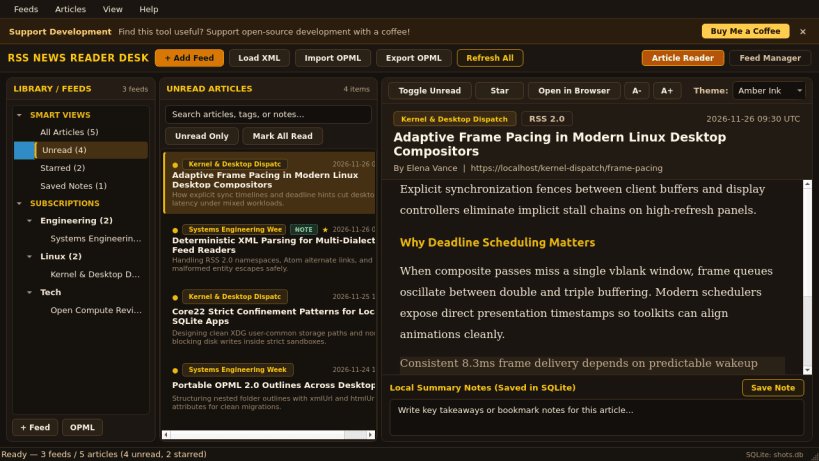
RSS News Reader Desk is an editorial desktop RSS 2.0, Atom 1.0, and OPML 2.0 news reader for Linux with persistent local SQLite storage.
Key features:
- Multi-Dialect Feed Parser: Subscribe to live HTTP/HTTPS feeds or load local RSS 2.0 and Atom 1.0 XML files with clean HTML-to-richtext formatting.
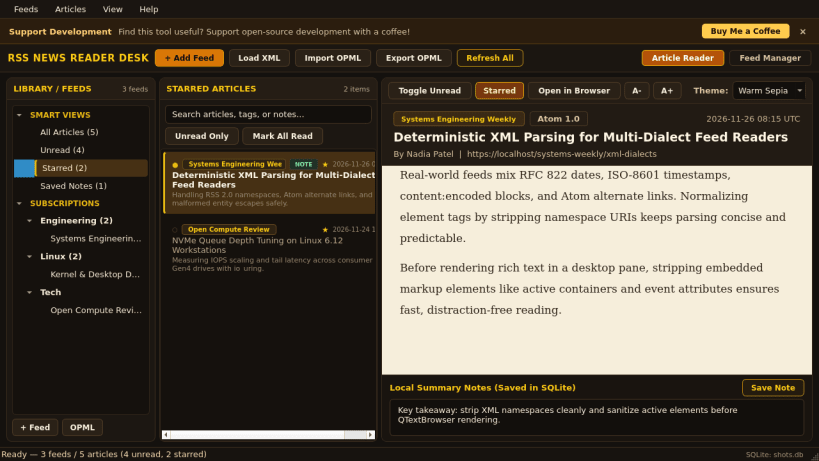
- Persistent 3-Pane Editorial Workspace: Browse smart views (All Articles, Unread, Starred, Saved Notes) alongside folder-organized subscriptions, instant keyword filtering, and unread/star tracking backed by SQLite.
- Typography-Tuned Reader & Notes: Switch between Amber Ink, Slate Dark, Warm Sepia, and Crisp Light reading themes, adjust font size, and save personal summary notes per article.
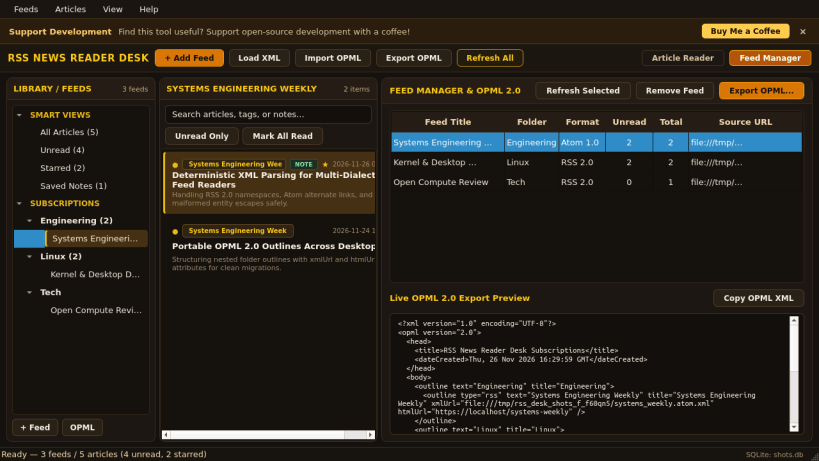
- OPML 2.0 Import & Export: Migrate entire foldered subscription trees via standard OPML 2.0 files or inspect live OPML XML output.
| Revision | Channel | Version | Build | Commit | Download SBOM |
|---|
The build and commit information is derived from build infrastructure records.
Install RSS News Reader Desk on your Linux distribution
Choose your Linux distribution to get detailed installation instructions. If yours is not shown, get more details on the installing snapd documentation.











