

SFTP and TLS Transfer Suite (sftp-tls-transfer-suite)
Install latest/stable of SFTP and TLS Transfer Suite
Ubuntu 16.04 or later?
Make sure snap support is enabled in your Desktop store.
Install using the command line
sudo snap install sftp-tls-transfer-suiteDon't have snapd? Get set up for snaps.
Details for SFTP and TLS Transfer Suite
Package name
- sftp-tls-transfer-suite
License
- MIT
Last updated
- Yesterday - latest/stable
Websites
Contact
External link warning
You are about to open
Do you wish to proceed?
Report a Snap Store violation
Report SFTP and TLS Transfer Suite for a Snap Store violation
Snap Store Violation Report submitted successfully
Thank you for your report. Information you provided will help us investigate further.
Error submitting report
There was an error while sending your report. Please try again later.
Share this snap
Generate an embeddable card to be shared on external websites.
Multi-session OpenSSH SFTP/SCP & FTPS client with PBKDF2 vault & Ed25519 keys
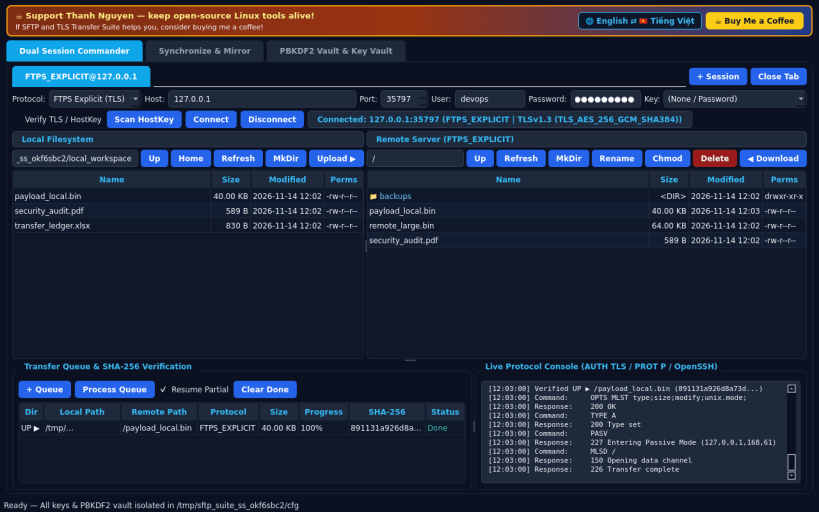
SFTP and TLS Transfer Suite is an independent open-source Linux dual-pane secure file transfer workbench powered by bundled OpenSSH (sftp, scp, ssh, ssh-keygen, ssh-keyscan) and Python TLS (ftplib.FTP_TLS).
Key Features:
- Dual Local <-> Remote Session Commander (Tab 0): Multi-session tabs with Quick Connect for OpenSSH SFTP, SCP, Explicit FTPS (AUTH TLS + PROT P), Implicit FTPS, and FTP. Includes dual directory panes, Upload, Download, MkDir, Rename, Chmod, Delete, a SHA-256 verified Transfer Queue with resumable transfers, and a live protocol console.
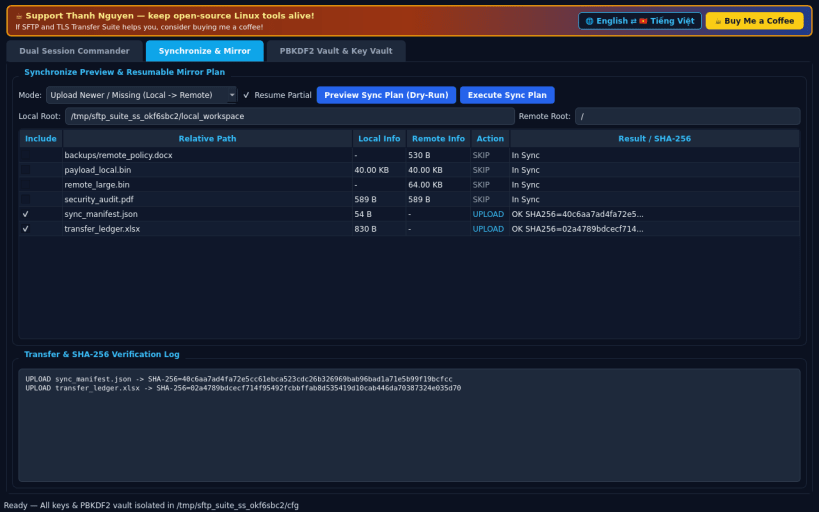
- Synchronize Preview & Resumable Mirror (Tab 1): Compare local and remote directory trees in Dry-Run mode (Upload Newer, Download Missing, Mirror) before executing resumable transfers with SHA-256 verification logging.
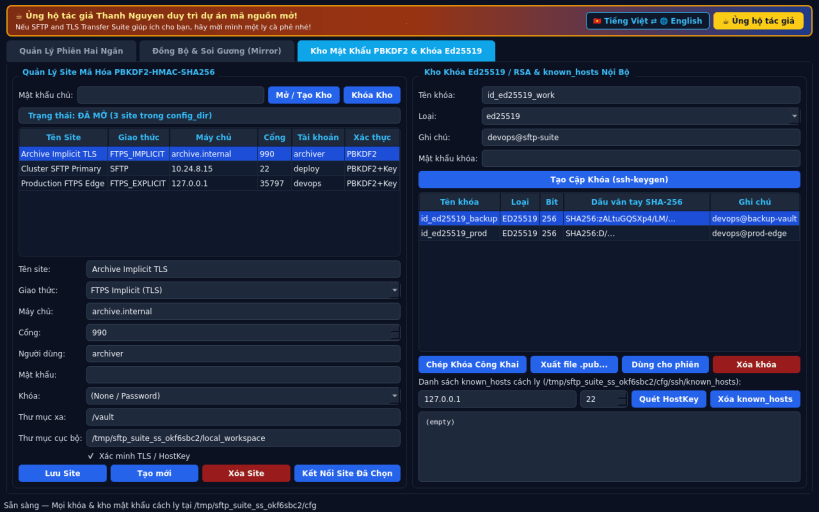
- PBKDF2 Site Manager & Ed25519 Key Vault (Tab 2): Store encrypted site profiles using PBKDF2-HMAC-SHA256 (200,000 rounds) plus HMAC-authenticated encryption, generate Ed25519 or RSA-4096 key pairs via bundled ssh-keygen, and manage host keys via ssh-keyscan strictly inside the isolated snap user common directory without requesting host ssh-keys access.
- Bilingual English and Vietnamese UI with instant runtime switching.
Disclaimer: This project is an independent open-source Linux tool and is not affiliated with, sponsored by, or endorsed by VanDyke Software or SecureFX.
Support: https://buymeacoffee.com/thanhnv128b
| Revision | Channel | Version | Build | Commit | Download SBOM |
|---|
The build and commit information is derived from build infrastructure records.
Install SFTP and TLS Transfer Suite on your Linux distribution
Choose your Linux distribution to get detailed installation instructions. If yours is not shown, get more details on the installing snapd documentation.


