

Simple FRP GUI (simply-frp-gui)
Install latest/stable of Simple FRP GUI
Ubuntu 16.04 or later?
Make sure snap support is enabled in your Desktop store.
Install using the command line
sudo snap install simply-frp-guiDon't have snapd? Get set up for snaps.

Details for Simple FRP GUI
Package name
- simply-frp-gui
License
- unset
Last updated
- 25 December 2025 - latest/stable
Websites
Source code
External link warning
You are about to open
Do you wish to proceed?
Report a Snap Store violation
Report Simple FRP GUI for a Snap Store violation
Snap Store Violation Report submitted successfully
Thank you for your report. Information you provided will help us investigate further.
Error submitting report
There was an error while sending your report. Please try again later.
Share this snap
Generate an embeddable card to be shared on external websites.
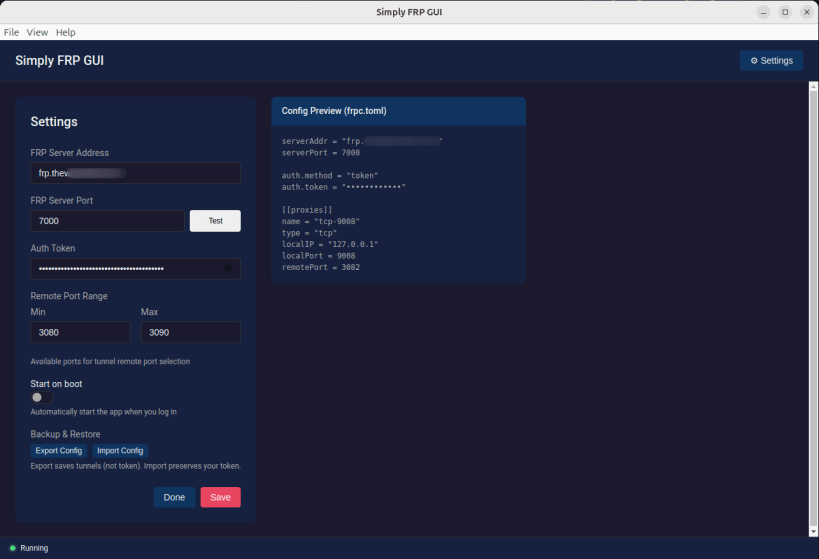
Desktop GUI for managing FRP tunnels
Simply FRP GUI makes it easy to expose your local development services to the internet using FRP (Fast Reverse Proxy). No more editing config files or memorizing command-line flags.
Features
- Simple Interface - Add, edit, and manage tunnels with a clean UI
- One-Click Control - Start and stop FRP connections instantly
- Individual Tunnel Toggles - Enable/disable specific tunnels
- System Tray - Runs in background with status indicator
- Real-Time Logs - Monitor FRP output as it happens
- Quick Link Access - Copy or open tunnel URLs with one click
- Config Import/Export - Backup and restore configurations
- Connection Testing - Verify server connectivity before starting
- Secure Token Storage - Auth tokens encrypted via system keychain
- Auto-Reconnect - Automatically recovers from connection failures
- Dark Theme - Easy on the eyes
Perfect For
- Web developers exposing local dev servers
- Testing webhooks and callbacks locally
- Sharing work-in-progress with clients
- IoT and home server access
Requirements
- An FRP server (self-hosted or service)
frpcclient (auto-installed with .deb package)
Links
- Source: https://github.com/ryonwhyte/Simply-FRP-GUI-Client
- FRP Project: https://github.com/fatedier/frp
| Revision | Channel | Version | Build | Commit | Download SBOM |
|---|
The build and commit information is derived from build infrastructure records.
Install Simple FRP GUI on your Linux distribution
Choose your Linux distribution to get detailed installation instructions. If yours is not shown, get more details on the installing snapd documentation.











