

Spaced Flashcard Studio
Install latest/stable of Spaced Flashcard Studio
Ubuntu 16.04 or later?
Make sure snap support is enabled in your Desktop store.
Install using the command line
sudo snap install spaced-flashcard-studioDon't have snapd? Get set up for snaps.
Details for Spaced Flashcard Studio
Package name
- spaced-flashcard-studio
License
- MIT
Last updated
- Today - latest/stable
Websites
Contact
External link warning
You are about to open
Do you wish to proceed?
Report a Snap Store violation
Report Spaced Flashcard Studio for a Snap Store violation
Snap Store Violation Report submitted successfully
Thank you for your report. Information you provided will help us investigate further.
Error submitting report
There was an error while sending your report. Please try again later.
Share this snap
Generate an embeddable card to be shared on external websites.
SM-2 spaced repetition flashcard studio with cloze cards and analytics
Spaced Flashcard Studio is an offline spaced-repetition study workbench for Linux desktops powered by a local SQLite storage engine and the SM-2 memory scheduling algorithm.
Key features:
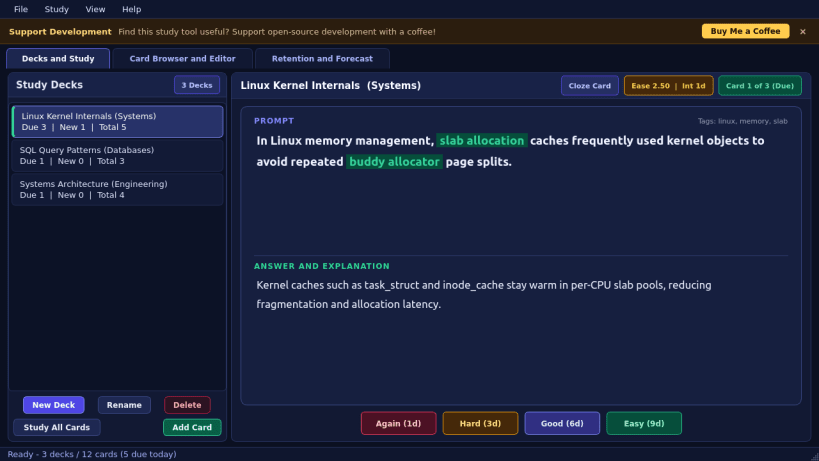
- Decks and Interactive Study: Organize study decks by topic, inspect live Due, New, and Total counters, review Basic or Cloze deletion cards, and grade recall with Again, Hard, Good, and Easy intervals computed in real time.
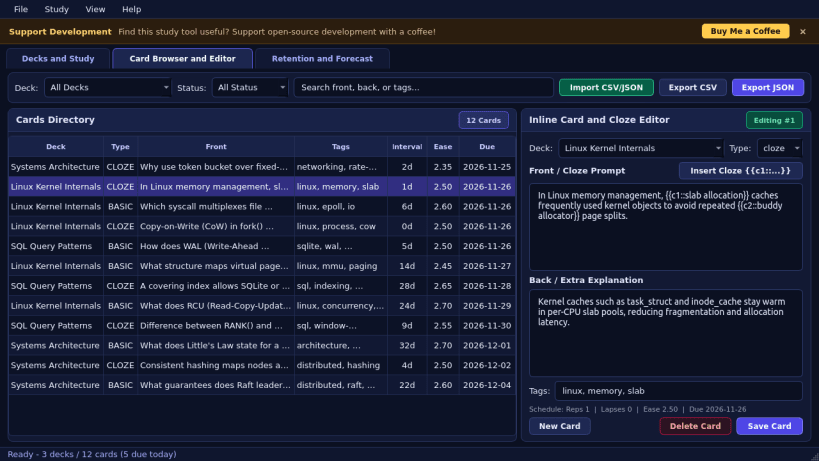
- Card Browser and Cloze Editor: Filter cards by deck, status, or keyword, edit prompts inline, insert {{c1::...}} cloze deletions in one click, and import or export decks cleanly in CSV or JSON format.
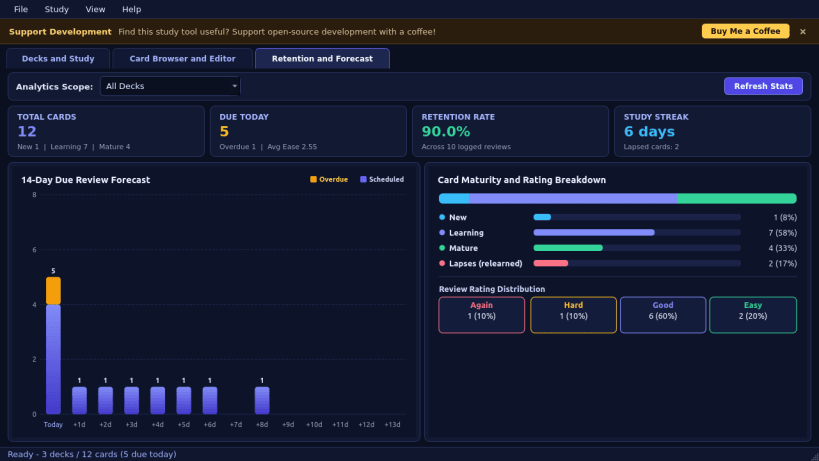
- Retention and Forecast Analytics: Track 14-day due review workload, card maturity stages (New, Learning, Mature, Lapses), review rating breakdown, retention rate, and study streak directly from local SQLite review logs.
| Revision | Channel | Version | Build | Commit | Download SBOM |
|---|
The build and commit information is derived from build infrastructure records.
Install Spaced Flashcard Studio on your Linux distribution
Choose your Linux distribution to get detailed installation instructions. If yours is not shown, get more details on the installing snapd documentation.











