

Sprite Sheet Composer
Install latest/stable of Sprite Sheet Composer
Ubuntu 16.04 or later?
Make sure snap support is enabled in your Desktop store.
Install using the command line
sudo snap install sprite-sheet-composerDon't have snapd? Get set up for snaps.
Details for Sprite Sheet Composer
Package name
- sprite-sheet-composer
License
- MIT
Last updated
- Yesterday - latest/stable
Report a Snap Store violation
Report Sprite Sheet Composer for a Snap Store violation
Snap Store Violation Report submitted successfully
Thank you for your report. Information you provided will help us investigate further.
Error submitting report
There was an error while sending your report. Please try again later.
Share this snap
Generate an embeddable card to be shared on external websites.
2D animation sprite sheet composer, flipbook player and JSON exporter
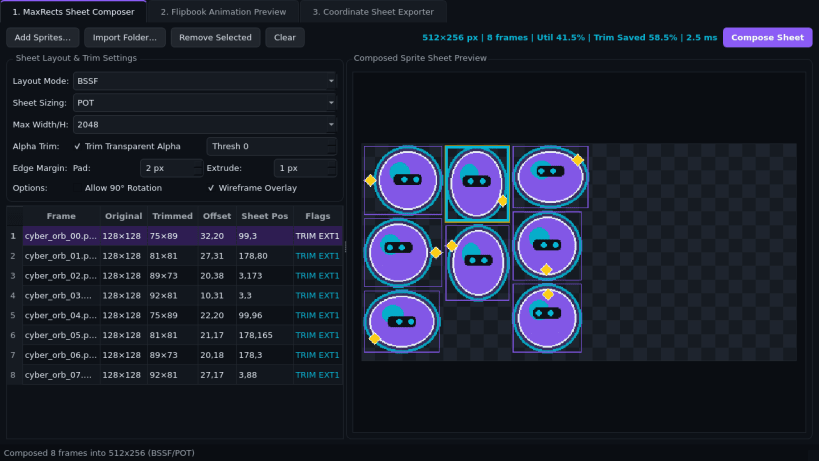
Sprite Sheet Composer is a desktop 2D illustration and animation sheet layout studio for combining individual PNG and WebP character frames into organized image sheets, previewing flipbook motion, and exporting frame coordinate files. An independent Linux desktop alternative to traditional 2D animation sheet editors for arranging frame grids, checking motion timing, and generating coordinate metadata for creative projects.
Key Features:
- Automatic Frame Sheet Layout: Import PNG and WebP artwork frames, crop transparent outer margins cleanly, add configurable inner spacing and border padding for clean rendering, and arrange frames into power-of-two or compact rectangular image sheets.
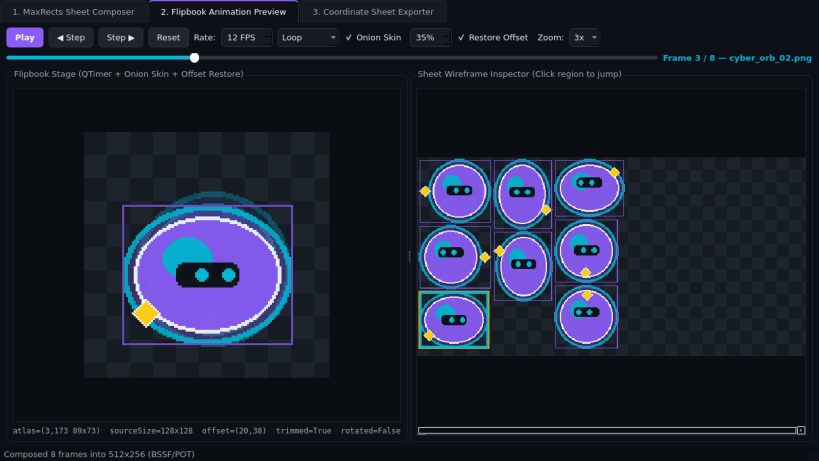
- Flipbook Animation Player: Preview frame sequences from 1 to 60 FPS with Loop, Ping-Pong, and Single-Play modes, onion-skin overlay, pixel-art zoom, and an interactive frame boundary viewer.
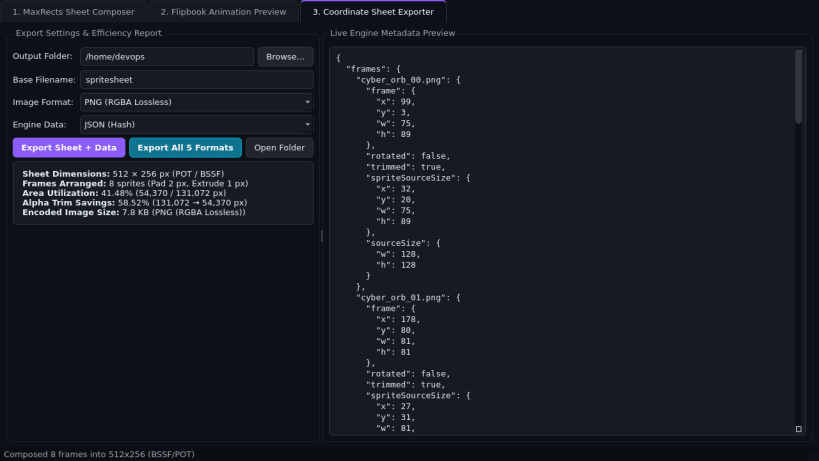
- Multi-Format Coordinate Exporter: Save composed PNG and WebP sprite sheets together with JSON Hash, JSON Array, XML, CSS Sprites, and CSV coordinate tables with area utilization statistics.
Disclaimer: This project is an independent open-source tool by TC Studio and is not affiliated with, endorsed by, or sponsored by any third-party animation software vendor.
| Revision | Channel | Version | Build | Commit | Download SBOM |
|---|
The build and commit information is derived from build infrastructure records.
Install Sprite Sheet Composer on your Linux distribution
Choose your Linux distribution to get detailed installation instructions. If yours is not shown, get more details on the installing snapd documentation.


