

Studio Music Player
Install latest/stable of Studio Music Player
Ubuntu 16.04 or later?
Make sure snap support is enabled in your Desktop store.
Install using the command line
sudo snap install studio-music-playerDon't have snapd? Get set up for snaps.
Details for Studio Music Player
Package name
- studio-music-player
License
- MIT
Last updated
- Yesterday - latest/stable
Report a Snap Store violation
Report Studio Music Player for a Snap Store violation
Snap Store Violation Report submitted successfully
Thank you for your report. Information you provided will help us investigate further.
Error submitting report
There was an error while sending your report. Please try again later.
Share this snap
Generate an embeddable card to be shared on external websites.
Studio Music Player - Library, Equalizer, Radio & Converter
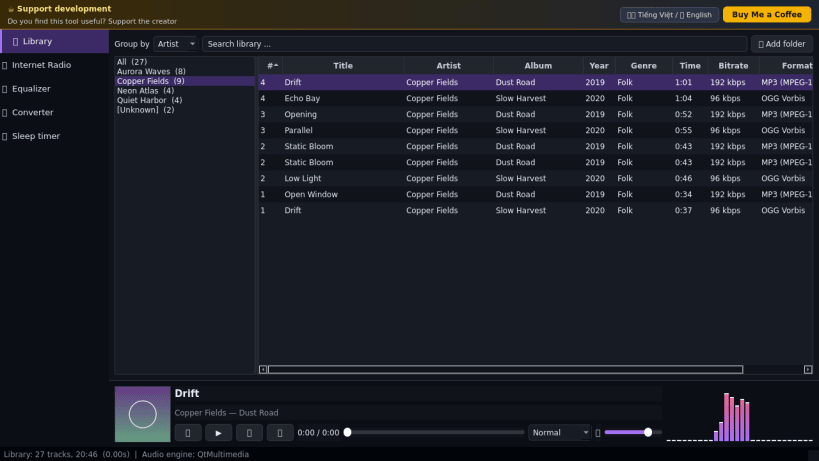
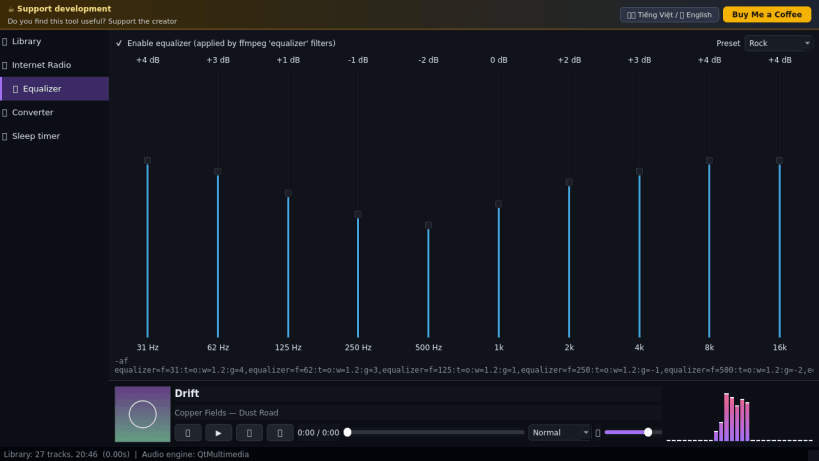
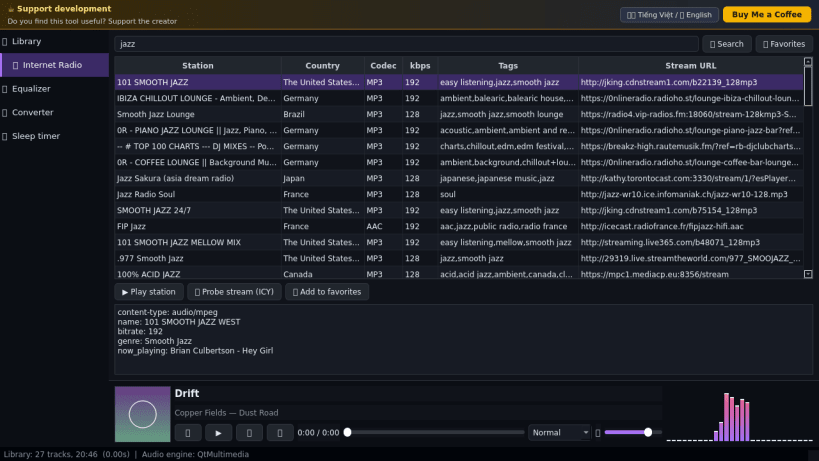
Studio Music Player is a desktop music player for Linux that combines a tag-aware library, a 10-band equalizer, internet radio, a batch audio converter and a sleep timer in one window. A lightweight Linux alternative to AIMP for people who want a feature-rich player.
Key Features:
- Library: scans your Music folder (MP3, FLAC, OGG, M4A, WAV), groups by artist, album, genre, year or folder, reads real tags and embedded cover art.
- 10-band equalizer (31 Hz - 16 kHz, +-12 dB, presets) applied to the audio through ffmpeg equalizer filters while you listen.
- Internet radio: search thousands of stations through the public radio-browser.info directory, probe a live stream (ICY headers and current song title), play it and keep favorites.
- Audio converter: batch convert tracks to MP3, FLAC, OGG Vorbis, M4A (AAC) or WAV with tags copied, using the bundled ffmpeg encoder.
- Sleep timer, shuffle / repeat modes, live FFT spectrum of the playing track.
- Playback through the bundled ffmpeg engine to your PulseAudio / PipeWire server (audio-playback interface). If no audio server can be reached, the app says so.
Disclaimer: This project is an independent open-source tool and is not affiliated with, sponsored by, or endorsed by the AIMP project or its owner.
| Revision | Channel | Version | Build | Commit | Download SBOM |
|---|
The build and commit information is derived from build infrastructure records.
Install Studio Music Player on your Linux distribution
Choose your Linux distribution to get detailed installation instructions. If yours is not shown, get more details on the installing snapd documentation.


