

TC Window Zones
Install latest/stable of TC Window Zones
Ubuntu 16.04 or later?
Make sure snap support is enabled in your Desktop store.
Install using the command line
sudo snap install tc-window-zonesDon't have snapd? Get set up for snaps.
Details for TC Window Zones
Package name
- tc-window-zones
License
- MIT
Last updated
- Today - latest/stable
Report a Snap Store violation
Report TC Window Zones for a Snap Store violation
Snap Store Violation Report submitted successfully
Thank you for your report. Information you provided will help us investigate further.
Error submitting report
There was an error while sending your report. Please try again later.
Share this snap
Generate an embeddable card to be shared on external websites.
TC Window Zones - Visual screen zone editor and X11 tiling script tool
TC Window Zones is a visual screen layout designer, monitor geometry inspector, and X11 window tiling script generator for Linux desktops.
An independent Linux alternative inspired by PowerToys FancyZones, built natively with Python and Qt5 to help organize multi-window workflows with pixel accuracy.
Key Features:
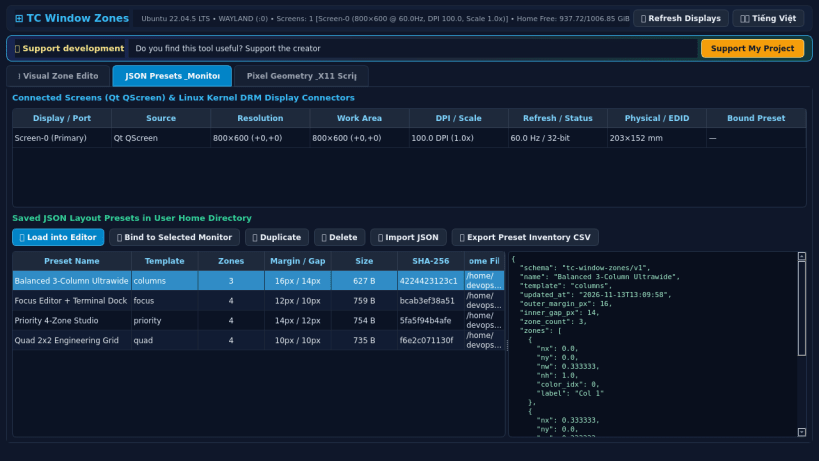
- Real Monitor & Display Detection: Reads connected screens, resolutions, work areas, refresh rates, and DPI scaling factors via Qt screen APIs and Linux /sys/class/drm.
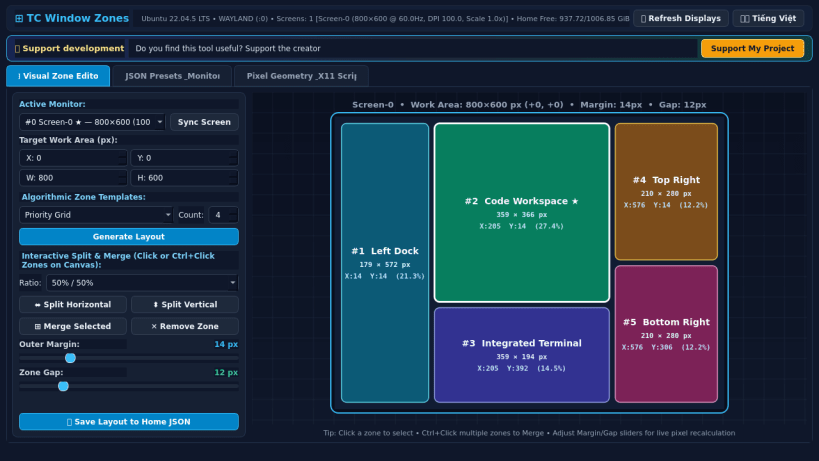
- Interactive Visual Zone Canvas: Generate Columns, Rows, Priority Grid, and Focus templates, or interactively split and merge custom screen zones in real time.
- Precision Gap & Margin Controls: Adjust outer work-area margins and inner zone padding in pixels with live visual geometry previews.
- JSON Layout Preset Manager: Save, load, import, duplicate, and manage persistent JSON zone presets and per-monitor bindings inside the user home configuration folder.
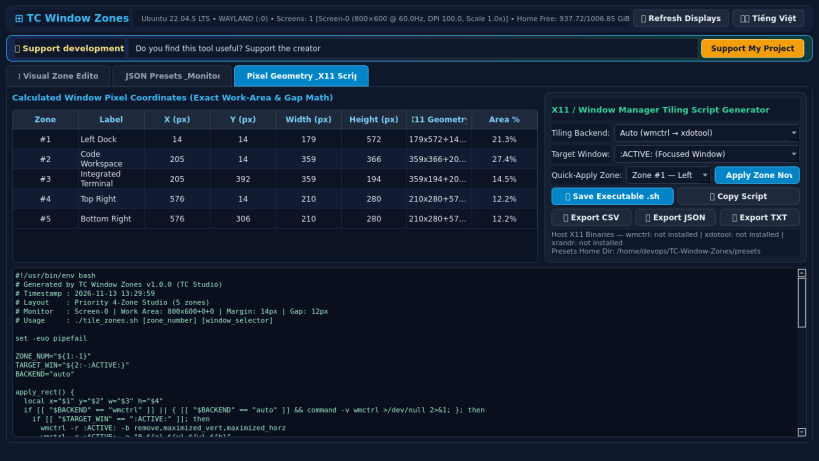
- Window Pixel-Geometry Calculator & X11 Exporter: Compute exact X, Y, Width, and Height coordinates and export executable wmctrl/xdotool shell scripts, CSV, or JSON.
Disclaimer: This project is an independent open-source utility built by TC Studio and is not affiliated with, sponsored by, or endorsed by Microsoft Corporation.
| Revision | Channel | Version | Build | Commit | Download SBOM |
|---|
The build and commit information is derived from build infrastructure records.
Install TC Window Zones on your Linux distribution
Choose your Linux distribution to get detailed installation instructions. If yours is not shown, get more details on the installing snapd documentation.


